
glade-tool/glade-mcp
Developer toolsこのページは AI により自動翻訳されています。技術的な詳細は原文をご確認ください。 原文を見る
glade-tool/glade-mcp は、https://github.com/glade-tool/glade-mcp. からインポートされたMCPサーバー候補です。
概要
glade-tool/glade-mcp は、https://github.com/glade-tool/glade-mcp. からインポートされたMCPサーバー候補です。
概要(AI 翻訳)
カーソル、Claude Code、Windsurf、Claude Desktop、その他のAIクライアントをUnityやGodotのエディターに直接接続できます。
Unity(2021.3+): 20カテゴリにわたる275ツール、完全なUnity対応システムプロンプト、GLADE.md プロジェクトのコンテキスト、スクリプトセマンティックサーチ、スキルキャリブレーション、無料のCC0アセットパイプライン、RAG付きクラウドインテリジェンスレイヤー、クロスセッションメモリ。
Godot (4.3+): 17カテゴリにわたる115のネイティブツール(シーン/ノード、スクリプト、リソース、信号、物理演算、編集時空間クエリ、2D(スプライト、タイルマップ、視差)、オーディオ、パーティクル、アニメーションとAnimationTree、カメラ、ナビゲーション、UI、ライティング、WorldEnvironment、ランタイム、エクスポート、プロジェクトの内省。
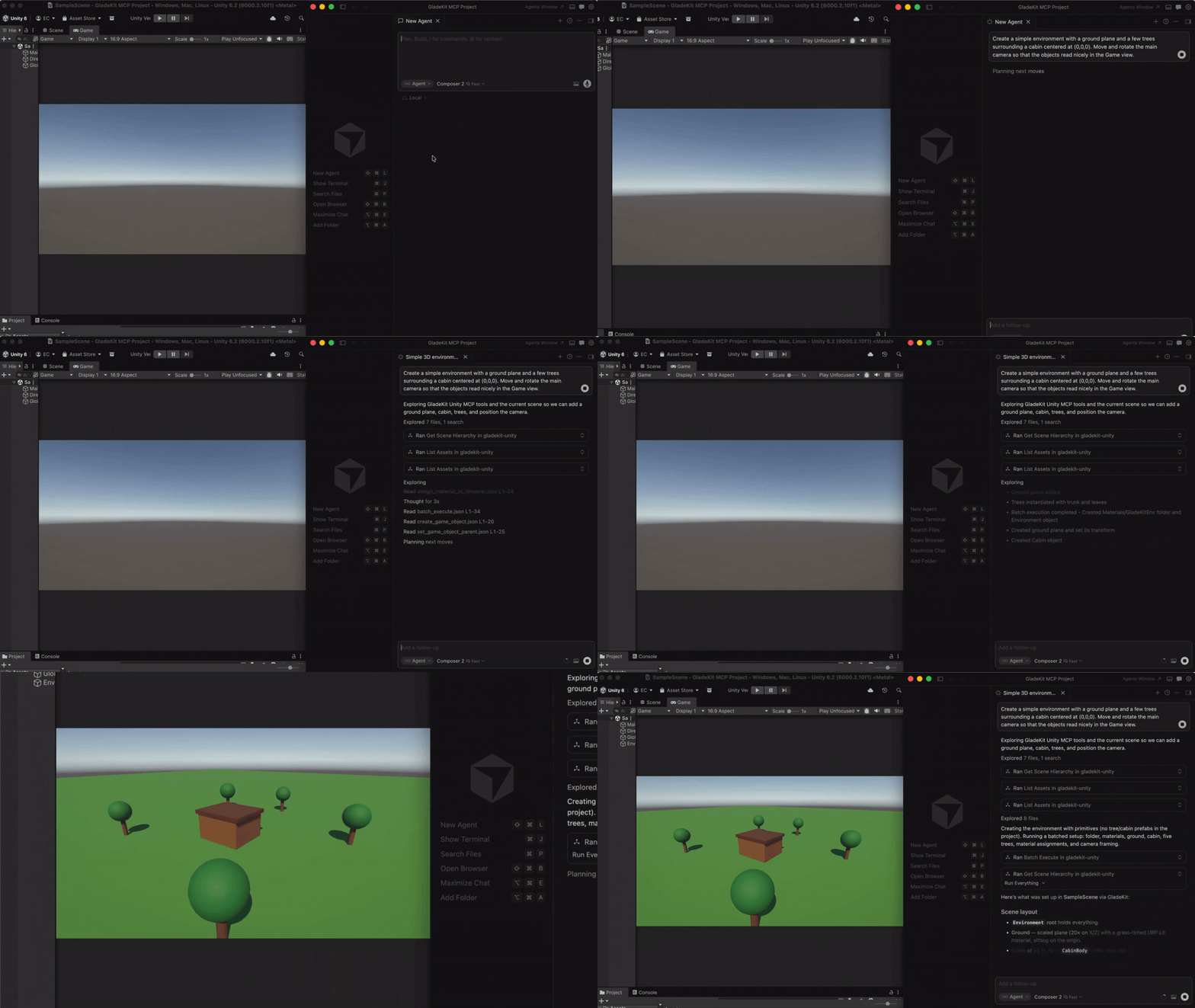
**両方のエンジン:**ワンコールで検証されたゲームプレイの足場(コントローラー、敵、戦闘、メニュー、セーブシステム)、検証ループ(look_at_game_viewスクリーンショット、ランタイムイベント観察、プレイアビリティプローブ)、真のfind_references/rename_symbolによる外科的なスクリプト編集、そしてエージェントが作成したものを出荷できるビルド/エクスポートツール。
MCPサーバーはどのエディタが動作しているか(Unityは:8765、Godotは:8766)を自動検出し、対応するツールセットを公開します。
クイックスタート
1.エディターブリッジをインストールする
このページは AI により自動翻訳されています。技術的な詳細は原文をご確認ください。
README
以下は原文 README の抜粋です。原文を見る。
GladeKit MCP
Connect Cursor, Claude Code, Windsurf, Claude Desktop, and other AI clients directly to your Unity or Godot editor.
Unity (2021.3+): 275 tools across 20 categories, full Unity-aware system prompt, GLADE.md project context, script semantic search, skill calibration, free CC0 asset pipeline, cloud intelligence layer with RAG and cross-session memory.
Godot (4.3+): 115 native tools across 17 categories - scene/node, scripts, resources, signals, physics and edit-time spatial queries, 2D (sprites, tilemaps, parallax), audio, particles, animation and AnimationTree, camera, navigation, UI, lighting and WorldEnvironment, runtime, export, and project introspection.
Both engines: one-call vetted gameplay scaffolders (controllers, enemies, combat, menus, save system), a verification loop (look_at_game_view screenshots, runtime-event observation, playability probes), surgical script editing with true find_references / rename_symbol, and build/export tools so the agent can ship what it built.
The MCP server auto-detects which editor is running (Unity on :8765, Godot on :8766) and exposes the matching tool set.
Quick Start
1. Install the editor bridge
GladeKit MCP supports both Unity and Godot. Both bridges live in this repo: unity-bridge/ is a UPM package, godot-bridge/ wraps the editor addon at godot-bridge/addons/com.gladekit.mcp-bridge/. Install the one for your engine.
- Download
com.gladekit.mcp-bridge.zipfrom the latest Godot bridge release. (Grab the zip asset under Assets - not “Source code”.) From source instead: copygodot-bridge/addons/com.gladekit.mcp-bridge/out of this repo. - Move the
com.gladekit.mcp-bridge/folder into your project’saddons/directory, so the final path is/addons/com.gladekit.mcp-bridge/plugin.cfg. - In Godot: Project → Project Settings → Plugins → enable GladeKit MCP Bridge.
The Godot bridge starts automatically on localhost:8766. You should see a confirmation line in the editor Output panel:
[GladeKit MCP Bridge] listening on ws://127.0.0.1:8766 (v0.7.14, 115 tools registered, thread-polled at 200Hz)
インストール
uvx gladekit-mcp設定
{
  "mcpServers": {
    "gladekit-mcp": {
      "command": "uvx",
      "args": ["gladekit-mcp"]
    }
  }
}