
screenbrowser/skill
Developer toolsこのページは AI により自動翻訳されています。技術的な詳細は原文をご確認ください。 原文を見る
Screen Browser のスキルと MCP サーバーのコンフィグ: コーディングエージェントの内側から、Web アプリのチュートリアル動画をナレーションしました.
概要
ガイドやコーディングエージェントから、Webアプリのデモやチュートリアル動画を鳴らしました。 機能のチュートリアルビデオのコードベースを知っているエージェントを尋ねます。 ボタンとフィールドが使用している言葉でウォークスルーを書きます。スクリーンブラウザは、展開されたアプリに対してそれに従って実際のブラウザを記録し、それをナレーションし、画面上のエフェクトを追加し、エージェントはGIF、字幕、章でMP4を手渡します。 アプリが変更されると、行を編集してもう一度尋ねます。 リクエストから成る66秒のビデオの最初の章「キャンペーンを作成するためのチュートリアルビデオを作る」です。 セッション全体は、その文から完成したビデオまで、道に沿って正確なプロンプトとすべての画面で、Claudeコードガイドにあります.
概要(AI 翻訳)
ガイドやコーディングエージェントから、Webアプリのデモやチュートリアル動画を鳴らしました。
機能のチュートリアルビデオのコードベースを知っているエージェントを尋ねます。 ウォークスルーを書く ボタンとフィールドを使用する言葉では、 Screen Browser は本物を記録します デプロイされたアプリに対して続くブラウザで、それをナレーションし、画面上のエフェクトを追加し、 エージェントは、GIF、字幕、および章でMP4を手にします。 アプリが変更されると、行を編集し、 お問い合わせ
リクエストから作られた66秒のビデオの最初の章です。 キャンペーンの作成 セッション全体、その文章から完成したビデオまで、正確で 道に沿ってプロンプトとすべての画面は、 クロードコードガイド。
このリポジトリはエージェントの2つのことを与えます。
- [
screenbrowserスキル — あなたのコードベースを読み、二つのガイドを記述する方法 Screen Browser ニーズ(ログインフローとウォークスルー)は、その瞬間にフィットし、ガイドをチェックする方法 録画前に無料で、動画を手渡す前にレビューする方法。 - ** MCP サーバー構成** — エージェントの呼び出しのツール: プロジェクトの作成、ガイドのアップロード、,
このページは AI により自動翻訳されています。技術的な詳細は原文をご確認ください。
README
以下は原文 README の抜粋です。原文を見る。
Screen Browser skill
Narrated demo and tutorial videos of your web app, from a guide or your coding agent.
Ask the agent that knows your codebase for a tutorial video of a feature. It writes the walkthrough in the words your buttons and fields use, Screen Browser records a real browser following it against your deployed app, narrates it, adds the on-screen effects, and the agent hands you the MP4 with a GIF, subtitles and chapters. When the app changes, edit a line and ask again.
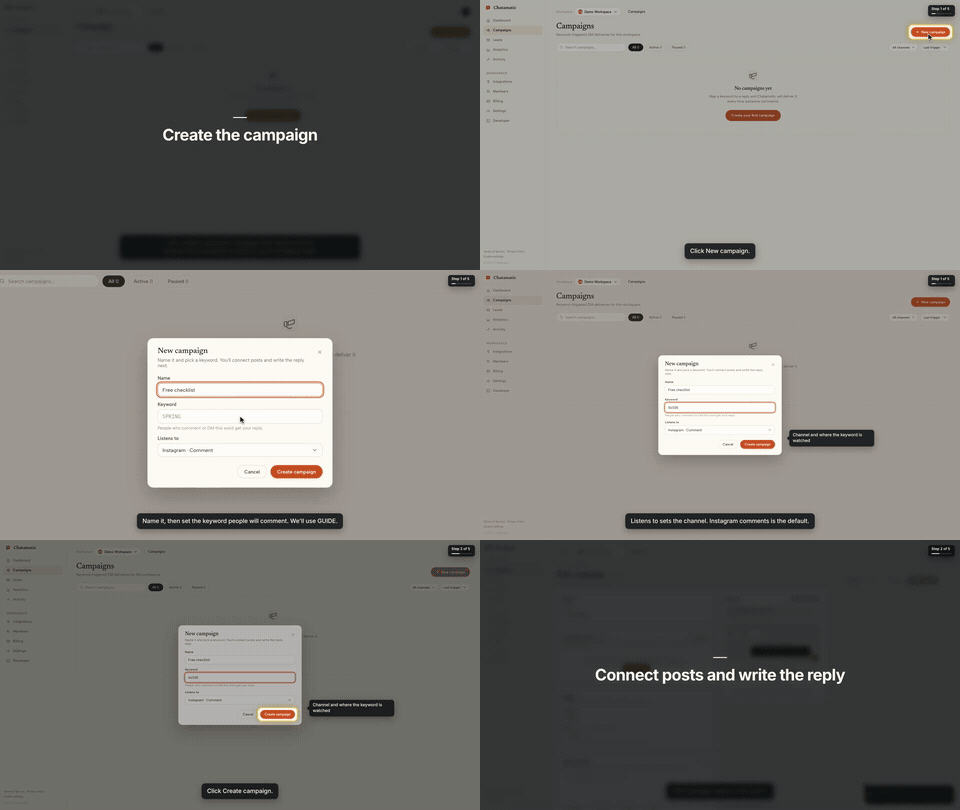
That is the first chapter of a 66-second video made from the request “make a tutorial video of creating a campaign”. The whole session, from that sentence to the finished video with the exact prompt and every screen along the way, is in the Claude Code guide.
This repository gives your agent two things:
- The
screenbrowserskill — how to read your codebase and write the two guides Screen Browser needs (the login flow and the walkthrough), which effect fits which moment, how to check a guide for free before recording, and how to review the video before handing it over. - The MCP server configuration — the tools the agent calls: create the project, upload guides,
check them, start the run, poll it, fetch the video. The server itself is part of your Screen
Browser account at
https://mcp.screenbrowser.com.
Claude Code, Codex, Cursor or any MCP client can use it. Sign-in happens in the browser; there is no key to paste.
Install (Claude Code)
Add this repository as a plugin marketplace and install the plugin:
claude plugin marketplace add screenbrowser/skill
claude plugin install screenbrowser@screenbrowser
The first time the agent reaches for a Screen Browser tool, Claude Code opens your browser: sign in
to Screen Browser, approve the connection, and you are done. Nothing to copy. (If it does not
prompt, run /mcp and pick screenbrowser → Authenticate.)
Without the plugin system, register the server yourself and copy the skill:
claude mcp add --transport http screenbrowser https://mcp.screenbrowser.com
cp -r skills/screenbrowser ~/.claude/skills/
With an API key instead
If your agent cannot open a browser to sign in, create a key under Settings → API keys in Screen Browser and pass it as a bearer token:
claude mcp add --transport http screenbrowser https://mcp.screenbrowser.com \
  --header "Authorization: Bearer "
Any MCP client works the same way: Streamable HTTP at https://mcp.screenbrowser.com, OAuth 2.1 with
推奨ツール
別のキーワードを試すか、フィルタを外してください。
インストール
npx skillfish add screenbrowser/skill