
roychri/mcp-server-asana
Developer toolsこのページは AI により自動翻訳されています。技術的な詳細は原文をご確認ください。 原文を見る
roychri/mcp-server-asana は、https://github.com/roychri/mcp-server-asana. からインポートされたMCPサーバー候補です。
概要
roychri/mcp-server-asana は、https://github.com/roychri/mcp-server-asana. からインポートされたMCPサーバー候補です。
概要(AI 翻訳)
このAsanaのモデルコンテキストプロトコルサーバー実装は、あなたにを可能にします AnthropicのClaudeのようなMCPクライアントからAsana APIと通信するために デスクトップアプリケーションなど、他にも多くの作品があります。
MCPの詳細についてはこちらをご覧ください:
- https://www.anthropic.com/news/model-context-protocol
- https://modelcontextprotocol.io/introduction
- https://github.com/modelcontextprotocol
環境変数
ASANA_ACCESS_TOKEN:(必須)あなたのAsanaアクセストークンREAD_ONLY_MODE:(任意)すべての書き込み操作を無効にするために「true」に設定します。このモードで:- Asanaのデータを変更するツール(作成、更新、削除)は無効化されます
create-taskプロンプトは無効化されます- 読み取り操作のみが利用可能になります これはテストやAsanaワークスペースの変更ができないか確認したい場合に役立ちます。
使用法
お好きなAIツール(例:Claude Desktop)で、Asanaのタスク、プロジェクト、ワークスペース、コメントについて質問してください。「asana」という言葉を出すことで、LLMが正しいツールを選ぶ可能性が高まります。
例:
私たちのSprint 30プロジェクトには未完成のAsanaタスクがいくつありますか?
別の例:
道具
asana_list_workspaces
- Asanaで利用可能なすべてのワークスペースをリストアップしてください
このページは AI により自動翻訳されています。技術的な詳細は原文をご確認ください。
README
以下は原文 README の抜粋です。原文を見る。
MCP Server for Asana

This Model Context Protocol server implementation of Asana allows you to talk to Asana API from MCP Client such as Anthropic’s Claude Desktop Application, and many more.
More details on MCP here:
- https://www.anthropic.com/news/model-context-protocol
- https://modelcontextprotocol.io/introduction
- https://github.com/modelcontextprotocol
Environment Variables
ASANA_ACCESS_TOKEN: (Required) Your Asana access tokenREAD_ONLY_MODE: (Optional) Set to ‘true’ to disable all write operations. In this mode:- Tools that modify Asana data (create, update, delete) will be disabled
- The
create-taskprompt will be disabled - Only read operations will be available This is useful for testing or when you want to ensure no changes can be made to your Asana workspace.
Usage
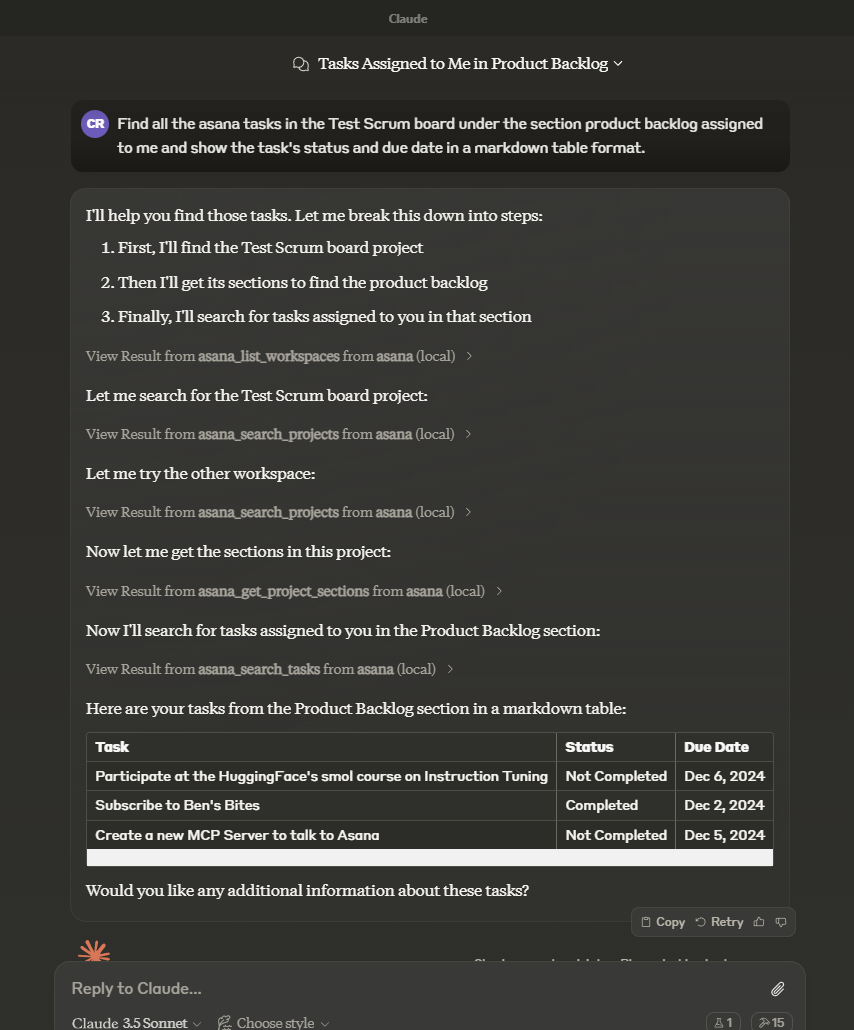
In the AI tool of your choice (ex: Claude Desktop) ask something about asana tasks, projects, workspaces, and/or comments. Mentioning the word “asana” will increase the chance of having the LLM pick the right tool.
Example:
How many unfinished asana tasks do we have in our Sprint 30 project?
Another example:
Tools
asana_list_workspaces- List all available workspaces in Asana
- Optional input:
- opt_fields (string): Comma-separated list of optional fields to include
- Returns: List of workspaces
asana_search_projects- Search for projects in Asana using name pattern matching
- Required input:
- workspace (string): The workspace to search in
- name_pattern (string): Regular expression pattern to match project names
- Optional input:
- archived (boolean): Only return archived projects (default: false)
- opt_fields (string): Comma-separated list of optional fields to include
- Returns: List of matching projects
asana_search_tasks- Search tasks in a workspace with advanced filtering options
- Required input:
- workspace (string): The workspace to search in
- Optional input:
- text (string): Text to search for in task names and descriptions
- resource_subtype (string): Filter by task subtype (e.g. milestone)
- completed (boolean): Filter for completed tasks
- is_subtask (boolean): Filter for subtasks
- has_attachment (boolean): Filter for tasks with attachments
- is_blocked (boolean): Filter for tasks with incomplete dependencies
- is_blocking (boolean): Filter for incomplete tasks with dependents
インストール
npx -y @roychri/mcp-server-asana設定
{
     "mcpServers": {
       "asana": {
         "command": "npx",
         "args": ["-y", "@roychri/mcp-server-asana"],
         "env": {
           "ASANA_ACCESS_TOKEN": "your-asana-access-token"
         }
       }
     }
   }