
kargatharaakash/stitch-mcp
Developer toolsこのページは AI により自動翻訳されています。技術的な詳細は原文をご確認ください。 原文を見る
Kargatharaakash/Stitch-MCPは、https://github.com/kargatharaakash/stitch-mcp.からインポートされたMCPサーバー候補です。
概要
Kargatharaakash/Stitch-MCPは、https://github.com/kargatharaakash/stitch-mcp.からインポートされたMCPサーバー候補です。
概要(AI 翻訳)
Google Stitch用のユニバーサルMCPサーバー
AIで瞬時に素晴らしいUI/UXデザインを構築できます。カーソル、Claude、Antigravity、そしてMCP対応のエディターとシームレスに動作します。
アーカシュ・カルガタラによって制作されました。
🚀 仕組み
✨ これがかっこいい理由
- ゼロ設定:一度ログインすればどこでも動作します。
- ユニバーサル:Windows、Mac、Linuxで動作します。
- 無料:Google Stitch APIは無料で利用できます。
️ クイックセットアップ(2分)
1.前提条件:Google Cloud
Stitch APIが有効化されたGoogle Cloudプロジェクトが必要です。
2.認証情報のインストール
これにより、stitch-mcpはあなたの代わりにGoogleと話す許可が得られます。
3.AIエディターに追加
これをコピーしてMCPの設定ファイルに貼り付けてください:
Claude Desktop用:
~/Library/Application Support/Claude/claude_desktop_config.json
カーソル用: MCP>設定 >新しいサーバーを追加
🛠️ 利用可能なツール
| ツール名 | 用途 |
|---|---|
extract_design_context |
🧠画面をスキャンして「デザインDNA」(フォント、色、レイアウト)を抽出します。これを使ってスタイルの一貫性を保ちます。 |
fetch_screen_code |
💾画面の生のHTML/フロントエンドコードをダウンロードします。 |
このページは AI により自動翻訳されています。技術的な詳細は原文をご確認ください。
README
以下は原文 README の抜粋です。原文を見る。
Stitch MCP
Build amazing UI/UX designs instantly with AI. Works seamlessly with Cursor, Claude, Antigravity, and any MCP-compatible editor.
Created by Aakash Kargathara.
🚀 How It Works
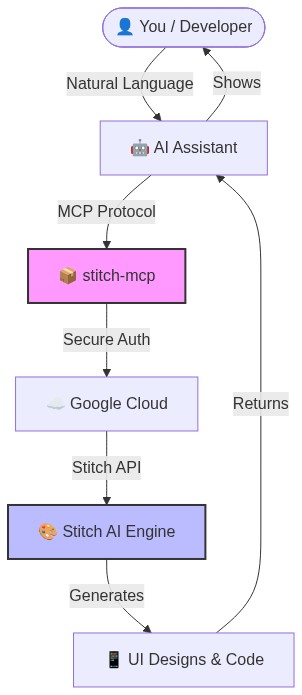
✨ Why this is cool
- Zero Config: Just login once and it works everywhere.
- Universal: Works on Windows, Mac, and Linux.
- Free: Google Stitch API is free to use.
�️ Quick Setup (2 Minutes)
1. Prerequisite: Google Cloud
You need a Google Cloud project with the Stitch API enabled.
# Login to your Google Cloud
gcloud auth login

# Set your project (replace with your actual project ID)
gcloud config set project YOUR_PROJECT_ID
gcloud auth application-default set-quota-project YOUR_PROJECT_ID

# Enable the magic
gcloud beta services mcp enable stitch.googleapis.com
2. Install the Credentials
This gives stitch-mcp permission to talk to Google on your behalf.
gcloud auth application-default login
3. Add to Your AI Editor
Copy and paste this into your MCP config file:
For Claude Desktop:
~/Library/Application Support/Claude/claude_desktop_config.json
For Cursor: Settings > MCP > Add New Server
{
  "mcpServers": {
    "stitch": {
      "command": "npx",
      "args": ["-y", "stitch-mcp"],
      "env": {
         "GOOGLE_CLOUD_PROJECT": "YOUR_PROJECT_ID"
      }
    }
  }
}
🛠️ Available Tools
| Tool Name | What it does |
|---|---|
extract_design_context |
🧠 Scans a screen to extract “Design DNA” (Fonts, Colors, Layouts). Use this to keep style consistent. |
fetch_screen_code |
💾 Downloads the raw HTML/Frontend code of a screen. |
fetch_screen_image |
🖼️ Downloads the high-res screenshot of a screen. |
generate_screen_from_text |
✨ Generates a NEW screen based on your prompt (and context). |
create_project |
📁 Creates a new workspace/project folder. |
list_projects |
📋 Lists all your available Stitch projects. |
インストール
npx -y stitch-mcp設定
{
  "mcpServers": {
    "stitch": {
      "command": "npx",
      "args": ["-y", "stitch-mcp"],
      "env": {
         "GOOGLE_CLOUD_PROJECT": "YOUR_PROJECT_ID"
      }
    }
  }
}