
christophenglisch/keycloak-model-context-protocol
Developer toolsこのページは AI により自動翻訳されています。技術的な詳細は原文をご確認ください。 原文を見る
Keycloak ユーザー管理のためのMCPサーバーの実装。 モデルコンテクストプロトコル(MCP)により、KeycloakユーザーのAIによる管理が可能.
概要
Keycloak管理用のモデルコンテキストプロトコルサーバーで、ユーザーや領域を管理するためのツールを提供します。 - 特定の領域で新しいユーザーを作成する - 領域からユーザーを削除します - 利用可能な領域のリスト - 特定の領域でユーザーを一覧表示 クラウドデスクトップ用のKeycloakをSmisery経由で自動的にインストールするには: サーバは NPM パッケージとして利用できます: サーバーを開発または変更したい場合: Claudeデスクトップ設定ファイル内のサーバーの設定: 指定された領域で新しいユーザーを作成します。 : - realm: 実名 - ユーザー名: 新規ユーザのユーザー名 - 電子メール: ユーザのメールアドレス - firstName: ユーザ名 - lastName: ユーザー名
概要(AI 翻訳)
Keycloak管理用のモデルコンテキストプロトコル(MCP)サーバー。 ClaudeなどのAIアシスタントは、ユーザー、グループ、ロール、セッションを管理し、クライアント、イベント、セキュリティの姿勢を検査し、Keycloak Admin REST APIを介し、少なくとも特権認証とすべての書き込みに関するガードレールを管理できます。
[!警告] このサーバーは、あなたがそれを与えるKeycloakアカウントの権限で動作します。 ** 専用サービスアカウントクライアントを使用して、必要なロールのみ**、ブートストラップ管理者は使用しません。 データを変更するツールは、デフォルトで確認を要求し、読み取り専用モードが使用可能です。 セキュリティを参照してください。
##ハイライト
- 7ツールセットで24ツール、ツールセットごとに有効。 デフォルトセット (
core]),groups, [[roles]]) は小さく、他のすべてがオプトインされます。 - 東特権のauth. [
client_credentials]]は、サービスアカウントで推奨される助成金であり、パスワードの付与は利用できます。 クレデンシャルのデフォルトはないので、不足している設定は高速に失敗します。 - ガードレール。 読み取り専用モード、リアルタイム許可、 [
master]] レルムの書き込み保護、およびすべての変更のためのプレビューエント[confirm: true]フロー.
このページは AI により自動翻訳されています。技術的な詳細は原文をご確認ください。
README
以下は原文 README の抜粋です。原文を見る。
Keycloak MCP Server


A Model Context Protocol (MCP) server for Keycloak administration. It lets an AI assistant such as Claude manage users, groups, roles and sessions, and inspect clients, events and the security posture of your realms, through the Keycloak Admin REST API, with least-privilege authentication and guardrails around every write.
[!WARNING] This server acts with the permissions of the Keycloak account you give it. Use a dedicated service-account client with only the roles you need, never the bootstrap admin. Every tool that changes data asks for confirmation by default, and a read-only mode is available. See Security.
Highlights
- 24 tools in 7 toolsets, enabled per toolset. The default set (
core,groups,roles) is small; everything else is opt-in. - Least-privilege auth.
client_credentialswith a service account is the recommended grant; the password grant stays available. No credential defaults, so a missing setting fails fast. - Guardrails. Read-only mode, realm allowlist, write protection for the
masterrealm, and a preview-then-confirm: trueflow for every change. Grants of administrative rights are detected through composite roles and parent groups. - 4 guided prompts (onboarding, offboarding, security audit, failed-login investigation) and MCP resources for realms and users, with realm-name completion.
- Structured, paginated output with output schemas; secrets and credentials are never returned or logged.
- Works with Claude Desktop, Claude Code, VS Code, Cursor and any stdio MCP client. Requires Node.js 22 or newer.
How it works
Your MCP client starts the server as a local child process and talks to it over stdio. Every tool call passes the guards, then goes through a single gateway that owns the Keycloak login and caches the access token.
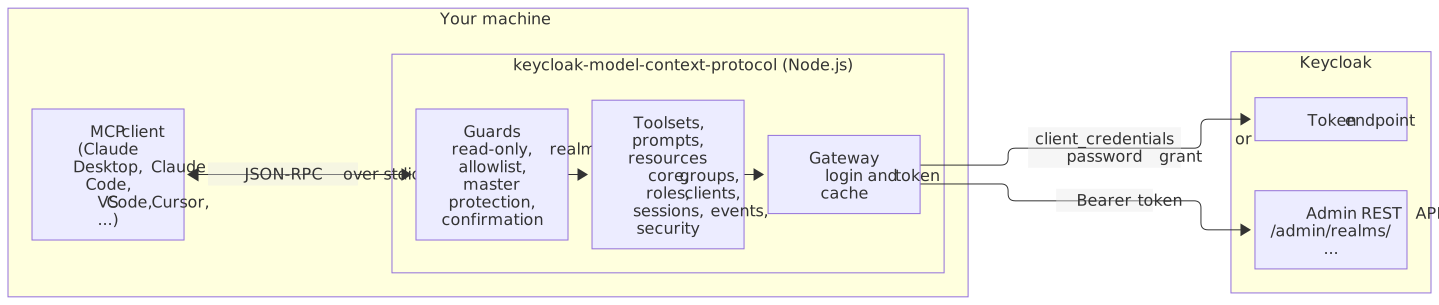
What a confirmed call looks like
インストール
npx -y keycloak-model-context-protocol@1設定
{
  "mcpServers": {
    "keycloak": {
      "command": "npx",
      "args": ["-y", "keycloak-model-context-protocol@1"],
      "env": {
        "KEYCLOAK_URL": "https://keycloak.example.com",
        "KEYCLOAK_AUTH_REALM": "demo",
        "KEYCLOAK_CLIENT_ID": "mcp-admin",
        "KEYCLOAK_CLIENT_SECRET": "<client-secret>"
      }
    }
  }
}