
biegehydra/bifrostmcp
Developer toolsこのページは AI により自動翻訳されています。技術的な詳細は原文をご確認ください。 原文を見る
biegehydra/bifrostmcp は、https://github.com/biegehydra/bifrostmcp. からインポートされたMCPサーバー候補です。
概要
biegehydra/bifrostmcp は、https://github.com/biegehydra/bifrostmcp. からインポートされたMCPサーバー候補です。
概要(AI 翻訳)
このVS Code拡張機能は、VSCodeの強力な開発ツールや言語機能をAIツールに公開するモデルコンテキストプロトコル(MCP)サーバーを提供します。MCPプロトコルをサポートするAIコーディングアシスタントを使用する場合、高度なコードナビゲーション、分析、操作機能を可能にします。
目次
- 特徴
- 設置/使用方法
- マルチプロジェクト支援
- 利用可能なツール
- 利用可能なコマンド
- トラブルシューティング
- 貢献
- デバッグ
- ライセンス
特徴
- 言語サーバー統合:対応言語のVSCode言語サーバー機能にアクセスできます
- コードナビゲーション:参照、定義、実装などを探す
- シンボル検索:ワークスペース全体でシンボルを検索
- コード解析:意味的トークン、文書記号、型情報の取得
- スマート選択:インテリジェントなコード選択のためにセマンティック選択範囲を活用します
- コードアクション:リファクタリングの提案やクイックフィックスへのアクセス
- HTTP/SSEサーバー:MCP互換HTTPサーバー上で言語機能を公開します
- AIアシスタント統合:MCPプロトコルをサポートするAIアシスタントと連携可能です
使用法
就任
このページは AI により自動翻訳されています。技術的な詳細は原文をご確認ください。
README
以下は原文 README の抜粋です。原文を見る。
Bifrost - VSCode Dev Tools MCP Server
This VS Code extension provides a Model Context Protocol (MCP) server that exposes VSCode’s powerful development tools and language features to AI tools. It enables advanced code navigation, analysis, and manipulation capabilities when using AI coding assistants that support the MCP protocol.
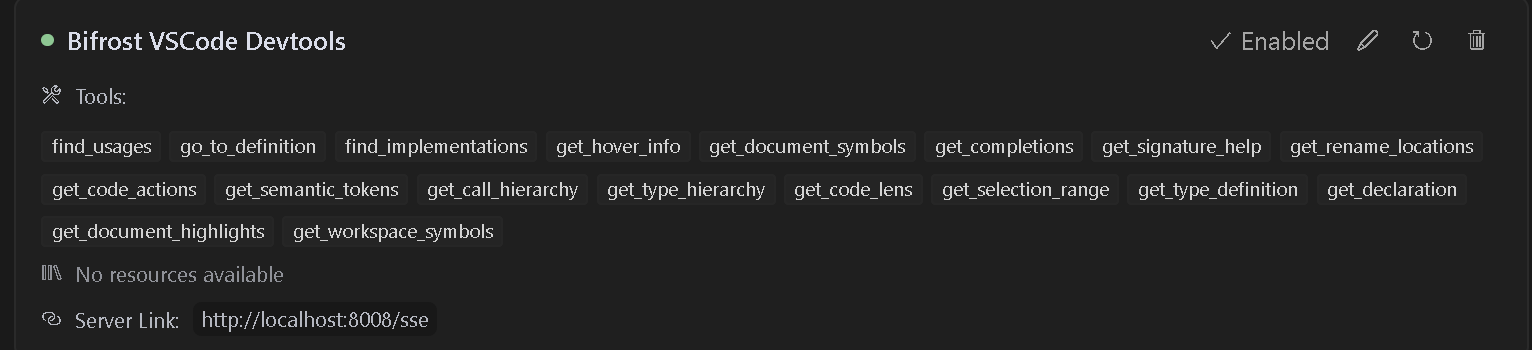
Table of Contents
- Features
- Installation/Usage
- Multi-Project Support
- Available Tools
- Available Commands
- Troubleshooting
- Contributing
- Debugging
- License
Features
- Language Server Integration: Access VSCode’s language server capabilities for any supported language
- Code Navigation: Find references, definitions, implementations, and more
- Symbol Search: Search for symbols across your workspace
- Code Analysis: Get semantic tokens, document symbols, and type information
- Smart Selection: Use semantic selection ranges for intelligent code selection
- Code Actions: Access refactoring suggestions and quick fixes
- HTTP/SSE Server: Exposes language features over an MCP-compatible HTTP server
- AI Assistant Integration: Ready to work with AI assistants that support the MCP protocol
Usage
Installation
- Install the extension from the VS Code marketplace
- Install any language-specific extensions you need for your development
- Open your project in VS Code
Configuration
The extension will automatically start an MCP server when activated. To configure an AI assistant to use this server:
- The server runs on port 8008 by default (configurable with
bifrost.config.json) - Configure your MCP-compatible AI assistant to connect to:
- SSE endpoint:
http://localhost:8008/sse - Message endpoint:
http://localhost:8008/message
- SSE endpoint:
LLM Rules
I have also provided sample rules that can be used in .cursorrules files for better results.
Cline Installation
- Step 1. Install Supergateway
- Step 2. Add config to cline
- Step 3. It will show up red but seems to work fine
Windows Config
{
  "mcpServers": {
    "Bifrost": {
      "command": "cmd",
"args": [インストール
npx -y supergateway --sse http://localhost:8008/sse設定
{
  "mcpServers": {
    "Bifrost": {
      "command": "cmd",
      "args": [
        "/c",
        "npx",
        "-y",
        "supergateway",
        "--sse",
        "http://localhost:8008/sse"
      ],
      "disabled": false,
      "autoApprove": [],
      "timeout": 600
    }
  }
}