
一个MCP(模型上下文协议)服务器,使LLM能够访问并了解关系数据库,如SQLite、Postgresql、MySQL & MariaDB、Oracle和MS-SQL。
概览
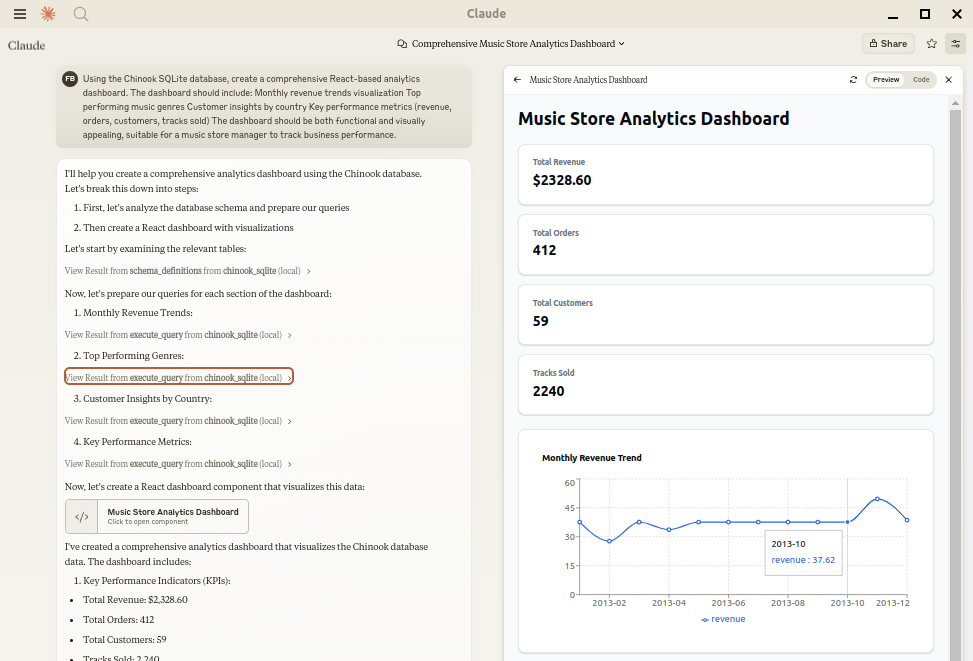
让Claude成为您的数据库专家!MCP Alchemy将Claude Desktop直接连接到您的数据库,使其能够: - 帮助你探索和理解数据库结构 - 协助编写和验证SQL查询 - 显示表之间的关系 - 分析大型数据集并创建报告 - Claude Desktop 可利用claude-local-file分析并创建非常大的数据集的伪影。 可兼容PostgreSQL、MySQL、MariaDB、SQLite、Oracle、MS SQL Server、CrateDB、Vertica及众多其他兼容SQLAlchemy的数据库。 添加到你的claude_desktop_config.json。你需要在---with参数中添加相应的数据库驱动程序。 注意:新版本发布后,缓存可能有长达600秒的时间窗口,导致uv触发版本错误。重启MCP客户端再次解决了错误。 连接CrateDB Cloud时,可以使用像 crate://user:[email protected]:4200 这样的URL吗?
概述(AI 翻译)
状态:积极维护,日常使用。测试发布版本会带有git标签发布到PyPI,问题和拉取请求会定期进行分流。
让Claude成为您的数据库专家!MCP Alchemy将Claude Desktop直接连接到您的数据库,使其能够:
- 帮助您探索和理解数据库结构
- 协助编写和验证SQL查询
- 显示表之间的关系
- 分析大型数据集并创建报告
- Claude Desktop 可利用 claude-local-file 分析并创建超大型数据集的伪影。
支持 PostgreSQL、MySQL、MariaDB、SQLite、Oracle、MS SQL Server、CrateDB、Vertica, 以及许多其他兼容SQLAlchemy的数据库。
安装
确保安装了紫外线:
使用 Claude Desktop
添加到你的 claude_desktop_config.json。你需要在 ‘--with’ 参数中添加相应的数据库驱动程序。
Note:新版本发布后,缓存在本地清理期间可能会有长达600秒的时间 缓存导致 uv 出现版本错误。重新启动 MCP 客户端再次解决了这个问题error.
SQLite(内置于 Python 中)
PostgreSQL
MySQL/MariaDB
本页由 AI 翻译,技术细节请以原文为准。
README
以下为原文 README 节选,完整内容请查看原文。
MCP Alchemy
Status: Actively maintained and in daily use. Tested releases are published to PyPI with git tags, and issues and pull requests are triaged regularly.
Let Claude be your database expert! MCP Alchemy connects Claude Desktop directly to your databases, allowing it to:
- Help you explore and understand your database structure
- Assist in writing and validating SQL queries
- Displays relationships between tables
- Analyze large datasets and create reports
- Claude Desktop Can analyse and create artifacts for very large datasets using claude-local-files.
Works with PostgreSQL, MySQL, MariaDB, SQLite, Oracle, MS SQL Server, CrateDB, Vertica, and a host of other SQLAlchemy-compatible databases.
Installation
Ensure you have uv installed:
# Install uv if you haven't already
curl -LsSf https://astral.sh/uv/install.sh | sh
Usage with Claude Desktop
Add to your claude_desktop_config.json. You need to add the appropriate database driver in the --with parameter.
Note: After a new version release there might be a period of up to 600 seconds while the cache clears locally cached causing uv to raise a versioning error. Restarting the MCP client once again solves the error.
SQLite (built into Python)
{
  "mcpServers": {
    "my_sqlite_db": {
      "command": "uvx",
      "args": ["--from", "mcp-alchemy==2026.10.15.202659",
               "--refresh-package", "mcp-alchemy", "mcp-alchemy"],
      "env": {
        "DB_URL": "sqlite:////absolute/path/to/database.db"
      }
    }
  }
}
PostgreSQL
{
  "mcpServers": {
    "my_postgres_db": {
      "command": "uvx",
      "args": ["--from", "mcp-alchemy==2026.10.15.202659", "--with", "psycopg2-binary",
               "--refresh-package", "mcp-alchemy", "mcp-alchemy"],
      "env": {
        "DB_URL": "postgresql://user:password@localhost/dbname"
      }
    }
  }
}
MySQL/MariaDB
{
  "mcpServers": {
    "my_mysql_db": {
      "command": "uvx",
      "args": ["--from", "mcp-alchemy==2026.10.15.202659", "--with", "pymysql",
               "--refresh-package", "mcp-alchemy", "mcp-alchemy"],
      "env": {
        "DB_URL": "mysql+pymysql://user:password@localhost/dbname"
      }
    }
  }
}
Microsoft SQL Server
{
  "mcpServers": {
    "my_mssql_db": {
      "command": "uvx",
      "args": ["--from", "mcp-alchemy==2026.10.15.202659", "--with", "pymssql",
               "--refresh-package", "mcp-alchemy", "mcp-alchemy"],
      "env": {
        "DB_URL": "mssql+pymssql://user:password@localhost/dbname"
      }
    }
  }
}
安装
uvx --from mcp-alchemy==2026.10.15.202659 --refresh-package mcp-alchemy mcp-alchemy配置
{
  "mcpServers": {
    "my_sqlite_db": {
      "command": "uvx",
      "args": ["--from", "mcp-alchemy==2026.10.15.202659",
               "--refresh-package", "mcp-alchemy", "mcp-alchemy"],
      "env": {
        "DB_URL": "sqlite:////absolute/path/to/database.db"
      }
    }
  }
}