
Agent Droid Bridge 通过 ADB 赋予 AI 智能体对 Android 设备和模拟器的程序控制,ADB 作为 MCP 服务器公开。
概览
Agent Droid Bridge 是一款 MCP 服务器,通过 ADB 连接 AI 代理与 Android 设备和模拟器。它专为移动自动化、应用测试、动态分析和逆向工程而建:将 ADB 的全部表面展示为结构化工具,任何兼容 MCP 的 AI 客户端都能直接调用。如果 ADB 能做到,代理也能做到。 专门构建的工具返回结构化、最少的响应。没有原始的XML转储,也没有浪费上下文——代理能在长时间的会话中保持快速。 上面的演示展示了几个简单的任务,展示了连接的座席能做什么,这只是冰山一角: - 安装Paint应用,打开它,并通过计算墙壁和屋顶的像素坐标绘制房屋 - 打开设备浏览器,搜索“MCP Wikipedia”,导航到结果页面并截图 - 打开计算器,计算1337×42,并将结果提取到主机 - 打开联系人,创建包含姓名和电话号码的新条目,然后......
概述(AI 翻译)
Agent Droid Bridge 是一款 MCP 服务器,通过 ADB 连接 AI 代理与 Android 设备和模拟器。它专为移动自动化、应用测试、动态分析和逆向工程而建:将 ADB 的全部表面展示为结构化工具,任何兼容 MCP 的 AI 客户端都能直接调用。如果 ADB 能做到,代理也能做到。
专门构建的工具返回结构化、最少的响应。没有原始的XML转储,没有浪费上下文——代理能在长时间的会话中保持快速。
演示
上面的演示展示了几个简单的任务,展示了连接的座席能做什么,这只是冰山一角:
- 安装Paint应用,打开它,并通过计算墙壁和屋顶的像素坐标绘制房屋
- 打开设备浏览器,搜索“MCP Wikipedia”,导航到结果页面,并截图
- 打开计算器,计算1337×42,并将结果提取到主机
- 打开联系人,创建包含姓名和电话号码的新条目,并确认已保存
- 打开日历并预约特定日期
- 打开设置并切换暗黑模式
本页由 AI 翻译,技术细节请以原文为准。
README
以下为原文 README 节选,完整内容请查看原文。









Agent Droid Bridge
Agent Droid Bridge is an MCP server that connects AI agents to Android devices and emulators over ADB. It is built for mobile automation, app testing, dynamic analysis, and reverse engineering: exposing the full surface of ADB as structured tools that any MCP-compatible AI client can call directly. If ADB can do it, an agent can do it.
Purpose-built tools return structured, minimal responses. No raw XML dumps, no wasted context — agents stay fast across long sessions.

Demo
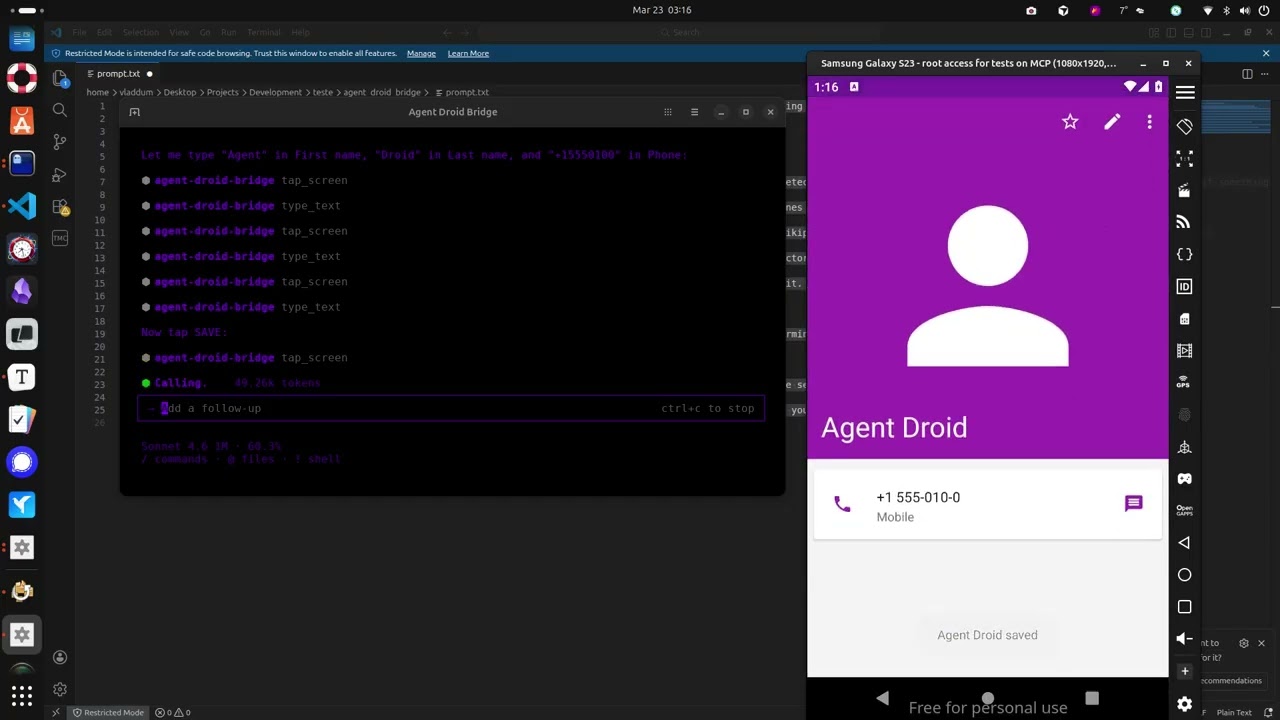
The demo above runs through a few straightforward tasks to show what a connected agent can do, and this is just scratching the surface:
- Installs the Paint app, opens it, and draws a house by calculating pixel coordinates for the walls and roof
- Opens the device browser, searches for “MCP Wikipedia”, navigates to the result page, and takes a screenshot
- Opens the Calculator, computes 1337 × 42, and extracts the result to the host machine
- Opens Contacts, creates a new entry with a name and phone number, and confirms it saved
- Opens the Calendar and schedules an appointment for a specific date
- Opens Settings and toggles dark mode
- Extracts the Calculator APK from the device to the host machine
- Installs Notepad, writes a one-sentence summary of every task completed, and takes a final screenshot
What it does
Tools
- 14 built-in tools for screen capture, UI inspection, text reading, element extraction, touch and swipe input, text entry, keycode events, app launching, ADB commands, and device inspection
安装
uvx agent-droid-bridge配置
{
  "mcpServers": {
    "agent-droid-bridge": {
      "command": "uvx",
      "args": ["agent-droid-bridge"],
      "env": {
        "ADB_EXECUTION_MODE": "unrestricted",
        "ADB_ALLOW_SHELL": "true",
        "ADB_PATH": "adb",
        "ADB_EXTRA_TOOL_PACKS": "",
        "MCP_LOG_ENABLED": "false",
        "MCP_LOG_DIR": "~/logs/agent-droid-bridge"
      }
    }
  }
}