
aarora79/aws-cost-explorer-mcp-server 是从 https://github.com/aarora79/aws-cost-explorer-mcp-server. 导入的一个 MCP 服务器候选
概览
aarora79/aws-cost-explorer-mcp-server 是从 https://github.com/aarora79/aws-cost-explorer-mcp-server. 导入的一个 MCP 服务器候选
概述(AI 翻译)
一个MCP服务器,通过Cost Explorer获取AWS支出数据,通过Amazon Cloud Watch中的Model invocation logs通过Anthropic的MCP(模型控制协议)获取亚马逊基石使用数据。请参见“安全”远程MCP服务器部分,了解如何通过HTTPS运行你的MCP服务器。
你可以在本地运行MCP服务器并通过Claude Desktop访问,或者在Amazon EC2上运行远程MCP服务器,通过内置于LangGraph代理中的MCP客户端访问。
🚨你也可以利用这个MCP服务器获取其他账户的AWS支出信息,只要MCP服务器使用的IAM角色能承担其他账户🚨的角色
演示视频
概述
该工具为分析和可视化AWS云支出数据提供了便捷方式,利用Anthropic的Claude模型作为交互界面。它作为MCP服务器,向Claude Desktop展示AWS成本浏览器API功能,允许你用自然语言询问AWS支出问题。
特色
- 亚马逊EC2支出分析:查看过去一天EC2支出的详细分解
本页由 AI 翻译,技术细节请以原文为准。
README
以下为原文 README 节选,完整内容请查看原文。
AWS Cost Explorer and Amazon Bedrock Model Invocation Logs MCP Server & Client
An MCP server for getting AWS spend data via Cost Explorer and Amazon Bedrock usage data via Model invocation logs in Amazon Cloud Watch through Anthropic’s MCP (Model Control Protocol). See section on “secure” remote MCP server to see how you can run your MCP server over HTTPS.
flowchart LR
    User([User]) --> UserApp[User Application]
    UserApp --> |Queries| Host[Host]

    subgraph "Claude Desktop"
        Host --> MCPClient[MCP Client]
    end

    MCPClient --> |MCP Protocol over HTTPS| MCPServer[AWS Cost Explorer MCP Server]

    subgraph "AWS Services"
        MCPServer --> |API Calls| CostExplorer[(AWS Cost Explorer)]
        MCPServer --> |API Calls| CloudWatchLogs[(AWS CloudWatch Logs)]
    end
You can run the MCP server locally and access it via the Claude Desktop or you could also run a Remote MCP server on Amazon EC2 and access it via a MCP client built into a LangGraph Agent.
🚨You can also use this MCP server to get AWS spend information from other accounts as long as the IAM role used by the MCP server can assume roles in those other accounts🚨
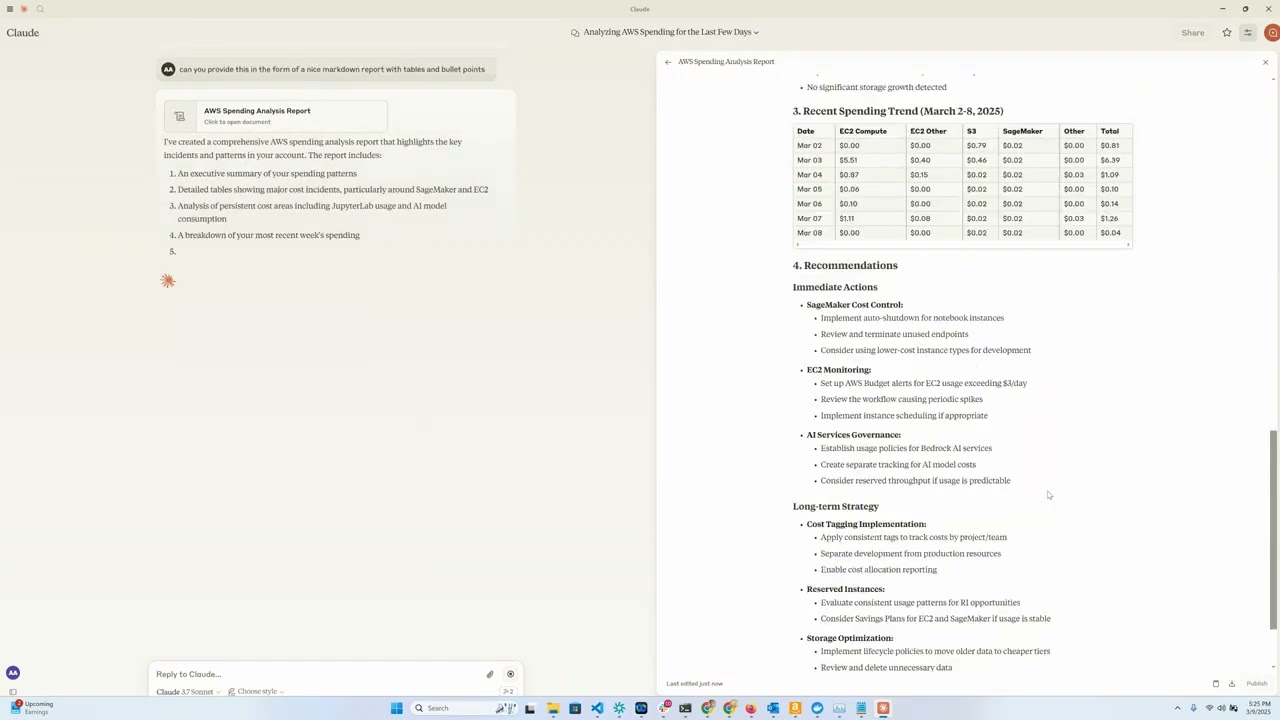
Demo video
Overview
This tool provides a convenient way to analyze and visualize AWS cloud spending data using Anthropic’s Claude model as an interactive interface. It functions as an MCP server that exposes AWS Cost Explorer API functionality to Claude Desktop, allowing you to ask questions about your AWS spend in natural language.
Features
- Amazon EC2 Spend Analysis: View detailed breakdowns of EC2 spending for the last day
- Amazon Bedrock Spend Analysis: View breakdown by region, users and models over the last 30 days
- Service Spend Reports: Analyze spending across all AWS services for the last 30 days
- Detailed Cost Breakdown: Get granular cost data by day, region, service, and instance type
- Interactive Interface: Use Claude to query your cost data through natural language
Requirements
- Python 3.12
- AWS credentials with Cost Explorer access
- Anthropic API access (for Claude integration)
- [Optional] Amazon Bedrock access (for LangGraph Agent)
- [Optional] Amazon EC2 for running a remote MCP server
Installation
-
Install
uv:# On macOS and Linux curl -LsSf https://astral.sh/uv/install.sh | sh# On Windows powershell -ExecutionPolicy ByPass -c "irm https://astral.sh/uv/install.ps1 | iex"Additional installation options are documented here
安装
docker run -i --rm -e AWS_ACCESS_KEY_ID -e AWS_SECRET_ACCESS_KEY -e AWS_REGION -e BEDROCK_LOG_GROUP_NAME -e MCP_TRANSPORT -e CROSS_ACCOUNT_ROLE_NAME aws-cost-explorer-mcp:latest配置
{
  "mcpServers": {
    "aws-cost-explorer": {
      "command": "docker",
      "args": [ "run", "-i", "--rm", "-e", "AWS_ACCESS_KEY_ID", "-e", "AWS_SECRET_ACCESS_KEY", "-e", "AWS_REGION", "-e", "BEDROCK_LOG_GROUP_NAME", "-e", "MCP_TRANSPORT", "-e", "CROSS_ACCOUNT_ROLE_NAME", "aws-cost-explorer-mcp:latest" ],
      "env": {
        "AWS_ACCESS_KEY_ID": "YOUR_ACCESS_KEY_ID",
        "AWS_SECRET_ACCESS_KEY": "YOUR_SECRET_ACCESS_KEY",
        "AWS_REGION": "us-east-1",
        "BEDROCK_LOG_GROUP_NAME": "YOUR_CLOUDWATCH_BEDROCK_MODEL_INVOCATION_LOG_GROUP_NAME",
        "CROSS_ACCOUNT_ROLE_NAME": "ROLE_NAME_FOR_THE_ROLE_TO_ASSUME_IN_OTHER_ACCOUNTS",
        "MCP_TRANSPORT": "stdio"
      }
    }
  }
}