
rishijatia/fantasy-pl-mcp
Developer toolsЭта страница переведена автоматически. Технические детали смотрите в оригинале. Открыть оригинал
rishijatia/fantasy-pl-mcp - кандидат на сервер MCP, импортированный из https://github.com/rishijatia/fantasy-pl-mcp.
Обзор
rishijatia/fantasy-pl-mcp - кандидат на сервер MCP, импортированный из https://github.com/rishijatia/fantasy-pl-mcp.
Обзор (машинный перевод)
Сервер Model Context Protocol (MCP) предоставляет доступ к данным и инструментам Fantasy Premier League (FPL). Этот сервер позволяет взаимодействовать с данными FPL в Claude for Desktop и других MCP-совместимых клиентах.
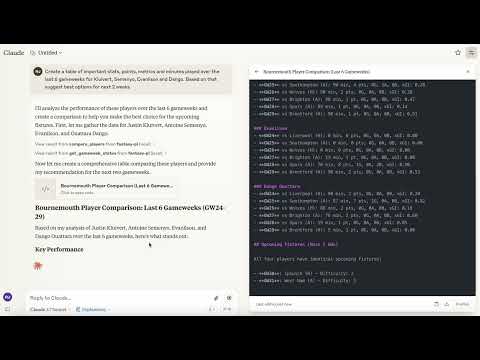
Демо-версия MCP-сервера Fantasy Premier League в действии
Поддерживаемые платформы
Клод Десктоп
- Курсор Виндсерф MCP Compatible Desktop LLM
Мобильность в настоящее время не поддерживается.
Особенности
** Богатые данные игроков**: доступ к полной статистике игроков из FPL API Командная информация: Узнайте больше о командах Премьер-лиги ** Данные игровой недели**: Просмотр текущей и прошлой информации игровой недели Игровой поиск: найдите игроков по имени или команде ** Сравнение игроков**: Сравните подробную статистику между двумя игроками.
Требования
Python 3.10 или выше Claude Desktop (для интеграции с ИИ)
##Установка
Вариант 1: Установка из PyPI (рекомендуется)
Вариант 1b: Установка в зависимости от разработки
Вариант 2: Установка на GitHub
Вариант 3: Клонировать и устанавливать локально
Запуск сервера
После установки у вас есть несколько вариантов запуска сервера:
###1 Используя команду CLI
###2 Использование модуля Python
###3.
Эта страница переведена автоматически. Технические детали смотрите в оригинале.
README
Показан фрагмент оригинального README. Открыть оригинал.
Fantasy Premier League MCP Server





A Model Context Protocol (MCP) server that provides access to Fantasy Premier League (FPL) data and tools. This server allows you to interact with FPL data in Claude for Desktop and other MCP-compatible clients.
Demo of the Fantasy Premier League MCP Server in action
Supported Platforms
- Claude Desktop
- Cursor
- Windsurf
- Other MCP Compatible Desktop LLMs
Mobile is currently not supported.
Features
- Rich Player Data: Access comprehensive player statistics from the FPL API
- Team Information: Get details about Premier League teams
- Gameweek Data: View current and past gameweek information
- Player Search: Find players by name or team
- Player Comparison: Compare detailed statistics between any two players
Requirements
- Python 3.10 or higher
- Claude Desktop (for AI integration)
Installation
Option 1: Install from PyPI (Recommended)
pip install fpl-mcp
Option 1b: Install with Development Dependencies
pip install "fpl-mcp[dev]"
Option 2: Install from GitHub
pip install git+https://github.com/rishijatia/fantasy-pl-mcp.git
Option 3: Clone and Install Locally
git clone https://github.com/rishijatia/fantasy-pl-mcp.git
cd fantasy-pl-mcp
pip install -e .
Running the Server
After installation, you have several options to run the server:
1. Using the CLI command
fpl-mcp
2. Using the Python module
python -m fpl_mcp
3. Using with Claude Desktop
Configure Claude Desktop to use the installed package by editing your claude_desktop_config.json file:
Method 1: Using the Python module directly (most reliable)
{
  "mcpServers": {
    "fantasy-pl": {
      "command": "python",
      "args": ["-m", "fpl_mcp"]
    }
  }
}
Method 2: Using the installed command with full path (if installed with pip)
{
  "mcpServers": {
"fantasy-pl": {Установка
npx @modelcontextprotocol/inspector python -m fpl_mcpКонфигурация
{
  "mcpServers": {
    "fantasy-pl": {
      "command": "python",
      "args": ["-m", "fpl_mcp"]
    }
  }
}