
llnl/paraview_mcp
Developer toolsЭта страница переведена автоматически. Технические детали смотрите в оригинале. Открыть оригинал
llnl/paraview mcp - кандидат на сервер MCP, импортированный из https://github.com/llnl/paraview_mcp.
Обзор
llnl/paraview mcp - кандидат на сервер MCP, импортированный из https://github.com/llnl/paraview_mcp.
Обзор (машинный перевод)
ParaView-MCP - это автономный агент, который интегрирует мультимодальные большие языковые модели с ParaView через протокол Model Context, позволяя пользователям создавать и манипулировать научными визуализациями с использованием естественного языка и визуальных входов вместо сложных команд или операций графического интерфейса. Система имеет возможности визуальной обратной связи, которые позволяют ей наблюдать видопорт и итеративно уточнять визуализации, делая расширенную визуализацию доступной для неспециалистов, одновременно дополняя экспертные рабочие процессы с интеллектуальной автоматизацией.
##Отказ от ответственности Текущая реализация соединения между MCP-сервером и ParaView, как в основной, так и в развёрнутой ветвях, основана на синхронизации между pvserver и клиентом ParaView. Поскольку эта функция была обесценена в последних версиях ParaView, представление приложения ParaView может неправильно отображать контент из экземпляра pvserver, и могут возникнуть общие проблемы с стабильностью.
Видео демо
Нажмите на изображение ниже, чтобы посмотреть видео:
##Установка
Настройка для LLM
Чтобы настроить интеграцию с claude desktop, добавьте следующее в claude desktop config.json:
бегать
###1 Начало работы сервера
###2.
Эта страница переведена автоматически. Технические детали смотрите в оригинале.
README
Paraview_MCP
ParaView-MCP is an autonomous agent that integrates multimodal large language models with ParaView through the Model Context Protocol, enabling users to create and manipulate scientific visualizations using natural language and visual inputs instead of complex commands or GUI operations. The system features visual feedback capabilities that allow it to observe the viewport and iteratively refine visualizations, making advanced visualization accessible to non-experts while augmenting expert workflows with intelligent automation.
Disclaimer
The current implementation of the connection between the MCP server and ParaView, in both the main and dev branches, relies on synchronization between pvserver and the ParaView client. Because this feature has been deprecated in most recent ParaView versions, the ParaView application view may not display content from the pvserver instance correctly, and overall stability issues may occur.
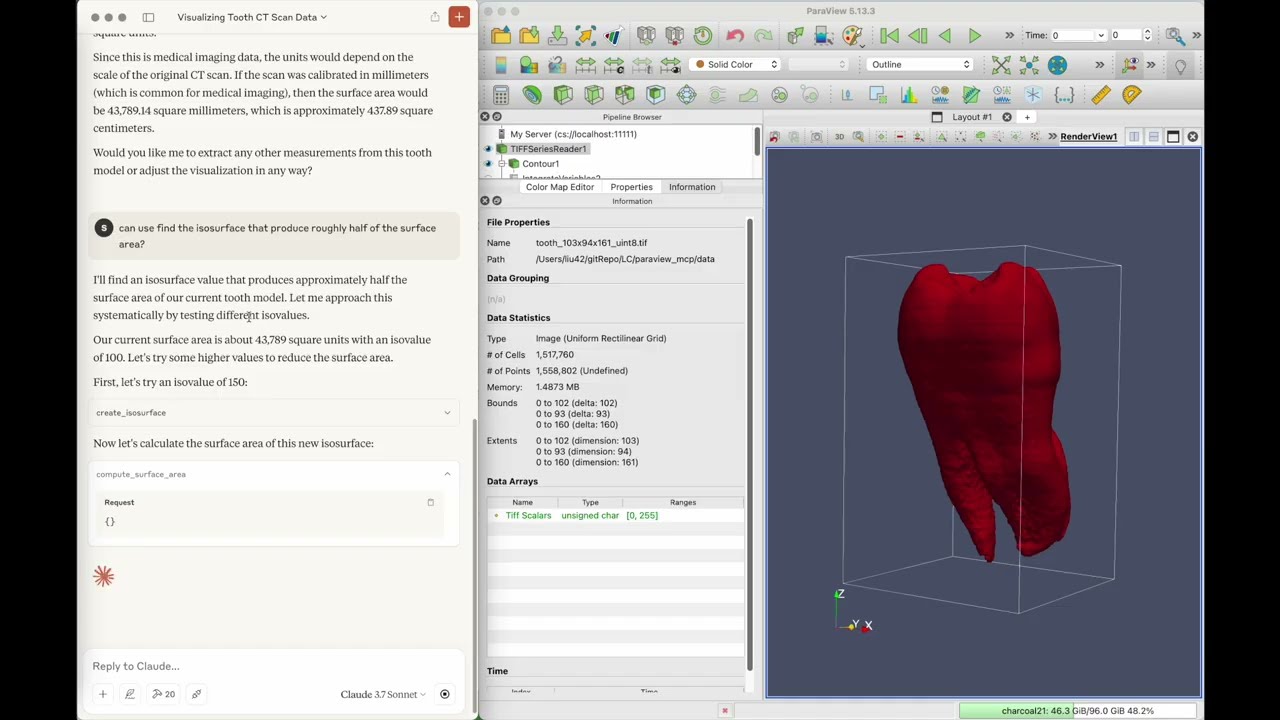
Video Demo
Click the image below to watch the video:
Installation
git clone https://github.com/LLNL/paraview_mcp.git
cd paraview_mcp

conda create -n paraview_mcp python=3.10
conda install conda-forge::paraview
conda install mcp[cli] httpx
Setup for LLM
To set up integration with claude desktop, add the following to claude_desktop_config.json
    "mcpServers": {
      "ParaView": {
        "command": "/path/to/python",
        "args": [
        "/path/to/paraview_mcp/paraview_mcp_server.py"
        ]
      }
    }
running
1. Start paraview server
python pvserver --multi-clients
2. Connect to paraview server from paraview GUI (file -> connect)
3. Start claude desktop app
Citing Paraview_MCP
S. Liu, H. Miao, and P.-T. Bremer, “Paraview-MCP: Autonomous Visualization Agents with Direct Tool Use,” in Proc. IEEE VIS 2025 Short Papers, 2025, pp. 00
@inproceedings{liu2025paraview,
  title={Paraview-MCP: Autonomous Visualization Agents with Direct Tool Use},
  author={Liu, S. and Miao, H. and Bremer, P.-T.},
  booktitle={Proc. IEEE VIS 2025 Short Papers},
  pages={00},
  year={2025},
  organization={IEEE}
}
Authors
Paraview_MCP was created by Shusen Liu ([email protected]) and Haichao Miao ([email protected])
License
Paraview_MCP is distributed under the terms of the BSD-3 license.
LLNL-CODE-2007260
Установка
This server does not publish a one-line install command.
Open the repository installation guide Новичок в MCP? Начните с руководства на mcpskill.org →Конфигурация
"mcpServers": {
      "ParaView": {
        "command": "/path/to/python",
        "args": [
        "/path/to/paraview_mcp/paraview_mcp_server.py"
        ]
      }
    }