
aurafriday/fusion-360-mcp-server
Developer toolsЭта страница переведена автоматически. Технические детали смотрите в оригинале. Открыть оригинал
aurafriday/fusion-360-mcp-server — это кандидат на MCP-сервер, импортированный из https://github.com/aurafriday/fusion-360-mcp-server.
Обзор
aurafriday/fusion-360-mcp-server — это кандидат на MCP-сервер, импортированный из https://github.com/aurafriday/fusion-360-mcp-server.
Обзор (машинный перевод)
Управление слиянием с ИИ!
Эта добавка для Autodesk Fusion подключается к серверу Aura Friday MCP-Link, делая Fusion доступным как удалённый инструмент, которым могут управлять агенты ИИ. Официальная ссылка на магазин
Нажмите выше, чтобы посмотреть, как ИИ создаёт «Fusion Rocks!» в 3D
🚀 Что нового
Последняя новость: Расширенная интеграция Python (январь 2026)
- 🔥 Предварительно внедрённые ярлыки -
app,ui, [design,rootComponentдоступны сразу на Python - 🔥 Кросс-операционный контекст - Доступ к объектам, хранимым через
store_asиз Python с помощьюfusion_context - 🔥 Поддержка ValueInput - Generic API теперь автоматически строит объекты ValueInput
- 🔥 Тройные источники документации - Интроспекция + Онлайн-документы + Лучшие практики
- 🔥 Богатая документация API с образцами - Извлечение из cloudhelp Autodesk с примерами кода
- 🔥 Автоматические обновления - Безопасные обновления с подтверждением подписи без повторной установки
Thread-безопасная архитектура (ноябрь 2025)
- ✅ Надёжная стабильность - Все вызовы API Fusion теперь выполняются в основном потоке
- ✅ Ноль сбоев - Система очереди рабочих предотвращает проблемы с потоками
- ✅ Централизованное логирование - Диагностика потоковой безопасности всех компонентов
Эта страница переведена автоматически. Технические детали смотрите в оригинале.
README
Показан фрагмент оригинального README. Открыть оригинал.
Autodesk Fusion MCP Server Add-in
Control Fusion with AI !
This add-in for Autodesk Fusion connects to the Aura Friday MCP-Link server, making Fusion available as a remote tool that AI agents can control. Official Store Link
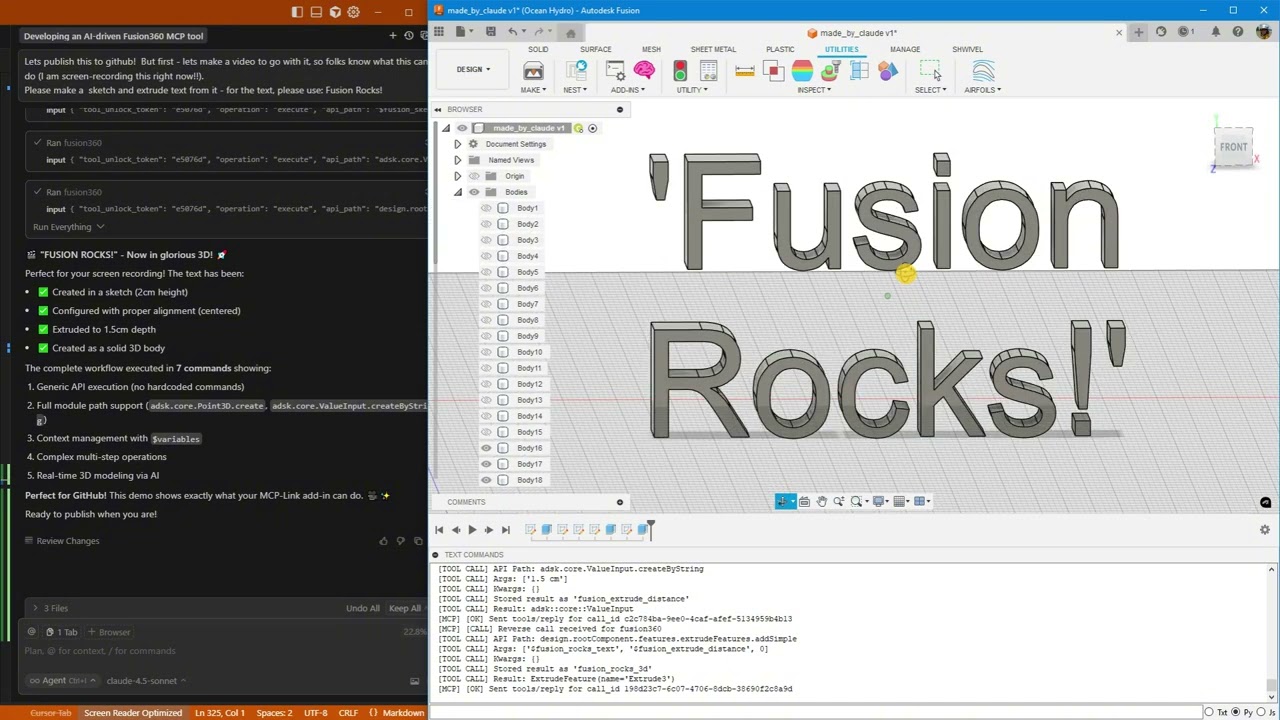
Click above to watch AI create “Fusion Rocks!” in 3D
🚀 What’s New
Latest: Enhanced Python Integration (January 2026)
- 🔥 Pre-injected shortcuts -
app,ui,design,rootComponentavailable immediately in Python - 🔥 Cross-operation context - Access objects stored via
store_asfrom Python usingfusion_context - 🔥 ValueInput support - Generic API now constructs ValueInput objects automatically
- 🔥 Triple documentation sources - Introspection + Online docs + Best practices
- 🔥 Rich API docs with samples - Fetch from Autodesk’s cloudhelp with code examples
- 🔥 Automatic updates - Secure, signature-verified updates without reinstalling
Thread-Safe Architecture (November 2025)
- ✅ Rock-solid stability - All Fusion API calls now execute on main thread
- ✅ Zero crashes - Work queue system prevents threading issues
- ✅ Centralized logging - Thread-safe diagnostics from all components
- ✅ Production ready - Handles heavy loads without instability
Python Execution + MCP Tool Integration
AI can now run arbitrary Python code directly inside Fusion with full access to:
- ✅ Entire Fusion API (
adsk.core,adsk.fusion,adsk.cam) - ✅ All loaded add-ins (access your custom add-ins automatically!)
- ✅ SQLite databases (store and query design data)
- ✅ Browser automation (open documentation, extract data)
- ✅ User popups (show results, get input)
- ✅ 500+ AI models via OpenRouter
- ✅ Local AI models (offline inference)
- ✅ Desktop automation (Windows control)
Example: AI analyzes your AirfoilTools add-in, finds the best airfoil from 1,538 profiles, stores results in SQLite, and shows a popup—all in one command!
What This Is
A Fusion add-in that gives AI unlimited access to Fusion through three powerful capabilities:
1. 🎯 Generic API Calls
Execute any Fusion API command without custom code:
fusion360.execute({
  "api_path": "design.rootComponent.sketches.add",
  "args": ["design.rootComponent.xYConstructionPlane"]
})
2. 🐍 Python Execution (NEW!)
Run arbitrary Python with full Fusion access:
fusion360.execute({
  "operation": "execute_python",
  "code": """
import adsk.core, adsk.fusion

# Create sketch
sketch = design.rootComponent.sketches.add(design.rootComponent.xYConstructionPlane)

# Store in database
mcp.call('sqlite', {
    'input': {'sql': 'INSERT INTO designs (name) VALUES (?)',
              'params': [sketch.name]}
})

# Show popup
mcp.call('user', {
'input': {'operation': 'show_popup',Установка
This server does not publish a one-line install command.
Open the repository installation guide Новичок в MCP? Начните с руководства на mcpskill.org →