
armorwallet/armor-crypto-mcp
Developer toolsЭта страница переведена автоматически. Технические детали смотрите в оригинале. Открыть оригинал
armorwallet/armor-crypto-mcp — это кандидат на сервер MCP, импортированный из https://github.com/armorwallet/armor-crypto-mcp.
Обзор
armorwallet/armor-crypto-mcp — это кандидат на сервер MCP, импортированный из https://github.com/armorwallet/armor-crypto-mcp.
Обзор (машинный перевод)
Alpha Test версия 0.1.24
Единый источник интеграции AI-агентов с криптоэкосистемой. Сюда входят создание и управление кошельками, свопы, переводы, события-транзакции, такие как DCA, стоп-лосс и тейк-профит, и многое другое. Armor MCP поддерживает Solana в Alpha и, в бета-версии, будет поддерживать более десятка блокчейнов, включая Ethereum. Base, Avalanche, Bitcoin, Sui, Berachain, megaETH, Optimism, Ton, BNB и Arbitrum, среди прочих. Используя MCP от Armor, вы можете объединить всю криптовалюту в своего AI-агента с помощью унифицированной логики и полного набора инструментов.
Особенности
🧠 AI Native
📙 Управление кошельком
🔃 Обмены
🌈 Специализированные сделки (DCA, стоп-лосс и т.д.)
⛓️ Многоцепочечная система
↔️ Кросс-чейневые трансляции
🥩 Стейкинг
🤖 Быстрая интеграция в агентные фреймворки
👫 Общественные настроения
🔮 Прогноз
Требования
1. Убедитесь, что у вас установлен Python
2. Установка uv
Linux / Windows
Mac
3. Claude Desktop или ваш AI Agent запускают MCP
См. раздел «Использование и конфигурация» для подробностей.
Альфа-тестирование
Эта страница переведена автоматически. Технические детали смотрите в оригинале.
README
Показан фрагмент оригинального README. Открыть оригинал.
Armor Crypto MCP
Alpha Test version 0.1.24
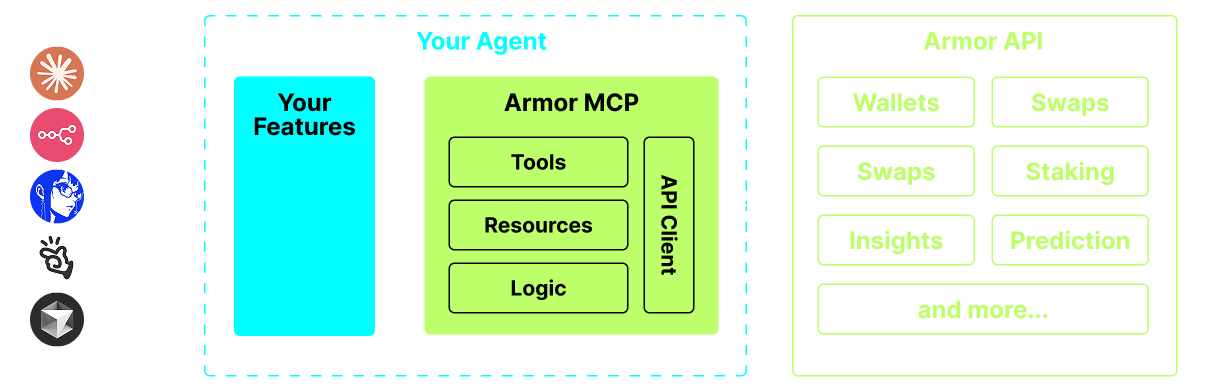
A single source for integrating AI Agents with the Crypto ecosystem. This includes Wallet creation and management, swaps, transfers, event-based trades like DCA, stop loss and take profit, and much more. The Armor MCP supports Solana in Alpha and, when in beta, will support more than a dozen blockchains, including Ethereum. Base, Avalanche, Bitcoin, Sui, Berachain, megaETH, Optimism, Ton, BNB, and Arbitrum, among others. Using Armor’s MCP you can bring all of crypto into your AI Agent with unified logic and a complete set of tools.
Features
🧠 AI Native
📙 Wallet Management
🔃 Swaps
🌈 Specialized trades (DCA, Stop Loss etc.)
⛓️ Multi-chain
↔️ Cross-chain transations
🥩 Staking
🤖 Fast intergration to Agentic frameworks
👫 Social Sentiment
🔮 Prediction
Requirements
1. Make sure you have python installed
2. Install uv
Linux / Windows
pip install uv
Mac
brew install uv
3. Claude Desktop or your AI Agent will run the MCP
See Usage & Configuration for details.
Alpha Testing
We are currently in pre-alpha, and we are testing the capabilities of various agents and agentic frameworks like Claude Desktop, Cline, Cursor, n8n, etc.
Current Features & Tools
- Wallet Management
- Grouping & Organization
- Archiving
- Swap & Trades
- Normal swap
- DCA (place / list / cancel)
- Scheduled Orders
- Limit Orders (place / list / cancel)
- Staking and Unstaking
- Token Search and Trending Tokens
- Statistical Calculator for accurate Analysis
- Supports Solana blockchain
Coming Soon
- More Blockchain Support
- Minting
- Armor Agents as a Tool (or A2A)
MCP Setup
Currently you need to have the Armor NFT to get an API Key. Get it here
Usage & Configuration
To use the Armor MCP with your agent, you need the following configuration, replace `` with your API key:
{
  "mcpServers": {
    "armor-crypto-mcp": {
      "command": "uvx",
      "args": ["armor-crypto-mcp@latest", "--version"],
      "env": {
        "ARMOR_API_KEY": ""
      }
    }
  }
}
Use in Claude Desktop
- Must have Developer Mode enabled
- Open Claude Desktop’s File Menu top left of the window.
- Go to File > Settings
- Under Developer, click Edit Configuration
- In the config file, insert the
armor-wallet-mcpsection from above - Make sure to replace the placeholder with your API key
- Save the file and start a new Chat in Claude Desktop
Use in Cline
Установка
uvx armor-crypto-mcp@latest --versionКонфигурация
{
  "mcpServers": {
    "armor-crypto-mcp": {
      "command": "uvx",
      "args": ["armor-crypto-mcp@latest", "--version"],
      "env": {
        "ARMOR_API_KEY": "<PUT-YOUR-KEY-HERE>"
      }
    }
  }
}