
dog-qiuqiu/invincat
Developer tools이 페이지는 AI로 자동 번역되었습니다. 기술적인 세부 사항은 원문을 확인하세요. 원문 보기
DeepAgents CLI에 내장 된 네이티브 파이썬 에이전트 CLI는 각 작업 후 학습을 캡처하고 hierarchical을 통해 효율적인 AI 코딩 지원을 제공합니다.
개요
Invincat은 로컬 저장소에 대한 단말 AI 코딩 보조입니다. 그것은 파일 검사 및 편집 할 수 있습니다, 승인과 함께 쉘 명령을 실행, 웹 / MCP 도구를 사용하여 장기 메모리를 유지, 실행 전에 계획, 예정된 작업을 실행, 및 교량 원격 WeCom 메시지 프로젝트 세션. - 터미널 UI에서 프로젝트 디렉토리에서 직접 작업합니다. - 읽기, 편집 및 승인 된 도구 실행 파일 생성. - configurable 안전 통제의 밑에 포탄 명령을 실행하십시오. - /plan을 사용하여 구현하기 전에 실행 계획을 검토하고 승인합니다. - 세션에서 사용자 및 프로젝트 메모리를 유지하십시오. - 자연적인 언어에 있는 recurring 또는 one-shot 계획된 일을 창조하십시오. - MCP 도구, 기술, WeCom 봇 데몬 통합을 통한 확장 기능. 첫 번째 실행에서 /model는 공급자와 모델을 구성합니다. 프로젝트 디렉토리에서 Invincat 실행: 첫번째 발사 후에, /model는 모형 매니저를 엽니다. - Ctrl+N을 눌러 모델을 등록합니다.
개요(AI 번역)
Invincat은 로컬 저장소에 대한 단말 AI 코딩 보조입니다. 그것은 파일 검사 및 편집 할 수 있습니다, 승인과 함께 쉘 명령을 실행, 웹 / MCP 도구를 사용하여 장기 메모리를 유지, 실행 전에 계획, 예정된 작업을 실행, 및 교량 원격 WeCom 메시지 프로젝트 세션.
특징
- 터미널 UI에서 프로젝트 디렉토리에서 직접 작업합니다.
- 읽기, 편집 및 승인 된 도구 실행 파일 생성.
- configurable 안전 통제의 밑에 포탄 명령을 실행하십시오.
/plan를 사용하여 구현하기 전에 실행 계획을 검토하고 승인합니다.- 세션에서 사용자 및 프로젝트 메모리를 유지하십시오.
- 자연적인 언어에 있는 recurring 또는 one-shot 계획된 일을 창조하십시오.
- MCP 도구, 기술, WeCom 봇 데몬 통합을 통한 확장 기능.
빠른 시작
첫 출시에서 /model를 실행하여 공급자와 모델을 구성합니다.
설치
Python 3.11+를 요구합니다.
소스에서 설치:
시작
프로젝트 디렉토리에서 Invincat 실행:
모형 윤곽
첫 번째 출시 후, /model를 실행하여 모델 관리자를 엽니 다.
Ctrl+N를 눌러 모델에 등록하십시오.- 공급자, 모형 이름, API 열쇠 및 선택적인 기본적인 URL에서 채우십시오.
이 페이지는 AI로 자동 번역되었습니다. 기술적인 세부 사항은 원문을 확인하세요.
README
원문 README의 일부입니다. 원문 보기.
Invincat


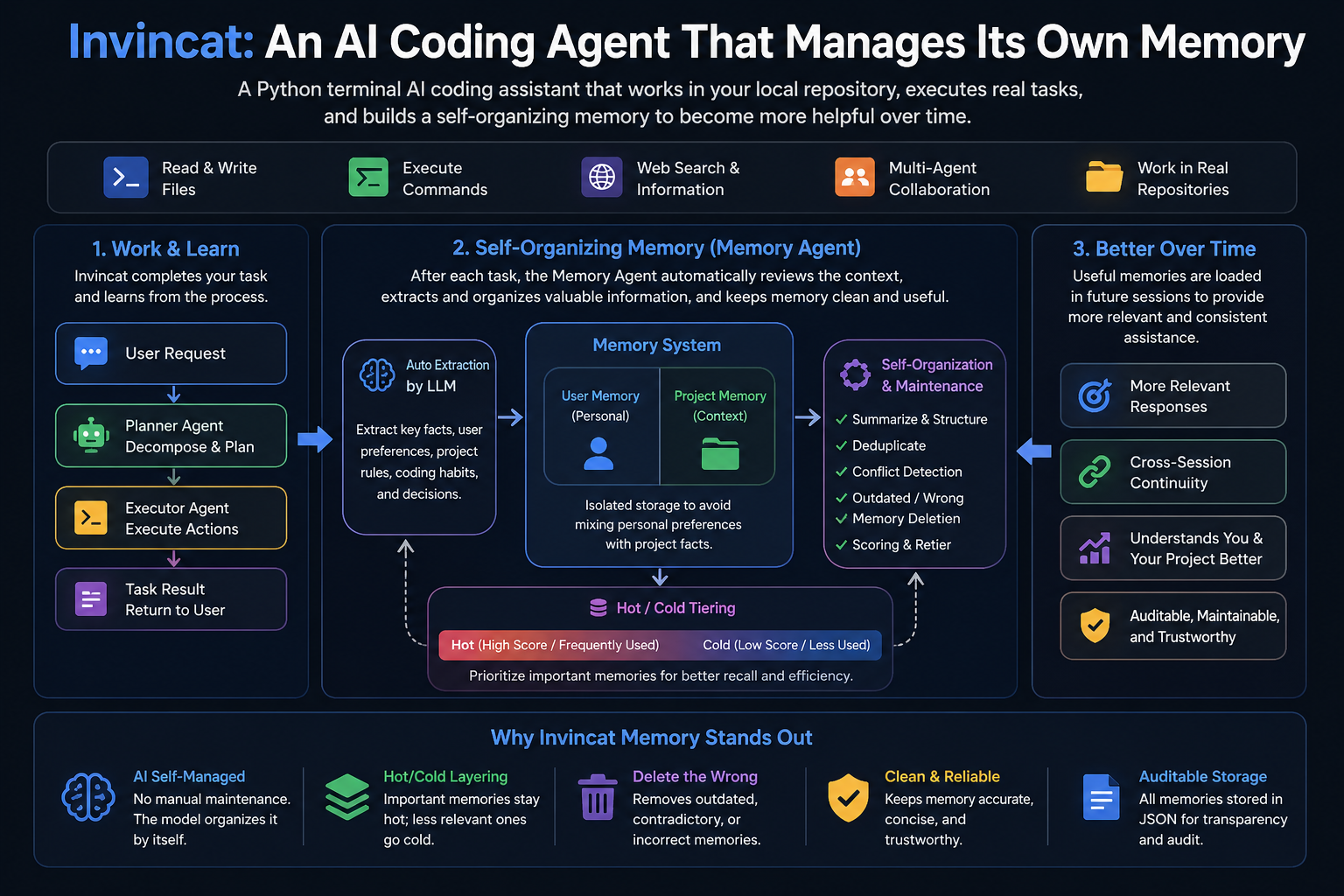
Invincat is a terminal-native AI coding assistant for local repositories. It can inspect and edit files, run shell commands with approval, use web/MCP tools, keep long-term memory, plan before execution, run scheduled tasks, and bridge remote WeCom messages into a project session.
Features
- Work directly from your project directory in a terminal UI.
- Read, edit, and create files with approval-gated tool execution.
- Run shell commands under configurable safety controls.
- Use
/planto review and approve an execution plan before implementation. - Keep user and project memory across sessions.
- Create recurring or one-shot scheduled tasks in natural language.
- Extend capabilities through MCP tools, skills, and WeCom bot daemon integration.
Quick Start
pip install invincat-cli
cd /path/to/your/project
invincat-cli
On first launch, run /model to configure a provider and model.
Installation
Requires Python 3.11+.
pip install invincat-cli
Install from source:
git clone https://github.com/dog-qiuqiu/invincat.git
cd invincat
pip install -e .
Start
Run Invincat from your project directory:
cd /path/to/your/project
invincat-cli
Model Configuration
After the first launch, run /model to open the model manager.
- Press
Ctrl+Nto register a model. - Fill in the provider, model name, API key, and optional base URL.
- Select a model and press
Enterto activate it.
You can also provide credentials through environment variables such as:
export OPENAI_API_KEY="..."
export ANTHROPIC_API_KEY="..."
export GOOGLE_API_KEY="..."
export DEEPSEEK_API_KEY="..."
export OPENROUTER_API_KEY="..."
Example for DeepSeek:
export DEEPSEEK_API_KEY="sk-..."
Then register a model in /model with:
| Field | Value |
|---|---|
| Provider | openai |
| Model | deepseek-v4-flash |
| API Key | DEEPSEEK_API_KEY |
| BASE URL | https://api.deepseek.com |
Invincat supports a primary model for normal work and an optional memory model for post-turn memory extraction. If no memory model is configured, memory extraction uses the current primary model.
Basic Commands
| Command | Description |
|---|---|
/model |
Configure and switch models. |
추천 도구
다른 키워드를 입력하거나 필터를 제거해 보세요.
설치
npx skillfish add dog-qiuqiu/invincat