
szamosimate/tapir-archicad-mcp
Developer tools이 페이지는 AI로 자동 번역되었습니다. 기술적인 세부 사항은 원문을 확인하세요. 원문 보기
szamosimate/tapir-archicad-mcp는 https://github.com/szamosimate/tapir-archicad-mcp.에서 가져온 MCP 서버 후보입니다.
개요
szamosimate/tapir-archicad-mcp는 https://github.com/szamosimate/tapir-archicad-mcp.에서 가져온 MCP 서버 후보입니다.
개요(AI 번역)
이 프로젝트는 Archicad용 모델 컨텍스트 프로토콜(MCP) 서버를 제공합니다. 이 서버는 다리 역할을 하여 AI 에이전트와 애플리케이션(예: 데스크톱용 Claude)이 커뮤니티 주도의 Tapir API와 공식 Archicad JSON API를 모두 랩핑하여 실행 중인 Archicad 인스턴스와 상호작용할 수 있도록 합니다.
서버는 결합된 API 스키마로부터 191+ MCP 도구의 포괄적인 세트를 동적으로 생성하여 Archicad 프로젝트에 대한 세밀한 제어를 가능하게 합니다.
주요 특징
- Pydantic 기반 런타임 검증 및 스키마 생성: 모든 도구의 입력 및 출력 도형은 엄격한 Pydantic 모델로 뒷받침됩니다. 서버는 이를 AI 에이전트가 검사할 수 있도록 상세한 JSON 스키마로 동적으로 컴파일하며, Archicad로 전달하기 전에 모든 들어오는 도구 인수를 런타임에 엄격히 검증합니다. 복잡한 모델, 유니언 타입, 타입 별칭을 원활하게 처리합니다.
- 점진적 도구 탐색(CLI 스타일): 서버는 결정론적 워크플로우(
archicad_list_commands및archicad_get_command_schema)를 사용하여 AI 에이전트가 사용 가능한 명령을 나열하고 정확한 매개변수 스키마를 필요할 때 가져올 수 있습니다. 이로 인해 모델의 컨텍스트 창이 대규모 스키마로 과도하게 채워지는 것을 방지할 수 있습니다.
이 페이지는 AI로 자동 번역되었습니다. 기술적인 세부 사항은 원문을 확인하세요.
README
원문 README의 일부입니다. 원문 보기.
Archicad Tapir MCP Server
Connect your AI assistant to Archicad. Use natural language to explore projects and automate workflows through the Tapir add-on and the official Archicad JSON API.





See it in action
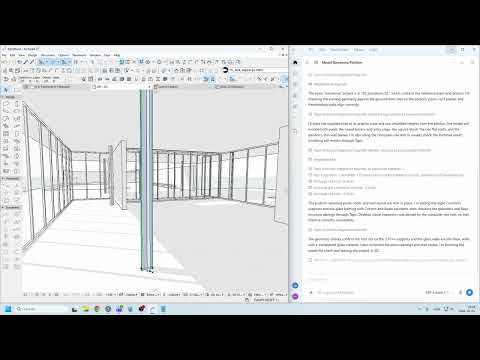
Astra uses photos and a plan as references to model in Archicad.
What can it do?
- Inspect open projects, elements, properties, and attributes.
- Find elements that match conditions on type, properties, and classifications.
- Create and modify model elements, and work with views and layouts.
- Export project data and use supported IFC and Teamwork commands.
- Access 843 Archicad commands, discovered on demand by your assistant.
- Connect to multiple running Archicad instances.
Quick start
Before installing the MCP server, make sure Archicad is running on Windows or macOS and install these two requirements:
- Tapir add-on — an Archicad add-on that gives the server access to Archicad’s automation commands. Install it in Archicad for the version you use.
- uv — a tool that installs and runs the MCP server and its dependencies. Install it on the computer running Archicad.
You’ll also need an MCP client: the AI application that connects to the server.
Ask your AI to install it
Copy this prompt into your AI assistant:
Install the Archicad Tapir MCP server for my MCP client, following the instructions at https://github.com/SzamosiMate/tapir-archicad-MCP/blob/master/docs/setup-and-configuration.md. Help me verify that it can connect to my running Archicad instance.
Install it yourself
If your client supports MCP bundles, download tapir-archicad.mcpb and open it in your client. The client must be able to find uv on its PATH.
Prefer the old-school approach? Follow the manual setup instructions—editing a config file is optional hacker cred.
Try it
With Archicad running, ask your assistant:
설치
This server does not publish a one-line install command.
Open the repository installation guide MCP 초보자라면? mcpskill.org 가이드부터 시작하세요 →