
snehil-shah/libresprite-mcp
Developer tools이 페이지는 AI로 자동 번역되었습니다. 기술적인 세부 사항은 원문을 확인하세요. 원문 보기
LibreSprite로 당신의 방법을 확산.
개요
모형 Context Protocol (MCP)는 LibreSprite 안쪽에 편집, 디자인 및 스크립팅을 위한 서버. https://github.com/user-attachments/assets/71440bba-16a5-4ee2-af10-2c346978a290] [T0]] [T0]] [T0]] [T0]] [T0]] [T0]] [T0]] [T0] [T0] [T0]] [T0] [T0] [T0]] [T0]] [T0] [T0] [T0] [T0] [T0]] [T0] [T0]] [T0] [T0] [T0]] [T0]] [T0] [T0] [T0]] https://github.com/user-attachments/assets/71440bba-16a5-4ee2-af10-2c346978a290] https://github.com/user-attachments/assets/71440bba-16a5-4ee2-af10-2c346978a290]]] https://github.com/user-attachments/assets/71440bba-16a5-4ee2-af10-2c346978a290]]]]]] [[https://github.com/user-attachments/assets/71440bba-16a5-4ee2-af10-2c346978a290]]]]]]] [[[[[[https://github.com/user-attachments/assets/71440bba-16a5-4ee2-af10-2c346978a290]]]]]]]]]]]]]] [[[[[[[https://github.com/user-attachments/assets/71440bba-16a5-4ee2-af10-2c346978a290]]]]]]]]]]]]]]]]]] [[[[[[[[[[[[[[[[[[[[[[ uv는 이 서버를 설치하고 사용하는 것이 좋습니다. 여기에 당신이하지 않은 경우 그것을 설치하는 빠른 한 라이너는: 패키지는 PyPI에 게시되므로 선호하는 다른 방법 (pipx, 등)을 자유롭게 섭취하십시오. MCP 클라이언트에 다음과 같은 엔트리포인트 명령 (또는 uv를 사용하지 않는 경우 다른 것)과 MCP 서버를 추가하십시오. 편집 Claude > 설정 > 개발자 > 편집 구성 > claude desktop config.json 또는 .cursor > mcp.json 서버 포함: 이 멋진 배지를 사용하여 빠르게 만들 수 있습니다. Claude Desktop을 다시 시작해야 합니다.
개요(AI 번역)
LibreSprite로 당신의 방법을 증명하십시오
모형 Context Protocol (MCP)는 LibreSprite 안쪽에 편집, 디자인 및 스크립팅을 위한 서버.
https://github.com/user-attachments/assets/71440bba-16a5-4ee2-af10-2c346978a290] [T0]] [T0]] [T0]] [T0]] [T0]] [T0]] [T0]] [T0] [T0] [T0]] [T0] [T0] [T0]] [T0]] [T0] [T0] [T0] [T0] [T0]] [T0] [T0]] [T0] [T0] [T0]] [T0]] [T0] [T0] [T0]] https://github.com/user-attachments/assets/71440bba-16a5-4ee2-af10-2c346978a290] https://github.com/user-attachments/assets/71440bba-16a5-4ee2-af10-2c346978a290]]] https://github.com/user-attachments/assets/71440bba-16a5-4ee2-af10-2c346978a290]]]]]] [[https://github.com/user-attachments/assets/71440bba-16a5-4ee2-af10-2c346978a290]]]]]]] [[[[[[https://github.com/user-attachments/assets/71440bba-16a5-4ee2-af10-2c346978a290]]]]]]]]]]]]]] [[[[[[[https://github.com/user-attachments/assets/71440bba-16a5-4ee2-af10-2c346978a290]]]]]]]]]]]]]]]]]] [[[[[[[[[[[[[[[[[[[[[[
필수품
uv 이 서버를 설치하고 사용하는 것이 좋습니다. 여기에 당신이하지 않은 경우 그것을 설치하는 빠른 한 라이너는:
-
Windows: (관리자로 실행)
-
** 유닉스 **:
uv 설치에 더.
패키지는 PyPI에 게시되어 있으므로 다른 방법을 사용하지 않도록하십시오 (pipx, 등)
사용법
단계 1: 클라이언트 설정
다음과 같은 엔트리포인트 명령을 가진 MCP 서버를 추가하십시오 (또는 MCP 클라이언트에 uv]를 사용하지 않는 경우 다른 경우 :
예제:
- **Claude 데스크탑 및 커서 **
편집 Claude > 설정 > 개발자 > 편집 구성 > claude desktop config.json 또는 .cursor > mcp.json 서버 포함:
이 멋진 배지를 사용하여 빠르게 만들 수 있습니다.
[!노트] MCP Server를 로드하기 위해 Claude Desktop을 재시작해야 합니다.
단계 2: LibreSprite 설정
최신 안정된 원격 스크립트를 다운로드 mcp.js 릴리스에서 LibreSprite의 스크립트 폴더에 추가:
이 페이지는 AI로 자동 번역되었습니다. 기술적인 세부 사항은 원문을 확인하세요.
README
원문 README의 일부입니다. 원문 보기.
LibreSprite-MCP


Prompt your way into LibreSprite
Model Context Protocol (MCP) server for prompt-assisted editing, designing, and scripting inside LibreSprite.
https://github.com/user-attachments/assets/71440bba-16a5-4ee2-af10-2c346978a290
Prerequisites
uv is the recommended way to install and use this server. Here are quick one-liners to install it if you haven’t:
-
Windows: (run as administrator)
powershell -ExecutionPolicy ByPass -c "irm https://astral.sh/uv/install.ps1 | iex" -
Unix:
curl -LsSf https://astral.sh/uv/install.sh | sh
More on installing uv.
The package is published on PyPI, so feel free to consume it any other way you prefer (pipx, etc)
Usage
Step 1: Setting up the client
Add the MCP server with the following entrypoint command (or something else if you are not using uv) to your MCP client:
uvx libresprite-mcp
Examples:
-
Claude Desktop & Cursor
Edit Claude > Settings > Developer > Edit Config > claude_desktop_config.json or .cursor > mcp.json to include the server:
{
    "mcpServers": {
        // ...existing servers...
        "libresprite": {
            "type": "stdio",
            "command": "uvx",
            "args": [
                "libresprite-mcp"
            ]
        }
        // ...existing servers...
    }
}
You can also use this fancy badge to make it quick:

[!NOTE] You will have to restart Claude Desktop to load the MCP Server.
Step 2: Setting up LibreSprite
Download the latest stable remote script mcp.js from releases and add it to LibreSprite’s scripts folder:
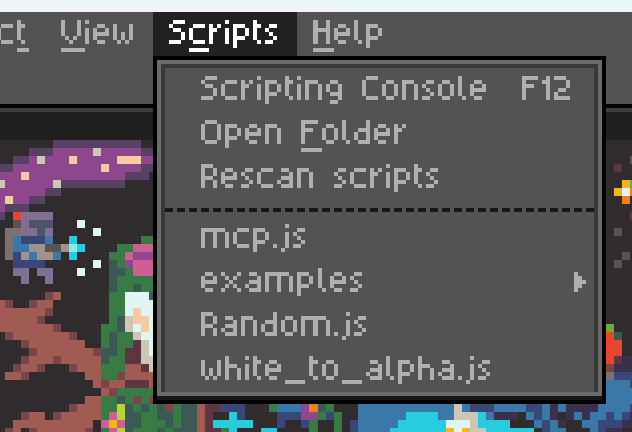
Step 3: Connect and use
Run the mcp.js script (that you see in the screenshot above), and make sure your MCP server is running (Claude Desktop/Cursor is loaded and running). If all went well, you should see the following screen:

설치
uvx libresprite-mcp설정
{
        "mcpServers": {
            // ...existing servers...
            "libresprite": {
                "type": "stdio",
                "command": "uvx",
                "args": [
                    "libresprite-mcp"
                ]
            }
            // ...existing servers...
        }
    }