
이 페이지는 AI로 자동 번역되었습니다. 기술적인 세부 사항은 원문을 확인하세요. 원문 보기
Model Context Protocol (MCP) 서버 구현은 자연적인 언어를 통해 문서 처리 기능을 노출하여 직접적인 인간 상호 작용과 AI 에이전트 도구 호출을 지원합니다.
개요
이 MCP 서버는 자연적인 언어를 통해서 문서 처리 기능을, 직접적인 인간 상호 작용 및 AI 대리인 공구 호출 지원하. 당신은 repo에 있습니다. Self-hosted/on-prem 문서 워크플로우 및 배포 컨트롤이 필요할 때 이것을 선택하십시오. - 생태계 개요 : Nutrient AI Infrastructure - 제품 방문 페이지 : Nutrient MCP Server 일단 구성되면 (또는 에이전트)는 자연 언어를 통해 문서와 상호 작용할 수 있습니다: "어떤 문서가 사용할 수 있습니까?" "나는 3 개의 문서를 볼 수 있습니다 : 연간 report.pdf, 계약 draft.pdf, 세금 - 2023.pdf. 이 모든 것을 분석하고 싶으신가요? "이 송장에서 모든 이름과 전화 번호를 추적" "나는 12 연락처를 찾았습니다 : 존 스미스 (555-0123), 사라 존슨 (555-0456) ..." "이 세금 양식의 모든 사회적 보안 번호" "나는 2 개의 문서에 걸쳐 3 SSN을 식별하고 적색했습니다. Redacted 버전이 준비되어 있습니다.
개요(AI 번역)
** 문서 처리에 AI 에이전트를 연결.**
이 MCP 서버는 자연적인 언어를 통해서 문서 처리 기능을, 직접적인 인간 상호 작용 및 AI 대리인 공구 호출 지원하.
어떤 MCP 서버가 사용해야합니까?
| 서버 | 베스트 | 배포 | 핵심 기능 | |—|—|||||| | Nutrient DWS MCP Server | 클라우드 문서 워크플로우 | Nutrient-hosted API(API 키) | 변환, OCR, redact, sign, extract, 워터마크, 자동화 | | Nutrient Document Engine MCP Server | 자체 호스팅된 문서 워크플로우 | On-prem/private cloud | 배포 제어 및 데이터 복원 처리 |
Document Engine MCP Server 저장소에 있습니다. Self-hosted/on-prem 문서 워크플로우 및 배포 컨트롤이 필요할 때 이것을 선택하십시오.
- 생태계 개요 : Nutrient AI 인프라
- 제품 랜딩 페이지: Nutrient MCP Server
예제 대화
일단 구성되면 (또는 에이전트)는 자연 언어를 통해 문서와 상호 작용할 수 있습니다:
당신은: “내 문서는 사용할 수 있습니까?” AI: "3개의 문서를 볼 수 있습니다: year-report.pdf, contract-draft.pdf, tax-form-2023.pdf. 이 모든 것을 분석하고 싶으신가요?
이 페이지는 AI로 자동 번역되었습니다. 기술적인 세부 사항은 원문을 확인하세요.
README
원문 README의 일부입니다. 원문 보기.
Nutrient Document Engine MCP Server
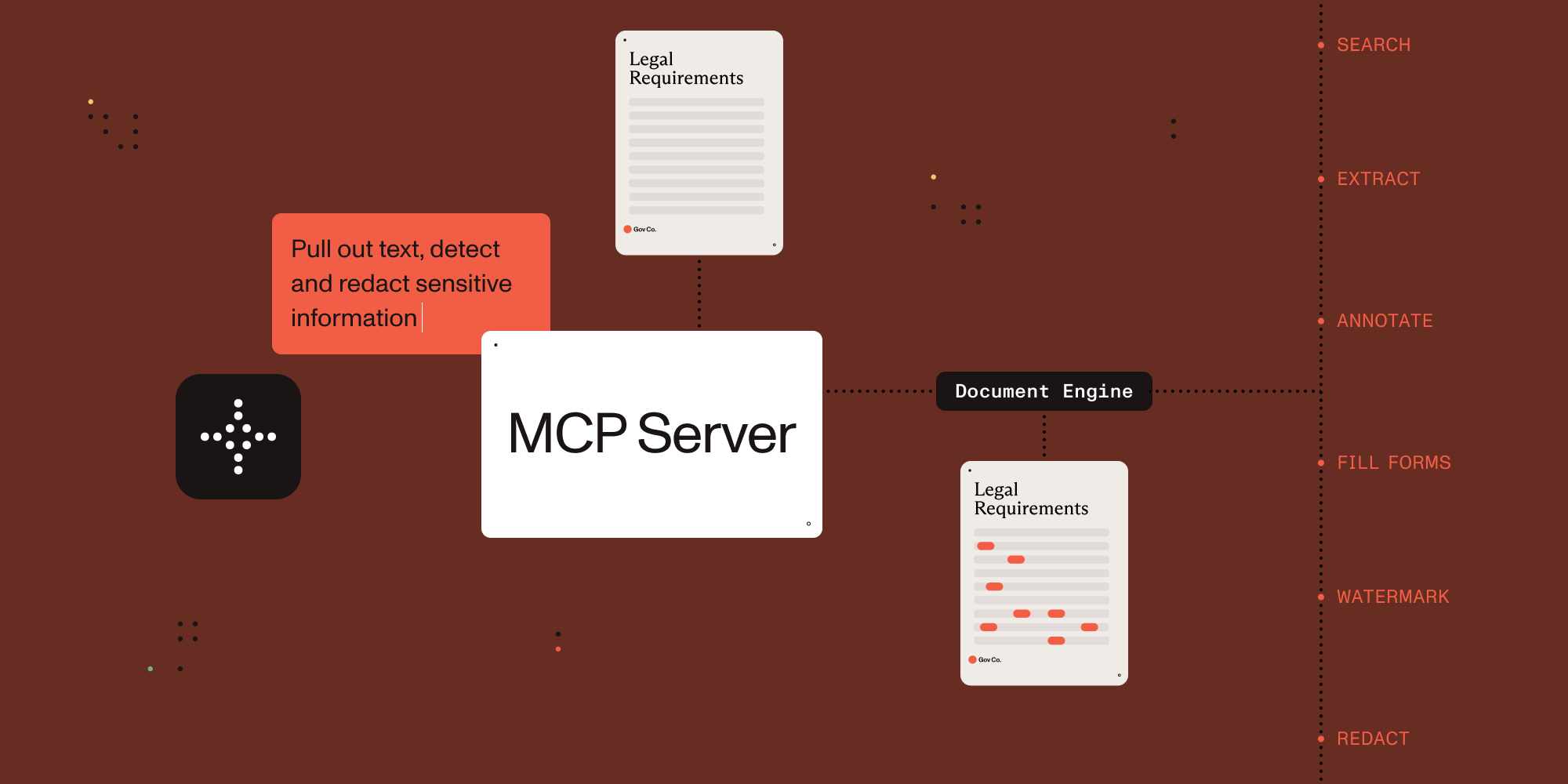

Connect AI agents to document processing.
This MCP server exposes document processing capabilities through natural language, supporting both direct human interaction and AI agent tool calling.
Which MCP Server Should I Use?
| Server | Best for | Deployment | Core capabilities |
|---|---|---|---|
| Nutrient DWS MCP Server | Cloud document workflows | Nutrient-hosted API (API key) | Convert, OCR, redact, sign, extract, watermark, automation |
| Nutrient Document Engine MCP Server | Self-hosted document workflows | On-prem/private cloud | Document processing with deployment control and data residency |
You are in the Document Engine MCP Server repo. Choose this when you need self-hosted/on-prem document workflows and deployment control.
- Ecosystem overview: Nutrient AI Infrastructure
- Product landing page: Nutrient MCP Server
Example Conversations
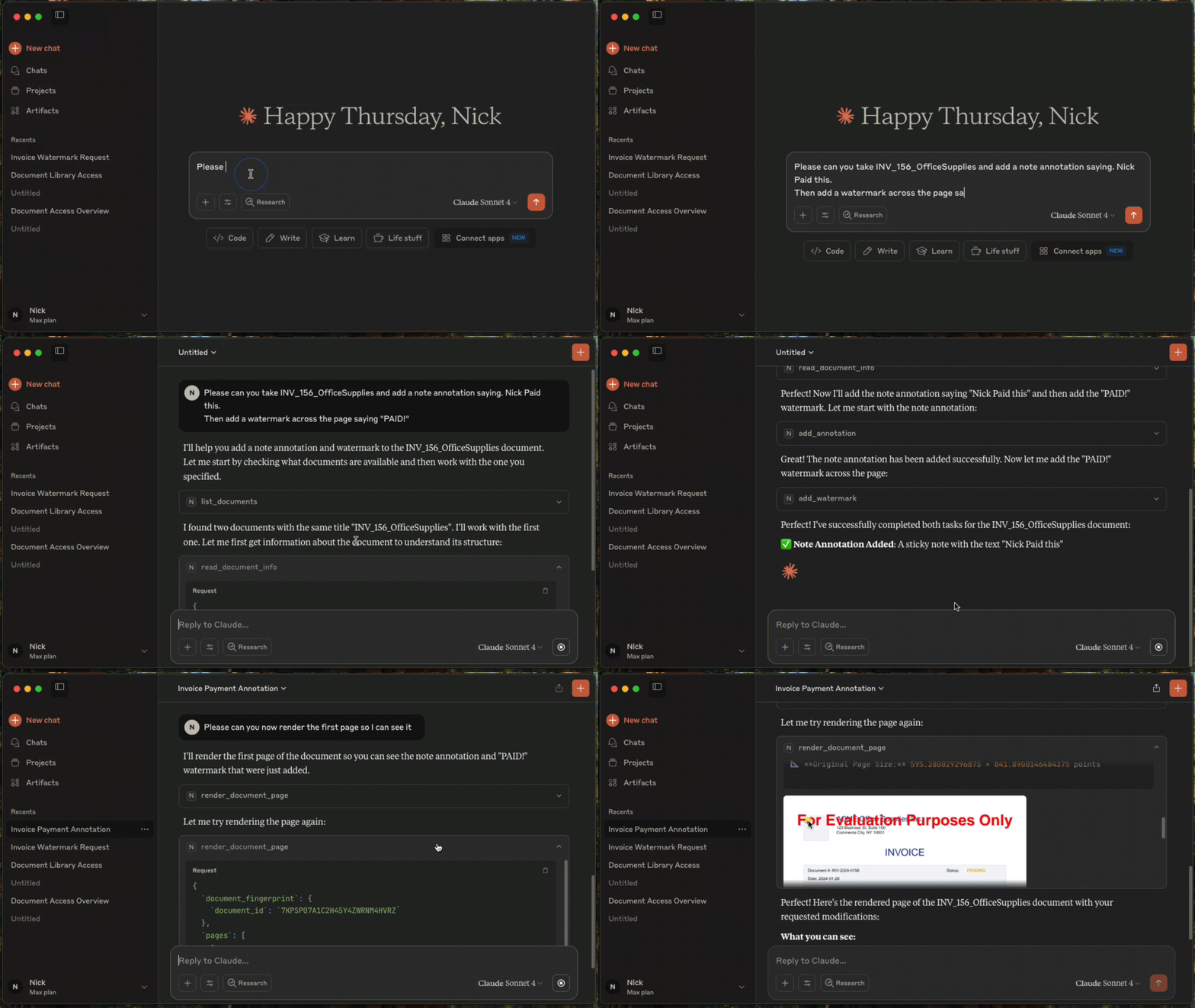
Once configured, you (or your agent) can interact with documents through natural language:
You: “What documents do I have available?”
AI: “I can see you have 3 documents: annual-report.pdf, contract-draft.pdf, and tax-form-2023.pdf. Would you like me to analyze any of these?”
You: “Extract all the names and phone numbers from these invoices”
AI: “I found 12 contacts: John Smith (555-0123), Sarah Johnson (555-0456)…”
You: “Redact all social security numbers from these tax forms”
AI: “I’ve identified and redacted 3 SSNs across 2 documents. The redacted versions are ready.”
You: “Split this 50-page contract into separate sections”
AI: “I’ve split the contract into 5 sections: Terms (pages 1-8), Payment (pages 9-15)…”
Setup with Claude Desktop
Prerequisites
- Claude Desktop - Download from Anthropic.
- Docker Compose - Download from Docker. For running Nutrient Document Engine locally.
- Node.js 18+ - This MCP server runs via
npx.
Licensing
Nutrient Document Engine runs with an evaluation license by default. Please see Removing Evaluation Limitations section on how to remove the evaluation limitations.
설치
npx -y @nutrient-sdk/document-engine-mcp-server설정
{
  "mcpServers": {
    "nutrient-document-engine": {
      "command": "npx",
      "args": ["-y", "@nutrient-sdk/document-engine-mcp-server"],
      "env": {
        "DASHBOARD_USERNAME": "admin",
        "DASHBOARD_PASSWORD": "password",
        "DOCUMENT_ENGINE_BASE_URL": "http://localhost:5000",
        "DOCUMENT_ENGINE_API_AUTH_TOKEN": "secret"
      }
    }
  }
}