
이 페이지는 AI로 자동 번역되었습니다. 기술적인 세부 사항은 원문을 확인하세요. 원문 보기
FastAPI, ODBC 및 SQLAlchemy를 사용하는 간단한 MCP ODBC 서버.
개요
- : 연결 된 데이터베이스에서 모든 스키마 이름을 나열합니다. - : 특정 스키마 또는 모든 스키마에 대한 테이블 정보를 검색합니다. - : 테이블 구조에 대한 자세한 설명 생성 : - 열 이름 및 데이터 유형 - Nullable 속성 - 일차 및 외국 키 - : 이름 하위 문자열을 기반으로 필터 및 검색 테이블. - : Virtuoso의 경우, 저장된 절차를 실행하고 결과를 검색합니다. - : - JSONL 결과 형식 : 구조 된 응답에 최적화. - Markdown 테이블 형식 :보고 및 시각화에 이상적입니다. 1. 설치 설정 확인 (즉, 키 INI 파일의 위치) 실행: odbcinst -j 2. 실행하여 사용 가능한 데이터 소스 이름 목록: odbcinst -q -s 3. : 대상 데이터베이스의 ODBC 데이터 소스 이름 (~/.odbc.ini) 구성. Virtuoso DBMS의 예: .envby가 기본을 overriding하여 선호도를 일치시킵니다. claude desktop config에 다음을 추가합니다.
개요(AI 번역)
SQLAlchemy를 통해 MCP 서버 ODBC
** FastAPI**, pyodbc 및 SQLAlchemy를 내장한 ODBC용 경량 MCP(모델 콘텍스 프로토콜) 서버. 이 서버는 SQLAlchemy 공급자를 실행하는 Virtuoso DBMS 및 기타 DBMS 백엔드와 호환됩니다.
특징
-Get Schemas: 연결된 데이터베이스에서 모든 스키마 이름을 나열합니다. -Get Tables: 특정 스키마 또는 모든 스키마에 대한 테이블 정보를 검색합니다.
- Describe Table: 테이블 구조에 대한 자세한 설명 생성:
- 열명 및 데이터 유형
- Nullable 속성
- 1 차 및 외국 열쇠 -Search Tables: 이름 하위 문자열을 기준으로 필터 및 검색 테이블.
- Execute 저장된 절차: Virtuoso의 경우, 저장된 절차를 실행하고 결과를 검색합니다.
- **Execute 쿼리 **:
- JSONL 결과 형식 : 구조 된 응답에 최적화.
- Markdown 테이블 형식 :보고 및 시각화에 이상적입니다.
필수품
- **설치 **:
또는 사용 Homebrew:
-
unixODBC Runtime Environment Checks:
-
설치 설정 확인 (즉, 키 INI 파일의 위치) 실행:
odbcinst -j -
명세.
이 페이지는 AI로 자동 번역되었습니다. 기술적인 세부 사항은 원문을 확인하세요.
README
원문 README의 일부입니다. 원문 보기.
MCP Server ODBC via SQLAlchemy
A lightweight MCP (Model Context Protocol) server for ODBC built with FastAPI, pyodbc, and SQLAlchemy. This server is compatible with Virtuoso DBMS and other DBMS backends that implement a SQLAlchemy provider.
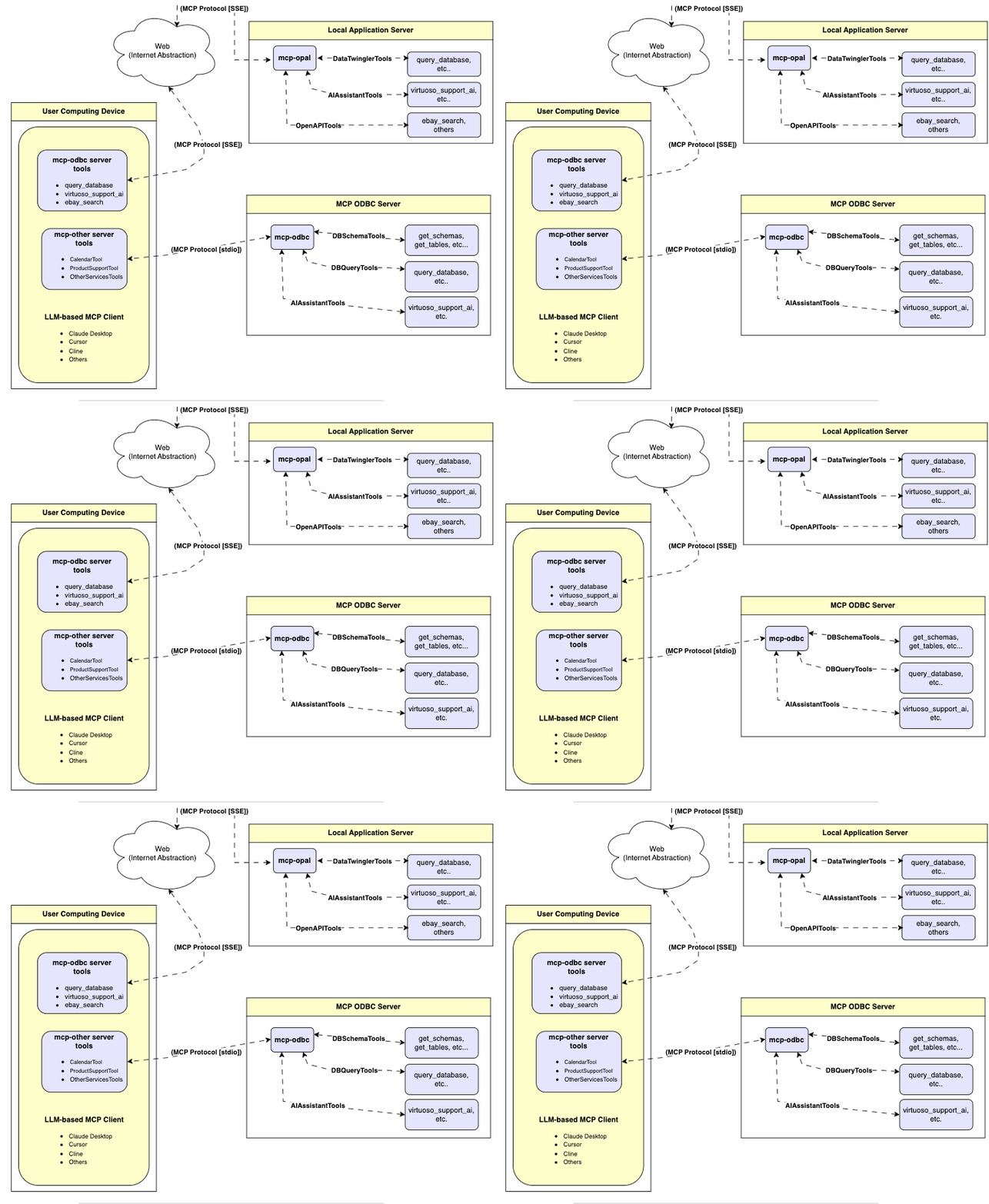
Features
- Get Schemas: Fetch and list all schema names from the connected database.
- Get Tables: Retrieve table information for specific schemas or all schemas.
- Describe Table: Generate a detailed description of table structures, including:
- Column names and data types
- Nullable attributes
- Primary and foreign keys
- Search Tables: Filter and retrieve tables based on name substrings.
- Execute Stored Procedures: In the case of Virtuoso, execute stored procedures and retrieve results.
- Execute Queries:
- JSONL result format: Optimized for structured responses.
- Markdown table format: Ideal for reporting and visualization.
Prerequisites
-
Install uv:
pip install uvOr use Homebrew:
brew install uv -
unixODBC Runtime Environment Checks:
-
Check installation configuration (i.e., location of key INI files) by running:
odbcinst -j -
List available data source names by running:
odbcinst -q -s -
ODBC DSN Setup: Configure your ODBC Data Source Name (
~/.odbc.ini) for the target database. Example for Virtuoso DBMS:[VOS] Description = OpenLink Virtuoso Driver = /path/to/virtodbcu_r.so Database = Demo Address = localhost:1111 WideAsUTF16 = Yes -
SQLAlchemy URL Binding: Use the format:
virtuoso+pyodbc://user:password@VOS
Installation
Clone this repository:
git clone https://github.com/OpenLinkSoftware/mcp-sqlalchemy-server.git
cd mcp-sqlalchemy-server
Environment Variables
Update your .envby overriding the defaults to match your preferences
ODBC_DSN=VOS
ODBC_USER=dba
ODBC_PASSWORD=dba
API_KEY=xxx
Configuration
For Claude Desktop users:
Add the following to claude_desktop_config.json:
{
  "mcpServers": {
    "my_database": {
      "command": "uv",
      "args": ["--directory", "/path/to/mcp-sqlalchemy-server", "run", "mcp-sqlalchemy-server"],
      "env": {
        "ODBC_DSN": "dsn_name",
        "ODBC_USER": "username",
        "ODBC_PASSWORD": "password",
        "API_KEY": "sk-xxx"
      }
    }
  }
}
Usage
Database Management System (DBMS) Connection URLs
Here are the pyodbc URL examples for connecting to DBMS systems that have been tested using this mcp-server.
| Database | URL Format |
|---|---|
| Virtuoso DBMS | virtuoso+pyodbc://user:password@ODBC_DSN |
| PostgreSQL | postgresql://user:password@localhost/dbname |
설치
npx @modelcontextprotocol/inspector uv --directory /path/to/mcp-sqlalchemy-server run mcp-sqlalchemy-server설정
{
  "mcpServers": {
    "my_database": {
      "command": "uv",
      "args": ["--directory", "/path/to/mcp-sqlalchemy-server", "run", "mcp-sqlalchemy-server"],
      "env": {
        "ODBC_DSN": "dsn_name",
        "ODBC_USER": "username",
        "ODBC_PASSWORD": "password",
        "API_KEY": "sk-xxx"
      }
    }
  }
}