
openlinksoftware/mcp-jdbc-server
Developer tools이 페이지는 AI로 자동 번역되었습니다. 기술적인 세부 사항은 원문을 확인하세요. 원문 보기
Java 기반 모델 Context Procotol (MCP) 서버 JDBC
개요
- : 연결 된 데이터베이스에서 모든 스키마 이름을 나열합니다. - : 특정 스키마 또는 모든 스키마에 대한 테이블 정보를 검색합니다. - : 테이블 구조에 대한 자세한 설명 생성 : - 열 이름 및 데이터 유형 - Nullable 속성 - 일차 및 외국 키 - : 이름 하위 문자열을 기반으로 필터 및 검색 테이블. - : Virtuoso-특정 기능! 저장된 절차를 실행하고 결과를 검색합니다. - : - JSONL 결과 형식 : 구조 된 응답에 최적화. - Markdown 테이블 형식 :보고 및 시각화에 이상적입니다. 이 기본값을 overriding하여 .env를 업데이트하여 선호도를 일치시킵니다. Virtuoso 및 JDBC 드라이버를 사용하는 사용자: claude desktop config.json에 다음을 추가하십시오: 다른 JDBC 드라이버 또는 드라이버의 조합을 사용하는 사용자: claude desktop config.json 에 로컬 환경에 맞게 편집된 다음을 추가하십시오. 성공적인 임명 후에, 뒤에 오는 공구는 MCP 클라이언트 신청에 유효합니다.
개요(AI 번역)
JDBC를 위한 OpenLink MCP 서버
JDBC의 경량 Java 기반 MCP (모델 Context Protocol) 서버는 Quakrus로 구축되었습니다. 이 서버는 Virtuoso DBMS와 JDBC 드라이버가 있는 다른 DBMS 백업과 호환됩니다.
특징
-Get Schemas: 연결된 데이터베이스에서 모든 스키마 이름을 나열합니다. -Get Tables: 특정 스키마 또는 모든 스키마에 대한 테이블 정보를 검색합니다.
- Describe Table: 테이블 구조에 대한 자세한 설명 생성:
- 열명 및 데이터 유형
- Nullable 속성
- 1 차 및 외국 열쇠 -Search Tables: 이름 하위 문자열을 기준으로 필터 및 검색 테이블. -Execute Stored Procedures: A Virtuoso-specific feature! 저장된 절차를 실행하고 결과를 검색합니다.
- **Execute 쿼리 **:
- JSONL 결과 형식 : 구조 된 응답에 최적화.
- Markdown 테이블 형식 :보고 및 시각화에 이상적입니다.
필수품
MCP 서버는 Java 21 이상이 필요합니다.
설치
이 저장소를 복제:
환경 변수
.env] 를 업데이트하여 기본을 overriding하여 선호도를 일치시킵니다.
구성
이 페이지는 AI로 자동 번역되었습니다. 기술적인 세부 사항은 원문을 확인하세요.
README
원문 README의 일부입니다. 원문 보기.
OpenLink MCP Server for JDBC
A lightweight Java-based MCP (Model Context Protocol) server for JDBC built with Quakrus. This server is compatible with Virtuoso DBMS and any other DBMS backend that has a JDBC driver.
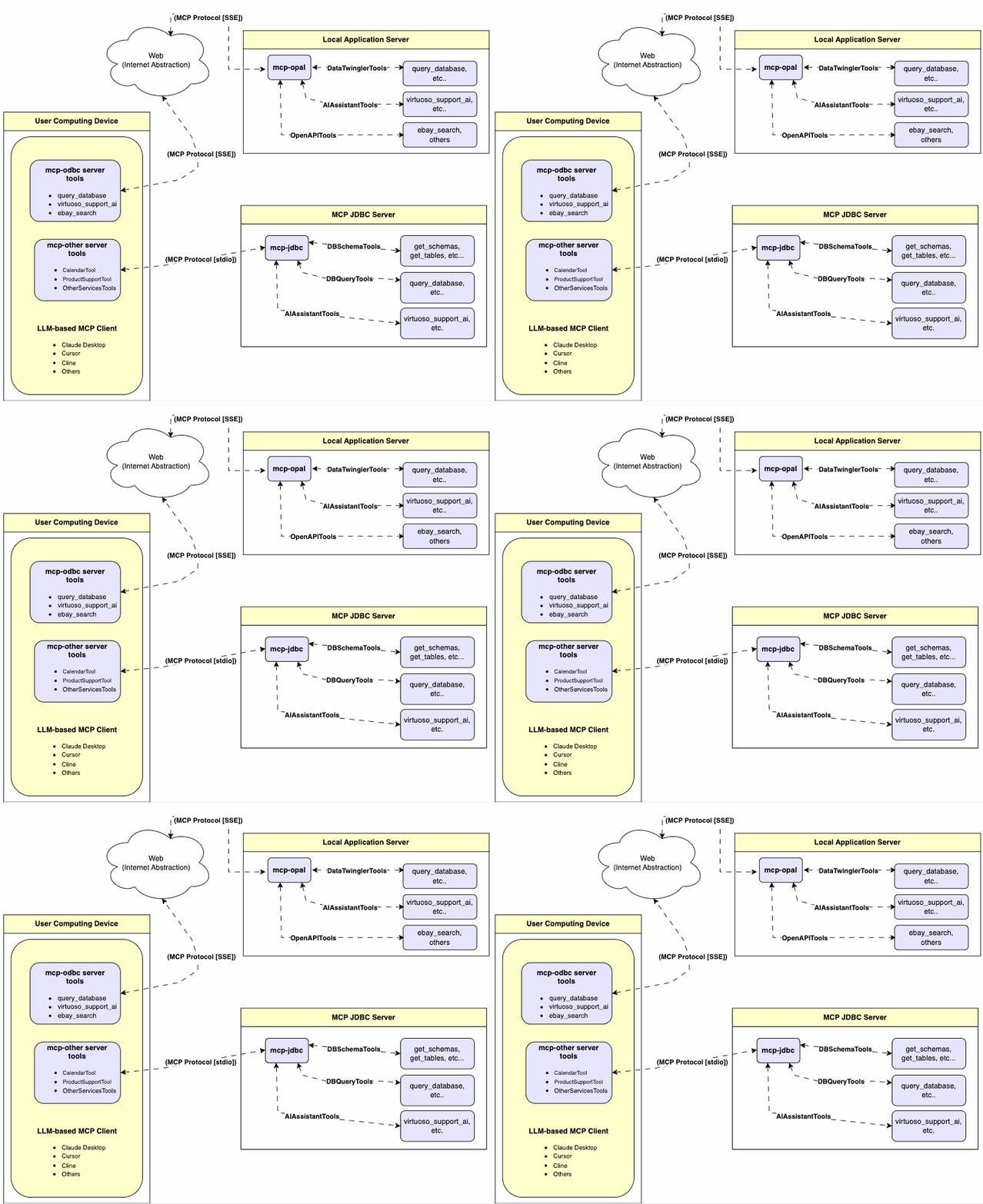
Features
- Get Schemas: Fetch and list all schema names from the connected database.
- Get Tables: Retrieve table information for specific schemas or all schemas.
- Describe Table: Generate a detailed description of table structures, including:
- Column names and data types
- Nullable attributes
- Primary and foreign keys
- Search Tables: Filter and retrieve tables based on name substrings.
- Execute Stored Procedures: A Virtuoso-specific feature! Execute stored procedures and retrieve results.
- Execute Queries:
- JSONL result format: Optimized for structured responses.
- Markdown table format: Ideal for reporting and visualization.
Prerequisites
MCP server requires Java 21 or above.
Installation
Clone this repository:
git clone https://github.com/OpenLinkSoftware/mcp-jdbc-server.git
cd mcp-jdbc-server
Environment Variables
Update your .env by overriding these defaults to match your preferences:
jdbc.url=jdbc:virtuoso://localhost:1111
jdbc.user=dba
jdbc.password=dba
jdbc.api_key=xxx
Configuration
For Claude Desktop users using Virtuoso and its JDBC driver:
Add the following to claude_desktop_config.json:
{
  "mcpServers": {
    "my_database": {
      "command": "java",
      "args": ["-jar", "/path/to/mcp-jdbc-server/MCPServer-1.0.0-runner.jar"],
      "env": {
        "jdbc.url": "jdbc:virtuoso://localhost:1111",
        "jdbc.user": "username",
        "jdbc.password": "password",
        "jdbc.api_key": "sk-xxx"
      }
    }
  }
}
For Claude Desktop users using another JDBC driver or a combination of drivers:
Add the following, edited to suit your local environment, to claude_desktop_config.json:
    "jdbc": {
      "command": "java",
      "args": [
        "-cp",
        "/path/to/mcp-jdbc-server/MCPServer-1.0.0-runner.jar:/path/to/jdbc_driver1.jar:/path/to/jdbc_driverN.jar",
        "io.quarkus.runner.GeneratedMain"
      ],
      "env": {
        "jdbc.url": "jdbc:virtuoso://localhost:1111",
        "jdbc.user": "dba",
        "jdbc.password": "dba"
      }
    }
Use
Tools Provided
After successful installation, the following tools will be available to MCP client applications.
Overview
| name | description |
|---|---|
jdbc_get_schemas |
List database schemas accessible to connected database management system (DBMS). |
jdbc_get_tables |
List tables associated with a selected database schema. |
설치
npx @modelcontextprotocol/inspector java -jar /path/to/mcp-jdbc-server/MCPServer-1.0.0-runner.jar설정
{
  "mcpServers": {
    "my_database": {
      "command": "java",
      "args": ["-jar", "/path/to/mcp-jdbc-server/MCPServer-1.0.0-runner.jar"],
      "env": {
        "jdbc.url": "jdbc:virtuoso://localhost:1111",
        "jdbc.user": "username",
        "jdbc.password": "password",
        "jdbc.api_key": "sk-xxx"
      }
    }
  }
}