
lark-base-team/lark-base-mcp-node-server
Developer tools이 페이지는 AI로 자동 번역되었습니다. 기술적인 세부 사항은 원문을 확인하세요. 원문 보기
Lark Base MCP 서버(w/ Personal Token)
개요
Feishu Base (多多)) 데이터베이스에 대한 읽음 및 쓰기 액세스를 제공하는 모델 Context Protocol 서버. 이 서버는 데이터베이스 스키마를 검사하기 위해 LLM을 활성화하고 기록을 읽습니다. Node.js가 컴퓨터에 설치되어 있는지 확인하십시오. AppToken 및 PersonalBaseToken을 기본 계정으로 가져옵니다. 글로벌 npm을 사용하여 MCP 서버 패키지 설치: MCP 서버 설정 파일에서 다음을 추가하십시오. : 사용중인 경우 옵션으로 MCP 구성을 추가해야합니다. 이 메뉴에 액세스 할 수 있으며 관련 섹션에서 MCP 서버 세부 사항을 추가 할 수 있습니다. 이 mcp 서버를 사용하기 전에 두 개의 토큰을 얻을 필요가 있습니다. - personalBaseToken: 기본 플러그인 UI를 찾아, Custom Plugin-> 인증 코드 받기
개요(AI 번역)
Feishu Base (多多)) 데이터베이스에 대한 읽음 및 쓰기 액세스를 제공하는 모델 Context Protocol 서버. 이 서버는 데이터베이스 스키마를 검사하기 위해 LLM을 활성화하고 기록을 읽습니다.
사용법
##1. Node.js 설치
Node.js가 컴퓨터에 설치되어 있는지 확인하십시오.
##2. Base 토큰 획득
appToken]와 personalBaseToken] 을 기본 계정으로 가져옵니다.
##3. MCP Server Package 설치
글로벌 npm을 사용하여 MCP 서버 패키지 설치:
##4. MCP 서버 구성
MCP 서버 설정 파일에서 다음을 추가하십시오.
** 참고**: Claude를 사용하는 경우 ** ** 개발자 ** 옵션 **를 통해 MCP 구성을 추가해야합니다. Settings 메뉴에서 이것을 액세스할 수 있으며 관련 섹션에서 MCP 서버 세부 정보를 추가할 수 있습니다.
토큰
이 mcp 서버를 사용하기 전에 두 개의 토큰을 얻을 필요가 있습니다.
-
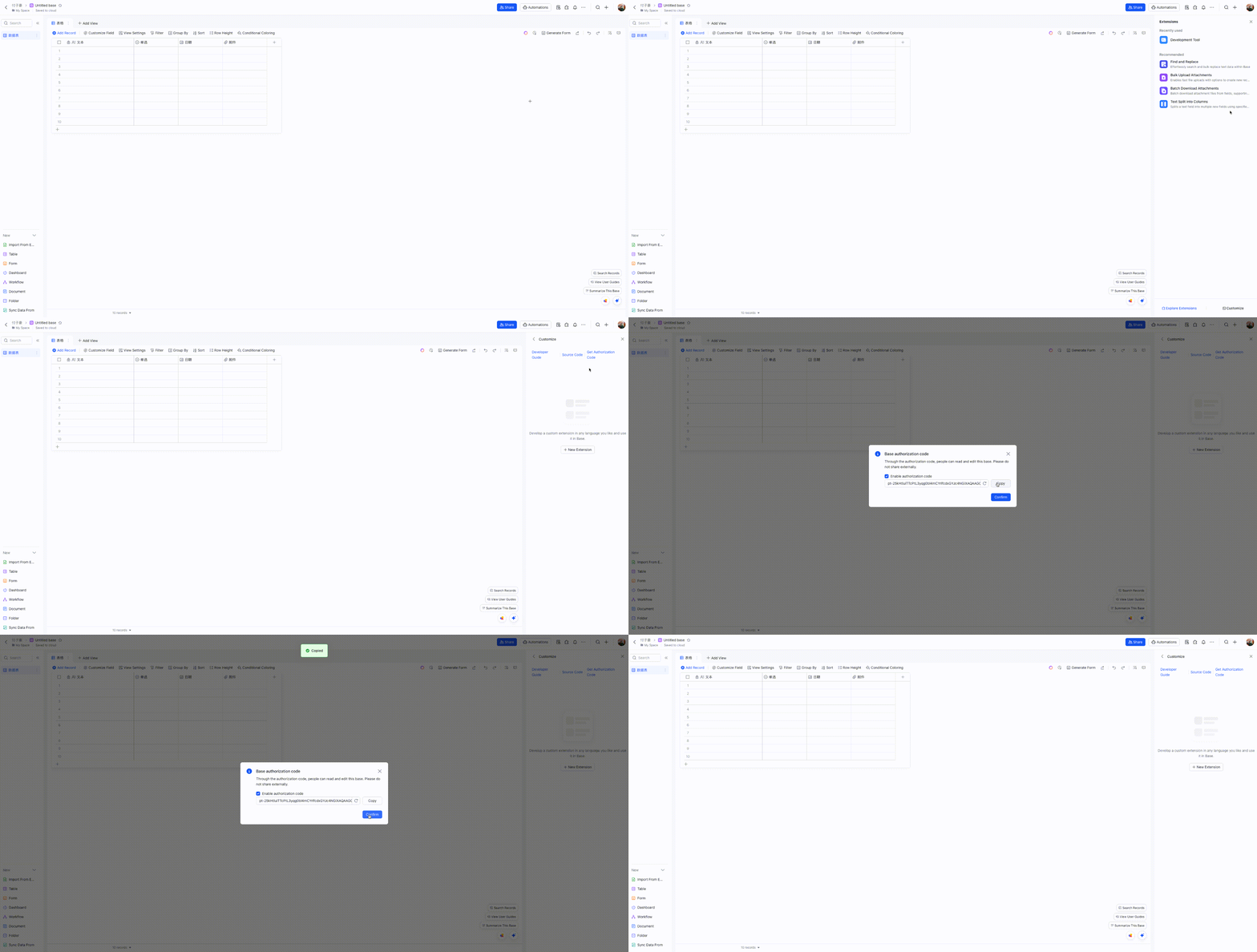
personalBaseToken: 기본 플러그인 UI를 찾아, Custom Plugin-> 인증 코드 받기
-
appToken: 개발 도구 플러그인을 통해
appToken을 빠르게 얻을 수 있습니다. 다음은 간단한 단계별 프로세스입니다.
부품
도구
- **list tables **
이 페이지는 AI로 자동 번역되었습니다. 기술적인 세부 사항은 원문을 확인하세요.
README
원문 README의 일부입니다. 원문 보기.
base-mcp-server
A Model Context Protocol server that provides read and write access to Feishu Base (飞书多维表格) databases. This server enables LLMs to inspect database schemas, then read and write records.
Usage
1. Install Node.js
Make sure Node.js is installed on your machine.
2. Obtain Base Tokens
Get the appToken and personalBaseToken for your base account.
3. Install MCP Server Package Globally
Install the MCP server package globally using npm:
npm install -g @lark-base-open/mcp-node-server
4. MCP Server Configuration
In your MCP server configuration file, add the following:
{
  "mcpServers": {
    "base-mcp-server": {
      "command": "npx",
      "args": [
        "@lark-base-open/mcp-node-server",
        "-a",
        "appToken of base",
        "-p",
        "personalBaseToken of base"
      ]
    }
  }
}
Note: If you are using Claude, you will need to add the MCP configuration through the Developer option in the Claude client settings. You can access this in the Settings menu, and then add the MCP server details under the relevant section.
tokens
You need get two tokens before using this mcp server.
-
personalBaseToken: find Base Plugin UI in your base, and access Custom Plugin->Get Authorization Code
-
appToken: You can obtain the
appTokenquickly through a Developement Tool plugin. Here’s a simplified step-by-step process on how to do it: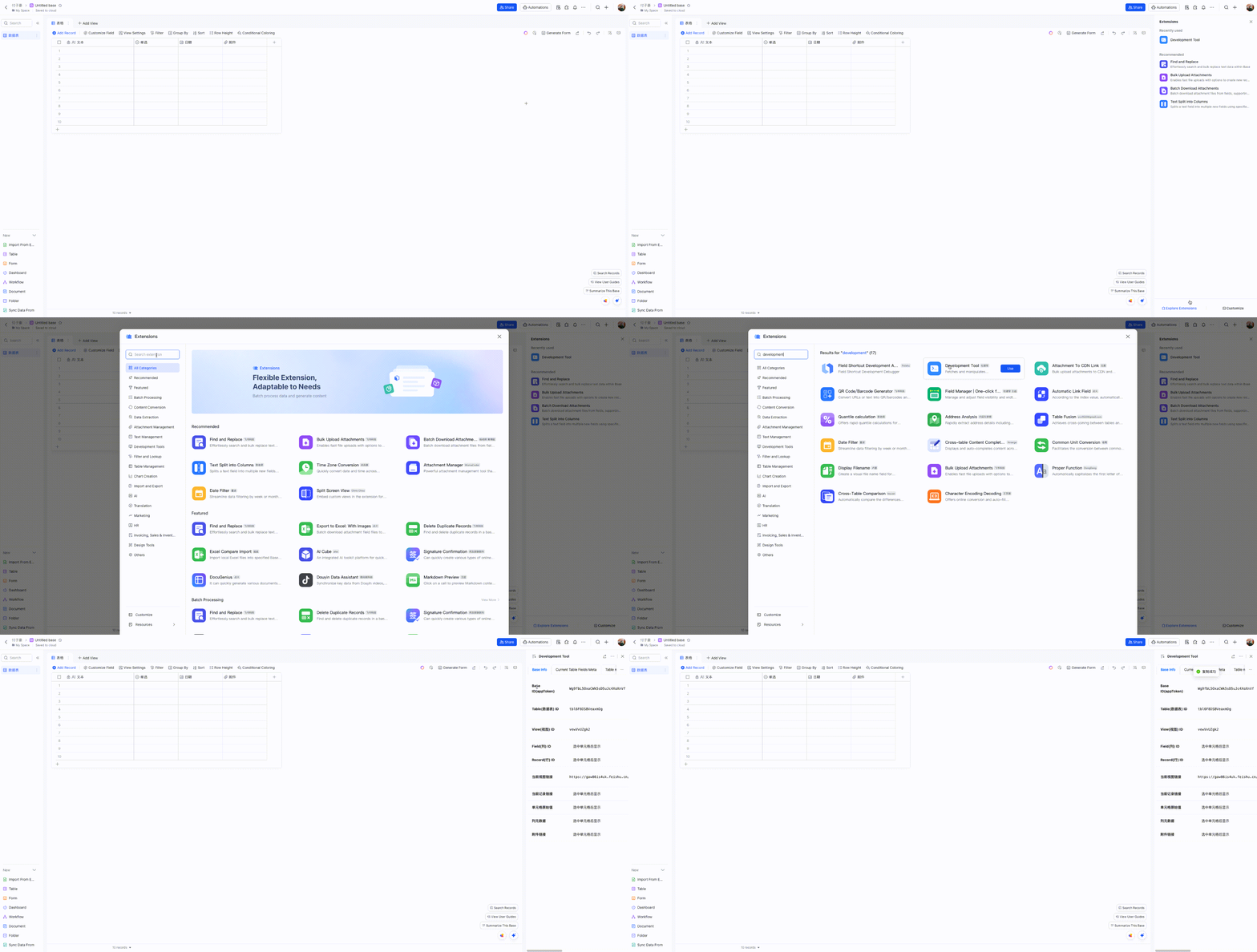
Components
Tools
-
list_tables
- Lists all tables in a base
- No input parameters required
-
list_records
- Lists records from a specified table
- Input parameters:
tableId(string, required): The ID of the table to query
-
get_record
- Gets a specific record by ID
- Input parameters:
tableId(string, required): The ID of the tablerecordId(string, required): The ID of the record to retrieve
-
create_record
- Creates a new record in a table
- Input parameters:
tableId(string, required): The ID of the tablefields(object, required): The fields and values for the new record
-
update_record
- Updates a record in a table
- Input parameters:
tableId(string, required): The ID of the tablerecordId(string, required): The ID of the recordfields(object, required): The fields to update and their new values
-
delete_record
- Deletes a record from a table
- Input parameters:
tableId(string, required): The ID of the tablerecordId(string, required): The ID of the record to delete
-
create_table
- Creates a new table in a base
- Input parameters:
설치
npx @lark-base-open/mcp-node-server -a appToken of base -p personalBaseToken of base설정
{
  "mcpServers": {
    "base-mcp-server": {
      "command": "npx",
      "args": [
        "@lark-base-open/mcp-node-server",
        "-a",
        "appToken of base",
        "-p",
        "personalBaseToken of base"
      ]
    }
  }
}