
kargatharaakash/stitch-mcp
Developer tools이 페이지는 AI로 자동 번역되었습니다. 기술적인 세부 사항은 원문을 확인하세요. 원문 보기
Kargatharaakash/Stitch-MCP는 [[T0]에서 가져온 MCP 서버 후보입니다.
개요
Kargatharaakash/Stitch-MCP는 [[T0]에서 가져온 MCP 서버 후보입니다.
개요(AI 번역)
구글 스티치용 범용 MCP 서버
AI와 함께 놀라운 UI/UX 디자인을 즉시 만들어보세요. 커서, 클로드, 안티그래비티 및 모든 MCP 호환 편집기와 원활하게 작동합니다.
아카시 카르가타라가 제작했습니다.
🚀 작동 원리
✨ 왜 이게 멋진 거야
- Zero Config: 한 번만 로그인하면 어디서든 작동합니다.
- Universal: Windows, Mac, Linux에서 작동합니다.
- 무료: 구글 스티치 API는 무료로 사용할 수 있습니다.
️ 빠른 준비 (2분)
1. 선수 조건: 구글 클라우드
Stitch API가 활성화된 Google Cloud 프로젝트가 필요합니다.
2. 자격 증명 설치
이 경우 stitch-mcp가 당신을 대신해 구글과 대화할 수 있는 권한을 부여합니다.
3. AI 편집기에 추가하기
이 내용을 복사해서 MCP 설정 파일에 붙여넣으세요:
클로드 데스크톱용:
~/Library/Application Support/Claude/claude_desktop_config.json
커서용: MCP > 설정 > 새 서버 추가
🛠️ 사용 가능한 도구
| 도구명 | 기능 |
|---|---|
extract_design_context |
🧠 화면을 스캔하여 “디자인 DNA”(글꼴, 색상, 레이아웃)를 추출합니다. 스타일 일관성을 유지하기 위해 이 기능을 사용하세요. |
fetch_screen_code |
💾 화면의 원시 HTML/프론트엔드 코드를 다운로드합니다. |
이 페이지는 AI로 자동 번역되었습니다. 기술적인 세부 사항은 원문을 확인하세요.
README
원문 README의 일부입니다. 원문 보기.
Stitch MCP
Build amazing UI/UX designs instantly with AI. Works seamlessly with Cursor, Claude, Antigravity, and any MCP-compatible editor.
Created by Aakash Kargathara.
🚀 How It Works
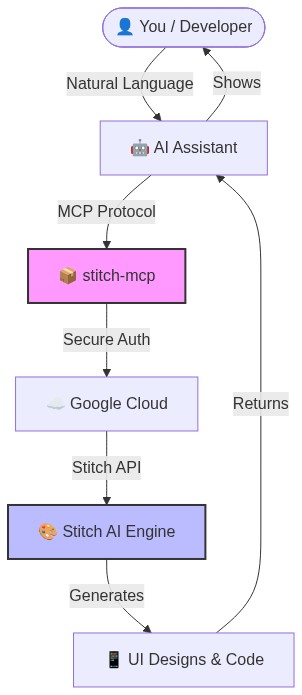
✨ Why this is cool
- Zero Config: Just login once and it works everywhere.
- Universal: Works on Windows, Mac, and Linux.
- Free: Google Stitch API is free to use.
�️ Quick Setup (2 Minutes)
1. Prerequisite: Google Cloud
You need a Google Cloud project with the Stitch API enabled.
# Login to your Google Cloud
gcloud auth login

# Set your project (replace with your actual project ID)
gcloud config set project YOUR_PROJECT_ID
gcloud auth application-default set-quota-project YOUR_PROJECT_ID

# Enable the magic
gcloud beta services mcp enable stitch.googleapis.com
2. Install the Credentials
This gives stitch-mcp permission to talk to Google on your behalf.
gcloud auth application-default login
3. Add to Your AI Editor
Copy and paste this into your MCP config file:
For Claude Desktop:
~/Library/Application Support/Claude/claude_desktop_config.json
For Cursor: Settings > MCP > Add New Server
{
  "mcpServers": {
    "stitch": {
      "command": "npx",
      "args": ["-y", "stitch-mcp"],
      "env": {
         "GOOGLE_CLOUD_PROJECT": "YOUR_PROJECT_ID"
      }
    }
  }
}
🛠️ Available Tools
| Tool Name | What it does |
|---|---|
extract_design_context |
🧠 Scans a screen to extract “Design DNA” (Fonts, Colors, Layouts). Use this to keep style consistent. |
fetch_screen_code |
💾 Downloads the raw HTML/Frontend code of a screen. |
fetch_screen_image |
🖼️ Downloads the high-res screenshot of a screen. |
generate_screen_from_text |
✨ Generates a NEW screen based on your prompt (and context). |
create_project |
📁 Creates a new workspace/project folder. |
list_projects |
📋 Lists all your available Stitch projects. |
설치
npx -y stitch-mcp설정
{
  "mcpServers": {
    "stitch": {
      "command": "npx",
      "args": ["-y", "stitch-mcp"],
      "env": {
         "GOOGLE_CLOUD_PROJECT": "YOUR_PROJECT_ID"
      }
    }
  }
}