
jparkerweb/mcp-sqlite
Database management이 페이지는 AI로 자동 번역되었습니다. 기술적인 세부 사항은 원문을 확인하세요. 원문 보기
jparkerweb/mcp-sqlite는 [[T0]에서 가져온 MCP 서버 후보입니다.
개요
jparkerweb/mcp-sqlite는 [[T0]에서 가져온 MCP 서버 후보입니다.
개요(AI 번역)
이는 포괄적인 SQLite 데이터베이스 상호작용 기능을 제공하는 모델 컨텍스트 프로토콜(MCP) 서버입니다.
유지 관리
특징
- CRUD 작업 완료 (생성, 읽기, 업데이트, 삭제)
- 데이터베이스 탐색 및 내면 분석
- 맞춤형 SQL 쿼리 실행
준비
IDE의 MCP 서버 설정에서 명령어를 정의하세요:
예를 들어 Cursor:
예를 들어 VSCode:
데이터베이스 경로는 인수로 제공되어야 합니다.
사용 가능한 도구
데이터베이스 정보
db_info
연결된 데이터베이스에 대한 자세한 정보를 얻으세요.
예시:
list_tables
데이터베이스 내 모든 테이블을 나열하세요.
예시:
get_table_schema
테이블의 스키마에 대한 자세한 정보를 얻으세요.
조건:
tableName(문자열): 테이블 이름
예시:
크러드 운영
create_record
새 레코드를 테이블에 삽입하세요.
조건:
table(문자열): 테이블 이름data(객체): 키를 키-값 쌍으로 기록
예시:
read_records
선택적 필터링이 가능한 테이블에서 레코드를 쿼리합니다.
조건:
table(문자열): 테이블 이름conditions(객체, 선택): 키-값 쌍으로서의 필터 조건
이 페이지는 AI로 자동 번역되었습니다. 기술적인 세부 사항은 원문을 확인하세요.
README
원문 README의 일부입니다. 원문 보기.
🐇 MCP SQLite Server
This is a Model Context Protocol (MCP) server that provides comprehensive SQLite database interaction capabilities.

Maintained by
Features
- Complete CRUD operations (Create, Read, Update, Delete)
- Database exploration and introspection
- Execute custom SQL queries
Setup
Define the command in your IDE’s MCP Server settings:
e.g. Cursor:
{
    "mcpServers": {
        "MCP SQLite Server": {
            "command": "npx",
            "args": [
                "-y",
                "mcp-sqlite",
                ""
            ]
        }
    }
}
e.g. VSCode:
{
    "servers": {
        "MCP SQLite Server": {
            "type": "stdio",
            "command": "npx",
            "args": [
                "-y",
                "mcp-sqlite",
                ""
            ]
        }
    }
}
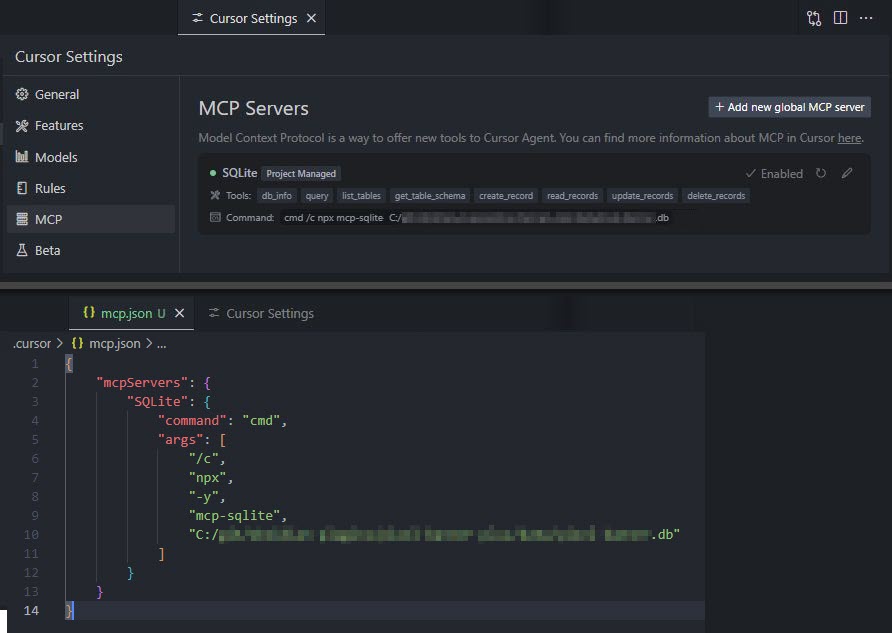
Your database path must be provided as an argument.
Available Tools
Database Information
db_info
Get detailed information about the connected database.
Example:
{
  "method": "tools/call",
  "params": {
    "name": "db_info",
    "arguments": {}
  }
}
list_tables
List all tables in the database.
Example:
{
  "method": "tools/call",
  "params": {
    "name": "list_tables",
    "arguments": {}
  }
}
get_table_schema
Get detailed information about a table’s schema.
Parameters:
tableName(string): Name of the table
Example:
{
  "method": "tools/call",
  "params": {
    "name": "get_table_schema",
    "arguments": {
      "tableName": "users"
    }
  }
}
CRUD Operations
create_record
Insert a new record into a table.
Parameters:
table(string): Name of the tabledata(object): Record data as key-value pairs
Example:
{
  "method": "tools/call",
  "params": {
    "name": "create_record",
    "arguments": {
      "table": "users",
      "data": {
        "name": "John Doe",
        "email": "[email protected]",
        "age": 30
      }
    }
  }
}
read_records
Query records from a table with optional filtering.
Parameters:
table(string): Name of the tableconditions(object, optional): Filter conditions as key-value pairslimit(number, optional): Maximum number of records to returnoffset(number, optional): Number of records to skip
설치
npx -y mcp-sqlite <path-to-your-sqlite-database.db>설정
{
    "mcpServers": {
        "MCP SQLite Server": {
            "command": "npx",
            "args": [
                "-y",
                "mcp-sqlite",
                "<path-to-your-sqlite-database.db>"
            ]
        }
    }
}