
christophenglisch/keycloak-model-context-protocol
Developer tools이 페이지는 AI로 자동 번역되었습니다. 기술적인 세부 사항은 원문을 확인하세요. 원문 보기
Keycloak 사용자 관리를위한 MCP 서버 구현. Model Context Protocol (MCP)을 통해 Keycloak 사용자 및 realms의 AI 전원 관리가 가능합니다.
개요
Keycloak 관리를위한 모델 Context Protocol 서버, 사용자 및 realms를 관리하기위한 도구를 제공합니다. - 특정 영역에서 새로운 사용자 만들기 - realms에서 사용자 삭제 - 목록 사용 가능한 영역 - 특정 영역에서 사용자 목록 Smithery를 통해 Claude Desktop용 Keycloak 설치하기: 서버는 NPM 패키지로 사용할 수 있습니다. 서버를 개발하거나 수정하려면: Claude Desktop 설정 파일에 서버 구성: 지정된 영역에서 새로운 사용자를 만듭니다. : - realm : realm name - 사용자 이름 : 새로운 사용자 이름 - 이메일 : 사용자의 이메일 주소 - firstName : 사용자 이름 - lastName: 사용자의 마지막 이름
개요(AI 번역)
** Keycloak 관리 **를 위한 모델 Context Protocol (MCP) 서버. Claude와 같은 AI 조수가 사용자, 그룹, 역할 및 세션을 관리하고, 클라이언트, 이벤트 및 Realms의 보안 자세를 검사하고, Keycloak Admin REST API를 통해 모든 쓰기 주변의 최소 개인 인증 및 가드 레일.
[!수신] 이 서버는 당신이 그것을주는 Keycloak 계정의 허가와 함께 작동합니다. ** 전용 서비스 계정 클라이언트를 사용하여 필요한 역할 만 **, 부트 스트랩 관리자가 없습니다. 데이터가 기본적으로 확인을 요청하는 모든 도구와 읽기 전용 모드를 사용할 수 있습니다. 보안을 참조하십시오.
하이라이트
- 7개의 툴셋**에 있는 **24 공구, 툴렛 당 활성화. 기본 설정 (
core,groups,roles]])는 작습니다; 다른 모든 것은 opt-in입니다. - Least-privilege auth.
client_credentials] 서비스 계정이 권장되는 보조금입니다. 비밀번호 보조금은 사용할 수 있습니다. credential 기본값이 없으므로 누락 된 설정이 빠릅니다. - ** 난간.** 읽기 전용 모드, realm allowlist, 쓰기 보호에 대한
masterrealm, 그리고 미리보기-then-confirm: true각 변경에 대한 흐름.
이 페이지는 AI로 자동 번역되었습니다. 기술적인 세부 사항은 원문을 확인하세요.
README
원문 README의 일부입니다. 원문 보기.
Keycloak MCP Server


A Model Context Protocol (MCP) server for Keycloak administration. It lets an AI assistant such as Claude manage users, groups, roles and sessions, and inspect clients, events and the security posture of your realms, through the Keycloak Admin REST API, with least-privilege authentication and guardrails around every write.
[!WARNING] This server acts with the permissions of the Keycloak account you give it. Use a dedicated service-account client with only the roles you need, never the bootstrap admin. Every tool that changes data asks for confirmation by default, and a read-only mode is available. See Security.
Highlights
- 24 tools in 7 toolsets, enabled per toolset. The default set (
core,groups,roles) is small; everything else is opt-in. - Least-privilege auth.
client_credentialswith a service account is the recommended grant; the password grant stays available. No credential defaults, so a missing setting fails fast. - Guardrails. Read-only mode, realm allowlist, write protection for the
masterrealm, and a preview-then-confirm: trueflow for every change. Grants of administrative rights are detected through composite roles and parent groups. - 4 guided prompts (onboarding, offboarding, security audit, failed-login investigation) and MCP resources for realms and users, with realm-name completion.
- Structured, paginated output with output schemas; secrets and credentials are never returned or logged.
- Works with Claude Desktop, Claude Code, VS Code, Cursor and any stdio MCP client. Requires Node.js 22 or newer.
How it works
Your MCP client starts the server as a local child process and talks to it over stdio. Every tool call passes the guards, then goes through a single gateway that owns the Keycloak login and caches the access token.
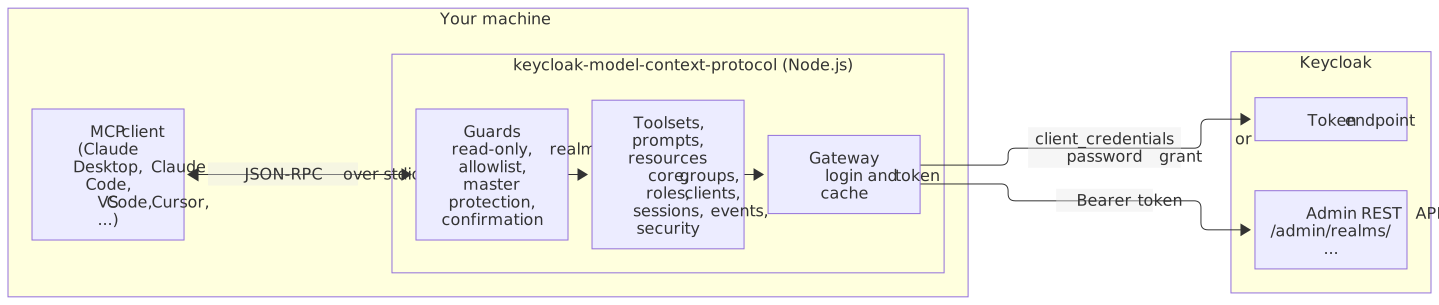
What a confirmed call looks like
설치
npx -y keycloak-model-context-protocol@1설정
{
  "mcpServers": {
    "keycloak": {
      "command": "npx",
      "args": ["-y", "keycloak-model-context-protocol@1"],
      "env": {
        "KEYCLOAK_URL": "https://keycloak.example.com",
        "KEYCLOAK_AUTH_REALM": "demo",
        "KEYCLOAK_CLIENT_ID": "mcp-admin",
        "KEYCLOAK_CLIENT_SECRET": "<client-secret>"
      }
    }
  }
}