
biegehydra/bifrostmcp
Developer tools이 페이지는 AI로 자동 번역되었습니다. 기술적인 세부 사항은 원문을 확인하세요. 원문 보기
biegehydra/bifrostmcp는 https://github.com/biegehydra/bifrostmcp.에서 임포트한 MCP 서버 후보입니다.
개요
biegehydra/bifrostmcp는 https://github.com/biegehydra/bifrostmcp.에서 임포트한 MCP 서버 후보입니다.
개요(AI 번역)
이 VS Code 확장은 VSCode의 강력한 개발 도구와 언어 기능을 AI 도구에 노출하는 모델 컨텍스트 프로토콜(MCP) 서버를 제공합니다. MCP 프로토콜을 지원하는 AI 코딩 어시스턴트를 사용할 때 고급 코드 탐색, 분석 및 조작 기능을 가능하게 합니다.
목차
- 특징
- 설치/사용
- 다중 프로젝트 지원
- 사용 가능한 도구
- 사용 가능한 명령어
- 문제 해결
- 기여
- 디버깅
- 면허
특징
- 언어 서버 통합: 지원되는 모든 언어에 대해 VSCode의 언어 서버 기능에 접근할 수 있습니다
- 코드 탐색: 참고문헌, 정의, 구현 등 찾아보기
- 심볼 검색: 작업 공간 전체에서 심볼을 검색하세요
- 코드 분석: 의미 토큰, 문서 기호, 타입 정보 얻기
- 스마트 선택: 지능형 코드 선택을 위해 의미 선택 범위를 사용합니다
- 코드 액션: 리팩토링 제안 및 빠른 해결 방법 접근
- HTTP/SSE 서버: MCP 호환 HTTP 서버를 통해 언어 기능을 노출
- AI 어시스턴트 통합: MCP 프로토콜을 지원하는 AI 어시스턴트와 함께 작업할 준비가 되어 있습니다
사용
설치
이 페이지는 AI로 자동 번역되었습니다. 기술적인 세부 사항은 원문을 확인하세요.
README
원문 README의 일부입니다. 원문 보기.
Bifrost - VSCode Dev Tools MCP Server
This VS Code extension provides a Model Context Protocol (MCP) server that exposes VSCode’s powerful development tools and language features to AI tools. It enables advanced code navigation, analysis, and manipulation capabilities when using AI coding assistants that support the MCP protocol.
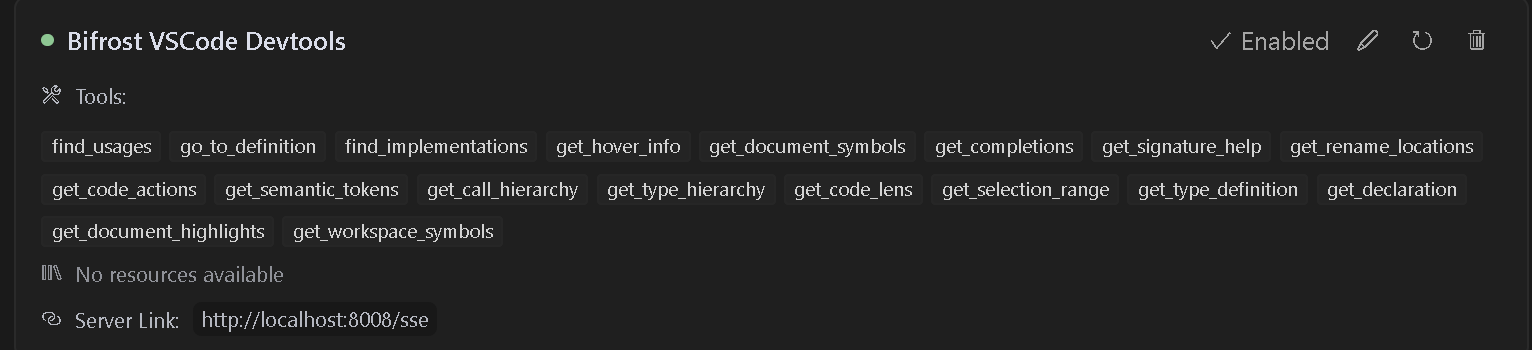
Table of Contents
- Features
- Installation/Usage
- Multi-Project Support
- Available Tools
- Available Commands
- Troubleshooting
- Contributing
- Debugging
- License
Features
- Language Server Integration: Access VSCode’s language server capabilities for any supported language
- Code Navigation: Find references, definitions, implementations, and more
- Symbol Search: Search for symbols across your workspace
- Code Analysis: Get semantic tokens, document symbols, and type information
- Smart Selection: Use semantic selection ranges for intelligent code selection
- Code Actions: Access refactoring suggestions and quick fixes
- HTTP/SSE Server: Exposes language features over an MCP-compatible HTTP server
- AI Assistant Integration: Ready to work with AI assistants that support the MCP protocol
Usage
Installation
- Install the extension from the VS Code marketplace
- Install any language-specific extensions you need for your development
- Open your project in VS Code
Configuration
The extension will automatically start an MCP server when activated. To configure an AI assistant to use this server:
- The server runs on port 8008 by default (configurable with
bifrost.config.json) - Configure your MCP-compatible AI assistant to connect to:
- SSE endpoint:
http://localhost:8008/sse - Message endpoint:
http://localhost:8008/message
- SSE endpoint:
LLM Rules
I have also provided sample rules that can be used in .cursorrules files for better results.
Cline Installation
- Step 1. Install Supergateway
- Step 2. Add config to cline
- Step 3. It will show up red but seems to work fine
Windows Config
{
  "mcpServers": {
    "Bifrost": {
      "command": "cmd",
"args": [설치
npx -y supergateway --sse http://localhost:8008/sse설정
{
  "mcpServers": {
    "Bifrost": {
      "command": "cmd",
      "args": [
        "/c",
        "npx",
        "-y",
        "supergateway",
        "--sse",
        "http://localhost:8008/sse"
      ],
      "disabled": false,
      "autoApprove": [],
      "timeout": 600
    }
  }
}