
agentico-dev/mcp
Deployment & DevOps이 페이지는 AI로 자동 번역되었습니다. 기술적인 세부 사항은 원문을 확인하세요. 원문 보기
Tools generated and created by the community with Agentico
개요
This is an early version of the MCP Intent-Based demo project. This project aims to demonstrate how to create and manage a flexible, dynamic server environment using a declarative manifest approach. Please note that this is a work in progress and may not be fully functional or stable. We welcome feedback to improve the project. For more details and examples, please check the mcp-intent-based-demo README here. The server.yaml file is the heart of the MCP Intent Based approach. It defines: The entry point of the application (index.ts) is : We have prepared a script in the package.json file for you to run the demo with inspector. If you are using the default parameters, the MCP Inspector will be available at http://127.0.0.
README
원문 README의 일부입니다. 원문 보기.
Getting Started with MCP Intent Based
This is an early version of the MCP Intent-Based demo project. This project aims to demonstrate how to create and manage a flexible, dynamic server environment using a declarative manifest approach. Please note that this is a work in progress and may not be fully functional or stable. We welcome feedback to improve the project.
For more details and examples, please check the mcp-intent-based-demo README here.
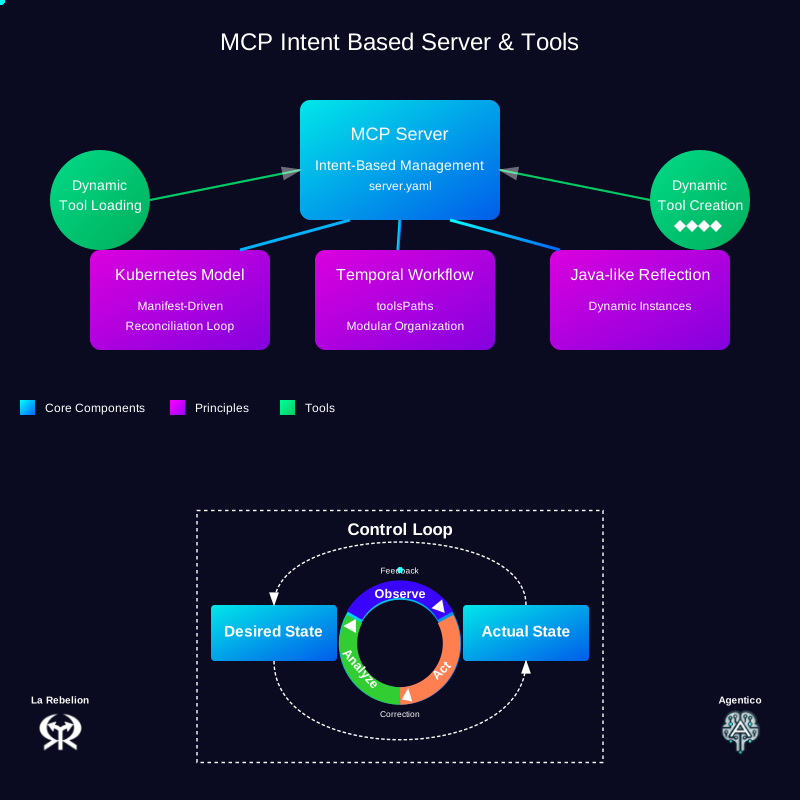
Understanding the Intent-Based Manifest File
The server.yaml file is the heart of the MCP Intent Based approach. It defines:
apiVersion: agentico.dev/v1
kind: Server
metadata:
  name: demo-mcp
  description: Demo MCP Server instance
  transport: stdio
  capabilities:
    - logging
    - tools
    #- telemetry # future: 🔭
  # future: the intent would allow to define the tools path - for now, needs to be set in the env var
  #toolsPath: ./build/tools
spec:
  template:
    metadata:
      scope: local  # future: cloud as well ☁️
    spec:
      tools:
        - name: echo
          description: 'Utility tool that returns the exact input provided to it...'
        - name: reverse
          description: 'Text manipulation tool that reverses the order of characters...'
        - name: uppercase
          description: 'String transformation utility that converts all alphabetic characters...'
Understanding the Server Initialization
The entry point of the application (index.ts) is remarkably simple:
#!/usr/bin/env node

import createServerFromFile from "@agentico/mcp-intent-based";

async function startServer() {
  const server = await createServerFromFile();
  // Yes, that's all you need to do to start the server with Agentico and Intent Based AI!!
  // server.yaml dictates the tools to be created
}

startServer().catch((error) => {
  console.error("Error starting server:", error);
  process.exit(1);
});
Running the Demo
To start the server:
We have prepared a script in the package.json file for you to run the demo with inspector.
npm run agentico
# or
yarn agentico
If you are using the default parameters, the MCP Inspector will be available at http://127.0.0.1:6274
If you want to do it manually, you can run the following commands:
NOTE: Make sure you add the tools path to the TOOLS_PATH environment variable, so that the server can find the tools.
npm run build
TOOLS_PATH=$PWD/build/tools npm run inspector
# or
yarn build
TOOLS_PATH=$PWD/build/tools yarn inspector
Next Steps
- Explore the MCP Intent Based Server documentation for more advanced features
- Try creating your custom tools and incorporate them into the manifest
설치
This server does not publish a one-line install command.
Open the repository installation guide MCP 초보자라면? mcpskill.org 가이드부터 시작하세요 →