
dog-qiuqiu/invincat
Developer toolsこのページは AI により自動翻訳されています。技術的な詳細は原文をご確認ください。 原文を見る
DeepAgents CLI 上に構築されたネイティブな Python エージェントは、各タスクの後に学習をキャプチャし、階層を介した効率的な AI コーディング支援を実現します.
概要
Invincatは、ローカルリポジトリのターミナルネイティブAIコーディングアシスタントです。 シェルコマンドを承認して実行し、Web/MCPツールを使用して、実行前に長期メモリ、計画を維持し、スケジュールされたタスクを実行し、リモートWeComメッセージをプロジェクトセッションにブリッジすることができます。 - ターミナルUIのプロジェクトディレクトリから直接作業します。 - 読み込み、編集、および承認されたツール実行でファイルを作成する。 - 設定可能な安全制御の下でシェルコマンドを実行します。 - /planを使用して、実装前に実行計画を見直し、承認します。 - セッション全体でユーザーとプロジェクトのメモリを維持します。 - 自然言語で再発または1ショットのスケジュールされたタスクを作成します。 - MCP ツール、スキル、WeCom ボットデーモン統合による機能拡張 起動時に、 /model を実行して、プロバイダーとモデルを設定します。 プロジェクトディレクトリからInvincatを実行します。 起動後、/model を実行してモデルマネージャを開きます。 - Ctrl+Nを押してモデルを登録します.
概要(AI 翻訳)
Invincatは、ローカルリポジトリのターミナルネイティブAIコーディングアシスタントです。 シェルコマンドを承認して実行し、Web/MCPツールを使用して、実行前に長期メモリ、計画を維持し、スケジュールされたタスクを実行し、リモートWeComメッセージをプロジェクトセッションにブリッジすることができます。
##特徴
- ターミナルUIのプロジェクトディレクトリから直接作業します。
- 読み込み、編集、および承認されたツール実行でファイルを作成する。
- 設定可能な安全制御の下でシェルコマンドを実行します。
- [
/plan]を使用して、実行計画を見直し、承認します。 - セッション全体でユーザーとプロジェクトのメモリを維持します。
- 自然言語で再発または1ショットのスケジュールされたタスクを作成します。
- MCP ツール、スキル、WeCom ボットデーモン統合による機能拡張
クイックスタート
最初に起動すると、/model を実行して、プロバイダーとモデルを設定します。
インストール
Python 3.11+ が必要です。
ソースからインストール:
スタート
プロジェクトディレクトリからInvincatを実行します。
モデル構成
起動後、[/modelを実行してモデルマネージャを開きます。
- モデルを登録するには、[
Ctrl+Nを押します。 - プロバイダー、モデル名、APIキー、オプションのベースURLを入力します.
このページは AI により自動翻訳されています。技術的な詳細は原文をご確認ください。
README
以下は原文 README の抜粋です。原文を見る。
Invincat


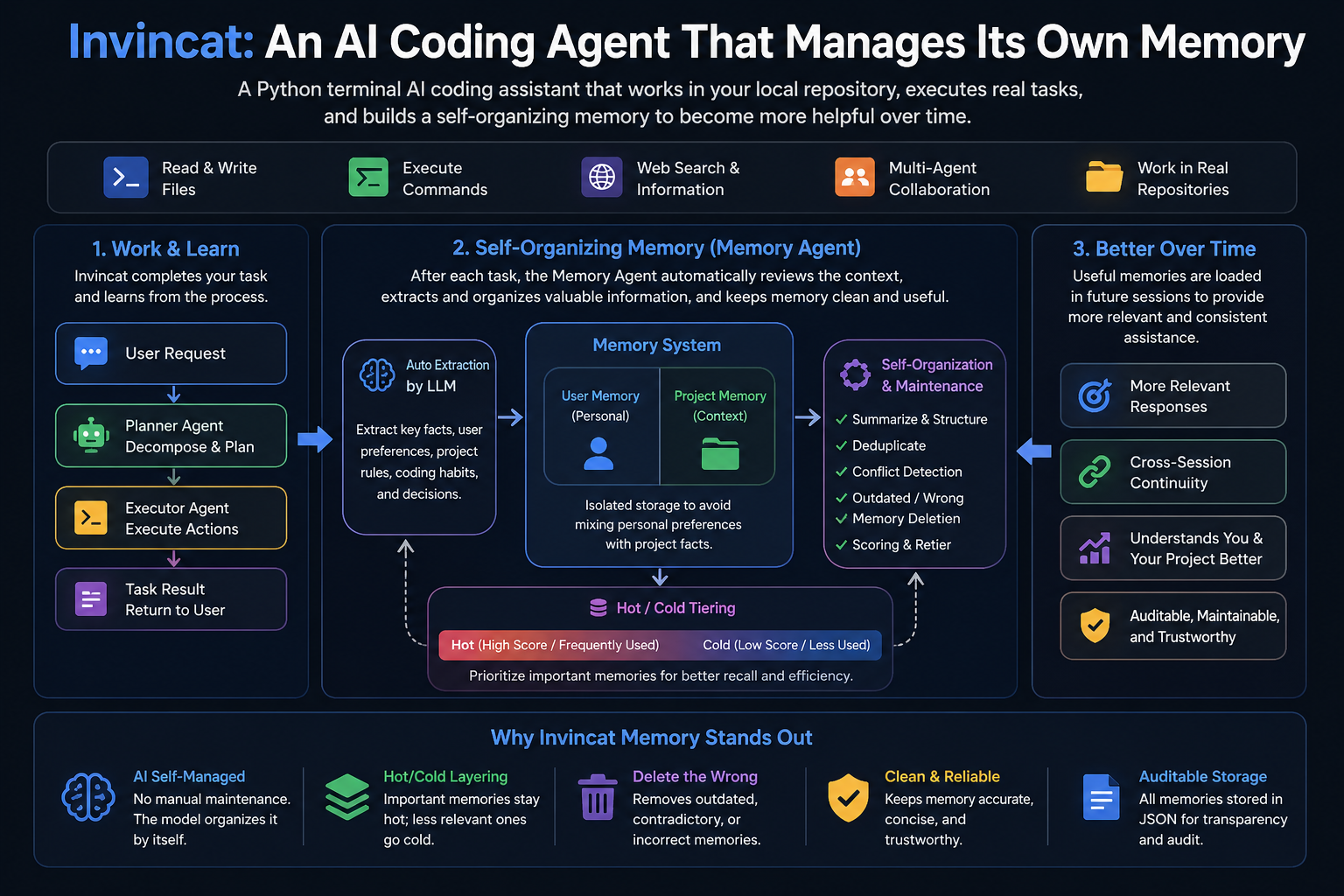
Invincat is a terminal-native AI coding assistant for local repositories. It can inspect and edit files, run shell commands with approval, use web/MCP tools, keep long-term memory, plan before execution, run scheduled tasks, and bridge remote WeCom messages into a project session.
Features
- Work directly from your project directory in a terminal UI.
- Read, edit, and create files with approval-gated tool execution.
- Run shell commands under configurable safety controls.
- Use
/planto review and approve an execution plan before implementation. - Keep user and project memory across sessions.
- Create recurring or one-shot scheduled tasks in natural language.
- Extend capabilities through MCP tools, skills, and WeCom bot daemon integration.
Quick Start
pip install invincat-cli
cd /path/to/your/project
invincat-cli
On first launch, run /model to configure a provider and model.
Installation
Requires Python 3.11+.
pip install invincat-cli
Install from source:
git clone https://github.com/dog-qiuqiu/invincat.git
cd invincat
pip install -e .
Start
Run Invincat from your project directory:
cd /path/to/your/project
invincat-cli
Model Configuration
After the first launch, run /model to open the model manager.
- Press
Ctrl+Nto register a model. - Fill in the provider, model name, API key, and optional base URL.
- Select a model and press
Enterto activate it.
You can also provide credentials through environment variables such as:
export OPENAI_API_KEY="..."
export ANTHROPIC_API_KEY="..."
export GOOGLE_API_KEY="..."
export DEEPSEEK_API_KEY="..."
export OPENROUTER_API_KEY="..."
Example for DeepSeek:
export DEEPSEEK_API_KEY="sk-..."
Then register a model in /model with:
| Field | Value |
|---|---|
| Provider | openai |
| Model | deepseek-v4-flash |
| API Key | DEEPSEEK_API_KEY |
| BASE URL | https://api.deepseek.com |
Invincat supports a primary model for normal work and an optional memory model for post-turn memory extraction. If no memory model is configured, memory extraction uses the current primary model.
Basic Commands
| Command | Description |
|---|---|
/model |
Configure and switch models. |
推奨ツール
別のキーワードを試すか、フィルタを外してください。
インストール
npx skillfish add dog-qiuqiu/invincat