
simon-kansara/ableton-live-mcp-server
Developer toolsこのページは AI により自動翻訳されています。技術的な詳細は原文をご確認ください。 原文を見る
Ableton Live OSC制御用のMCPサーバー実装
概要
これは、LLMとの間の通信を促進するためにModel Context Protocol(MCP)を実装したサーバーです。Ableton Liveとのメッセージの送受信に使用されます。AbletonOSCの実装に基づいており、利用可能なOSCアドレスをMCPクライアントがアクセス可能なものに詳細にマッピングします。 このプロジェクトは主に2つの要素で構成されています。 - mcp_ableton_server.py:クライアントとOSCデーモン間の通信を担当するMCPサーバー。- osc_daemon.py:Ableton Liveへのコマンド中継と応答処理を担当するOSCデーモン。 - MCPクライアントからAbleton Liveを制御するためのMCP互換APIを提供します。- OSCメッセージの送受信に使用されます。- AbletonOSCのOSC実装に基づいています。- Ableton Liveコマンドのリクエストレスポンス処理を実装しています。 - Python 3.8+ - python-osc(OSC通信用)- fastmcp(MCPサポート用)- uv(推奨Pythonパッケージインストーラー)- コントロールサーフェスとしてのAbletonOSC 1. UV(https://docs.astral.)をインストールする
概要(AI 翻訳)
📌 概要
Ableton Live MCP Serverは、 モデルコンテキストプロトコル(MCP)を活用して LLMとAbleton Live間の通信。これはOSC(オープンサウンド)を使用しています Control) はAbleton Liveとメッセージの送受信を行います。これは AbletonOSCの実装および 利用可能なOSCアドレスは網羅的に次のようにマッピングされています。 ツール アクセス可能 MCPクライアント。
このプロジェクトは主に2つの要素で構成されています。
mcp_ableton_server.py:通信を担当するMCPサーバー クライアントとOSCデーモン。osc_daemon.py:Abletonへのコマンド伝達を担当するOSCデーモン リアルタイムで応答を処理しています。
✨ 特徴
- MCPクライアントからAbleton Liveを制御するためのMCP互換APIを提供します。
- OSCメッセージの送受信にpython-oscを使用します。
- OSC実装に基づく AbletonOSC。
- Ableton Liveコマンドのリクエスト応答処理を実装します。
⚡ 設置
要件
- Python 3.8+
python-osc(OSC通信用)fastmcp(MCP支援用)uv(推奨Pythonパッケージインストーラー)- コントロールサーフェスとしてのAbletonOSC
設置手順
- インストール
uv(https://docs.astral.
このページは AI により自動翻訳されています。技術的な詳細は原文をご確認ください。
README
以下は原文 README の抜粋です。原文を見る。
Ableton Live MCP Server
📌 Overview
The Ableton Live MCP Server is a server implementing the Model Context Protocol (MCP) to facilitate communication between LLMs and Ableton Live. It uses OSC (Open Sound Control) to send and receive messages to/from Ableton Live. It is based on AbletonOSC implementation and exhaustively maps available OSC adresses to tools accessible to MCP clients.
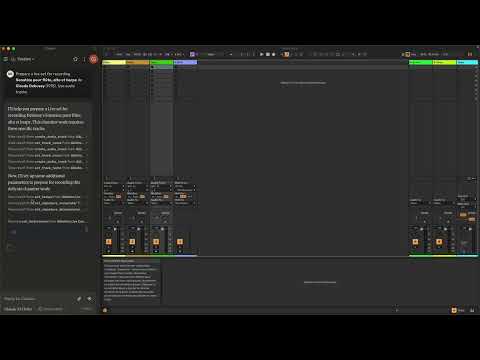
This project consists of two main components:
mcp_ableton_server.py: The MCP server handling the communication between clients and the OSC daemon.osc_daemon.py: The OSC daemon responsible for relaying commands to Ableton Live and processing responses.
✨ Features
- Provides an MCP-compatible API for controlling Ableton Live from MCP clients.
- Uses python-osc for sending and receiving OSC messages.
- Based on the OSC implementation from AbletonOSC.
- Implements request-response handling for Ableton Live commands.
⚡ Installation
Requirements
- Python 3.8+
python-osc(for OSC communication)fastmcp(for MCP support)uv(recommended Python package installer)- AbletonOSC as a control surface
Installation Steps
-
Install
uv(https://docs.astral.sh/uv/getting-started/installation):curl -LsSf https://astral.sh/uv/install.sh | sh -
Clone the repository:
git clone https://github.com/your-username/mcp_ableton_server.git cd mcp_ableton_server -
Install the project and its dependencies:
uv sync -
Install AbletonOSC Follow the instructions at AbletonOSC
🚀 Usage
Running the OSC Daemon
The OSC daemon will handle OSC communication between the MCP server and Ableton Live:
uv run osc_daemon.py
This will:
- Listen for MCP client connections on port 65432.
- Forward messages to Ableton Live via OSC on port 11000.
- Receive OSC responses from Ableton on port 11001.
Example Usage
In Claude desktop, ask Claude:
- Prepare a set to record a rock band
- Set the input routing channel of all tracks that have “voice” in their name to Ext. In 2
⚙️ Configuration
By default, the server and daemon run on localhost (127.0.0.1) with the following ports:
- MCP Server Socket: 65432
- Ableton Live OSC Port (Send): 11000
- Ableton Live OSC Port (Receive): 11001
To modify these, edit the AbletonOSCDaemon class in osc_daemon.py:
self.socket_host = '127.0.0.1'
self.socket_port = 65432
self.ableton_host = '127.0.0.1'
self.ableton_port = 11000
self.receive_port = 11001
インストール
This server does not publish a one-line install command.
Open the repository installation guide MCP 初心者?mcpskill.org のガイドから始めましょう →設定
{
  "mcpServers": {
    "Ableton Live Controller": {
      "command": "/path/to/your/project/.venv/bin/python",
      "args": ["/path/to/your/project/mcp_ableton_server.py"]
    }
  }