
runekaagaard/mcp-notmuch-sendmail
Developer toolsこのページは AI により自動翻訳されています。技術的な詳細は原文をご確認ください。 原文を見る
メールをノッチで読み、メールを sendmail で送信するモデルコンテキストプロトコルサーバ
概要
Claudeをメールアシスタントにしましょう! MCP Notmuch Sendmailは、Claudeデスクトップをあなたのノッチなメールデータベースに接続し、次のようにします。 - 電子メールのスレッドを検索してブラウズ - きれいなテキスト形式で会話を表示 - マークダウンを使用して新しいメールを作曲 - 引用されたコンテンツのスマートな重複排除でスレッドに返信 - LaTeXインスパイアされたスタイリングで美しいメールを作成する - 設定されたスクリプトを実行することにより、電子メールデータベースを同期 html2text は HTML 電子メールのレンダリングとマークダウン-it で、リッチな HTML メールをインラインイメージで作成します。 デフォルトでは、サーバーは stdio を話します.
概要(AI 翻訳)
** 状態: アクティブに維持され、毎日の使用。 テストされたリリースは、git タグでPyPIに公開され、問題やプルリクエストは定期的にトリガされます。**
Claudeをメールアシスタントにしましょう! MCP Notmuch Sendmailは、Claudeデスクトップをあなたのノッチなメールデータベースに接続し、次のようにします。
- 電子メールスレッドを検索し、閲覧
- きれいなテキスト形式で会話を表示
- マークダウンを使用して新しいメールを構成
- 引用されたコンテンツのスマートな複製とスレッドに応答
- LaTeXインスパイアされたスタイリングで美しいメールを作成する
- 設定されたスクリプトを実行することで、メールデータベースの同期
html2text は HTML 電子メールのレンダリングとマークダウン-it で、リッチな HTML メールをインラインイメージで作成します。
インストール
uvがインストールされていることを確認してください。
Claudeデスクトップでの使用
[claude_desktop_config.json]に追加します。
輸送
デフォルトでは、サーバーは stdio を話します。 クライアントは、その方法を接続するための HTTP を渡すこともできます。
環境変数
このページは AI により自動翻訳されています。技術的な詳細は原文をご確認ください。
README
以下は原文 README の抜粋です。原文を見る。
MCP Notmuch Sendmail
Status: Actively maintained and in daily use. Tested releases are published to PyPI with git tags, and issues and pull requests are triaged regularly.
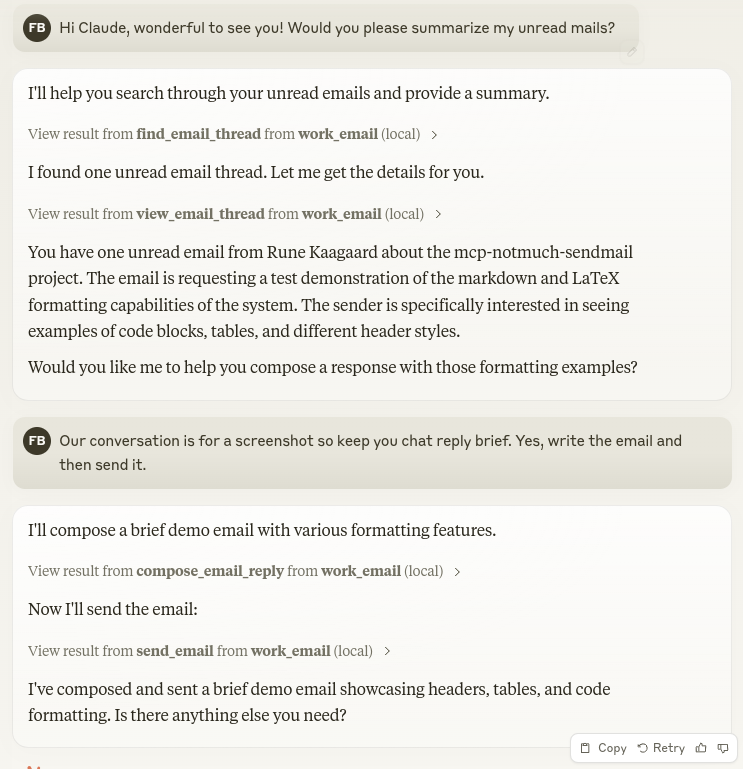
Let Claude be your email assistant! MCP Notmuch Sendmail connects Claude Desktop to your notmuch email database, allowing it to:
- Search and browse your email threads
- View conversations in a clean text format
- Compose new emails using markdown
- Reply to threads with smart deduplication of quoted content
- Create beautiful emails with LaTeX-inspired styling
- Synchronize your email database by running a configured script
Uses html2text for HTML email rendering and markdown-it for composing rich HTML emails with inline images.
Installation
Ensure you have uv installed:
# Install uv if you haven't already
curl -LsSf https://astral.sh/uv/install.sh | sh
Usage with Claude Desktop
Add to your claude_desktop_config.json:
{
  "mcpServers": {
    "email": {
      "command": "uvx",
      "args": ["--from", "mcp-notmuch-sendmail==2026.10.15.202932", "--python", "3.10",
               "--refresh", "mcp-notmuch-sendmail"]
      "env": {
        "NOTMUCH_DATABASE_PATH": "/path/to/your/notmuch/db",
        "NOTMUCH_REPLY_SEPARATORS": "Pipe|Separated|Phrases",
        "SENDMAIL_FROM_EMAIL": "[email protected]",
        "SENDMAIL_EMAIL_SIGNATURE_HTML": "Optional HTML signature",
        "SENDMAIL_ALLOWED_UPLOAD_DIRECTORIES": "/path/to/images,/another/path",
        "NOTMUCH_SYNC_SCRIPT": "/path/to/your/sync/script.sh",
        "LOG_FILE_PATH": "/path/to/log/file.log",
        "DRAFT_DIR": "/path/for/email/drafts"
      }
    }
  }
}
Transports
By default the server speaks stdio. It can also serve over HTTP for clients that connect that way:
# Recommended HTTP transport (serves on http://HOST:PORT/mcp)
mcp-notmuch-sendmail --transport streamable-http --host 127.0.0.1 --port 8000

# Legacy SSE transport, for older clients (serves on http://HOST:PORT/sse)
mcp-notmuch-sendmail --transport sse --host 127.0.0.1 --port 8000
Environment Variables
NOTMUCH_DATABASE_PATH: Path to your notmuch database (required)NOTMUCH_REPLY_SEPARATORS: Pipe-separated list of text markers - keeps email content up until the first line starting with any of these markers, removing quoted replies (required)SENDMAIL_FROM_EMAIL: Your email address for the From: field (optional - when unset, the email composing/sending tools are disabled and the server is read-only)SENDMAIL_EMAIL_SIGNATURE_HTML: HTML signature to append to emails (optional)SENDMAIL_ALLOWED_UPLOAD_DIRECTORIES: Comma-separated list of directories from which images referenced in markdown may be embedded into outgoing emails (optional - inline image embedding is disabled if not set)
インストール
uvx --from mcp-notmuch-sendmail==2026.10.15.202932 --python 3.10 --refresh mcp-notmuch-sendmail設定
{
  "mcpServers": {
    "email": {
      "command": "uvx",
      "args": ["--from", "mcp-notmuch-sendmail==2026.10.15.202932", "--python", "3.10",
               "--refresh", "mcp-notmuch-sendmail"]
      "env": {
        "NOTMUCH_DATABASE_PATH": "/path/to/your/notmuch/db",
        "NOTMUCH_REPLY_SEPARATORS": "Pipe|Separated|Phrases",
        "SENDMAIL_FROM_EMAIL": "[email protected]",
        "SENDMAIL_EMAIL_SIGNATURE_HTML": "<p>Optional HTML signature</p>",
        "SENDMAIL_ALLOWED_UPLOAD_DIRECTORIES": "/path/to/images,/another/path",
        "NOTMUCH_SYNC_SCRIPT": "/path/to/your/sync/script.sh",
        "LOG_FILE_PATH": "/path/to/log/file.log",
        "DRAFT_DIR": "/path/for/email/drafts"
      }
    }
  }
}