
reading-plus-ai/mcp-server-deep-research
Developer toolsこのページは AI により自動翻訳されています。技術的な詳細は原文をご確認ください。 原文を見る
reading-plus-ai/mcp-server-deep-researchは、https://github.com/reading-plus-ai/mcp-server-deep-research.からインポートされたMCPサーバー候補です。
概要
reading-plus-ai/mcp-server-deep-researchは、https://github.com/reading-plus-ai/mcp-server-deep-research.からインポートされたMCPサーバー候補です。
概要(AI 翻訳)
MCPサーバー for Deep Researchは、複雑なテーマについて包括的な研究を行うために設計されたツールです。このツールは、質問を深く探求し、関連する情報源を見つけ、構造化された研究報告を作成するのに役立ちます。
あなたの専属リサーチアシスタントとして、研究課題を包括的で引用の多いレポートに変えます。
🚀 試してみて
) YouTube: https://youtu.be/_a7sfo5yxoI
- Claude Desktopをダウンロード
- ここで手に入れる
- インストールとセットアップ
- macOSでは、ターミナルで以下のコマンドを実行します:
- 調査を始めましょう
- MCPから深掘りプロンプトテンプレートを選択する
- 調査を始めると、研究質問を提示する
特徴
Deep Research MCPサーバーは、完全な研究ワークフローを提供します:
- 質問の展開
- 研究課題の拡充と明確化
- 重要な用語や概念の特定
- 範囲とパラメータを定義する
- サブクエスチョン生成
- 異なる側面を扱う焦点を絞ったサブクエスチョンを作成する
- 主要なテーマの包括的なカバーを確保する
- 体系的研究のための構造を提供する
- ウェブ検索統合
- Claudeの組み込みウェブ検索機能を使用
- 各サブクエスチョンに対してターゲット検索を行う
このページは AI により自動翻訳されています。技術的な詳細は原文をご確認ください。
README
以下は原文 README の抜粋です。原文を見る。
MCP Server for Deep Research
MCP Server for Deep Research is a tool designed for conducting comprehensive research on complex topics. It helps you explore questions in depth, find relevant sources, and generate structured research reports.
Your personal Research Assistant, turning research questions into comprehensive, well-cited reports.
🚀 Try it Out
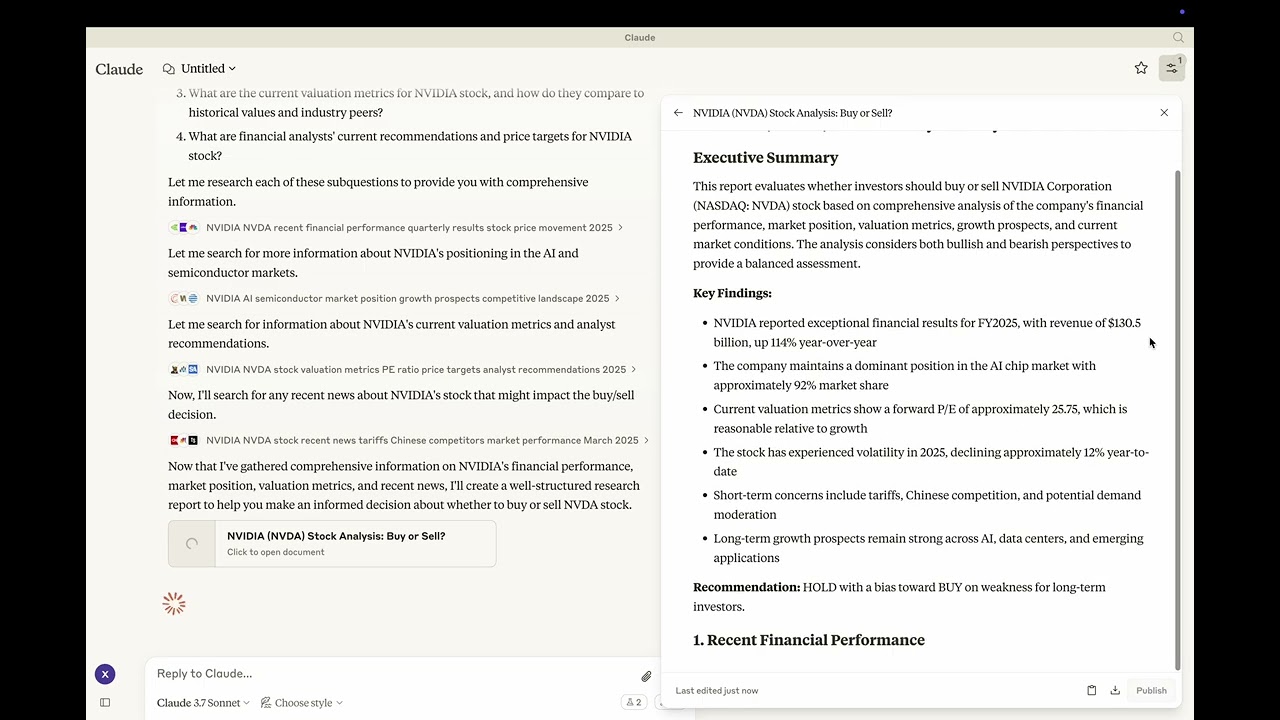 Youtube: https://youtu.be/_a7sfo5yxoI
-
Download Claude Desktop
- Get it here
-
Install and Set Up
- On macOS, run the following command in your terminal:
python setup.py -
Start Researching
- Select the deep-research prompt template from MCP
- Begin your research by providing a research question
Features
The Deep Research MCP Server offers a complete research workflow:
-
Question Elaboration
- Expands and clarifies your research question
- Identifies key terms and concepts
- Defines scope and parameters
-
Subquestion Generation
- Creates focused subquestions that address different aspects
- Ensures comprehensive coverage of the main topic
- Provides structure for systematic research
-
Web Search Integration
- Uses Claude’s built-in web search capabilities
- Performs targeted searches for each subquestion
- Identifies relevant and authoritative sources
- Collects diverse perspectives on the topic
-
Content Analysis
- Evaluates information quality and relevance
- Synthesizes findings from multiple sources
- Provides proper citations for all sources
-
Report Generation
- Creates well-structured, comprehensive reports as artifacts
- Properly cites all sources used
- Presents a balanced view with evidence-based conclusions
- Uses appropriate formatting for clarity and readability
📦 Components
Prompts
- deep-research: Tailored for comprehensive research tasks with a structured approach
⚙️ Modifying the Server
Claude Desktop Configurations
- macOS:
~/Library/Application\ Support/Claude/claude_desktop_config.json - Windows:
%APPDATA%/Claude/claude_desktop_config.json
Development (Unpublished Servers)
"mcpServers": {
  "mcp-server-deep-research": {
    "command": "uv",
    "args": [
      "--directory",
      "/Users/username/repos/mcp-server-application/mcp-server-deep-research",
      "run",
      "mcp-server-deep-research"
    ]
  }
}
Published Servers
"mcpServers": {
  "mcp-server-deep-research": {
    "command": "uvx",
    "args": [
      "mcp-server-deep-research"
    ]
  }
}
🛠️ Development
Building and Publishing
-
Sync Dependencies
uv sync -
Build Distributions
uv buildGenerates source and wheel distributions in the dist/ directory.
-
Publish to PyPI
uv publish
インストール
uvx mcp-server-deep-research設定
"mcpServers": {
  "mcp-server-deep-research": {
    "command": "uv",
    "args": [
      "--directory",
      "/Users/username/repos/mcp-server-application/mcp-server-deep-research",
      "run",
      "mcp-server-deep-research"
    ]
  }
}