
punitarani/fli
Developer toolsこのページは AI により自動翻訳されています。技術的な詳細は原文をご確認ください。 原文を見る
Google Flights MCP、CLI、Pythonライブラリ
概要
Google フライトのデータにプログラム的にアクセスできる強力なPythonライブラリで、洗練されたCLIインターフェースを備えています。フライトを検索し、最良のお得情報を見つけ、結果を簡単に絞り込みましょう。 🚀 ウェブスクレイピングに依存する他のフライト検索ライブラリとは異なり、Fliはリバースエンジニアリングを通じてGoogle FlightsのAPIと直接やり取りします。つまり、* :直接APIアクセスによりより速く、より信頼性の高い結果が得られます * : HTMLパース不要、ブラウザの自動化不要、純粋なAPI操作 * : UI変更による障害が少なく * : 拡張可能なアーキテクチャでカスタマイズと統合が容易になる : 実際のユーザー名に置き換えてください。また、端末でどのfli-mcpを実行するかでMCPサーバーへの経路を見つけることもできます。
概要(AI 翻訳)
Google Flightsデータにプログラム的にアクセスできる強力なPythonライブラリで、洗練されたCLIインターフェースを備えています。検索 フライトの情報、最良の取引を見つけ、簡単に結果を絞り込みましょう。
🚀
fliの何が特別なのか? ウェブスクレイピングに依存する他のフライト検索ライブラリとは異なり、FliはGoogle FlightsのAPIと直接連携します リバースエンジニアリングで>。 これは次のことを意味します:高速:直接APIアクセスはより速く、より信頼性の高い結果をもたらします スクレイピングゼロ:HTML解析なし、ブラウザ自動化なし、純粋なAPI操作のみ **信頼性:UI変更による壊れにくい
- モジュール化:カスタマイズと統合が容易になる拡張可能なアーキテクチャ
MCPサーバー
Claudeデスクトップに接続中
注:
を実際のユーザー名に置き換えてください。 ターミナルでwhich fli-mcpを実行することでMCPサーバーへの経路も見つけられます。
MCPツール提供
MCPサーバーは主に2つのツールを提供します:
| 道具 | 説明 |
|---|---|
search_flights |
詳細なフィルターで特定の日付のフライトを検索 |
このページは AI により自動翻訳されています。技術的な詳細は原文をご確認ください。
README
以下は原文 README の抜粋です。原文を見る。
🛫 Fli - Flight Search MCP Server and Library

A powerful Python library that provides programmatic access to Google Flights data with an elegant CLI interface. Search flights, find the best deals, and filter results with ease.
🚀 What makes
flispecial? Unlike other flight search libraries that rely on web scraping, Fli directly interacts with Google Flights’ API through reverse engineering. This means:
- Fast: Direct API access means faster, more reliable results
- Zero Scraping: No HTML parsing, no browser automation, just pure API interaction
- Reliable: Less prone to breaking from UI changes
- Modular: Extensible architecture for easy customization and integration
MCP Server
pipx install flights

# Run the MCP server on STDIO
fli-mcp

# Run the MCP server over HTTP (streamable)
fli-mcp-http  # serves at http://127.0.0.1:8000/mcp/
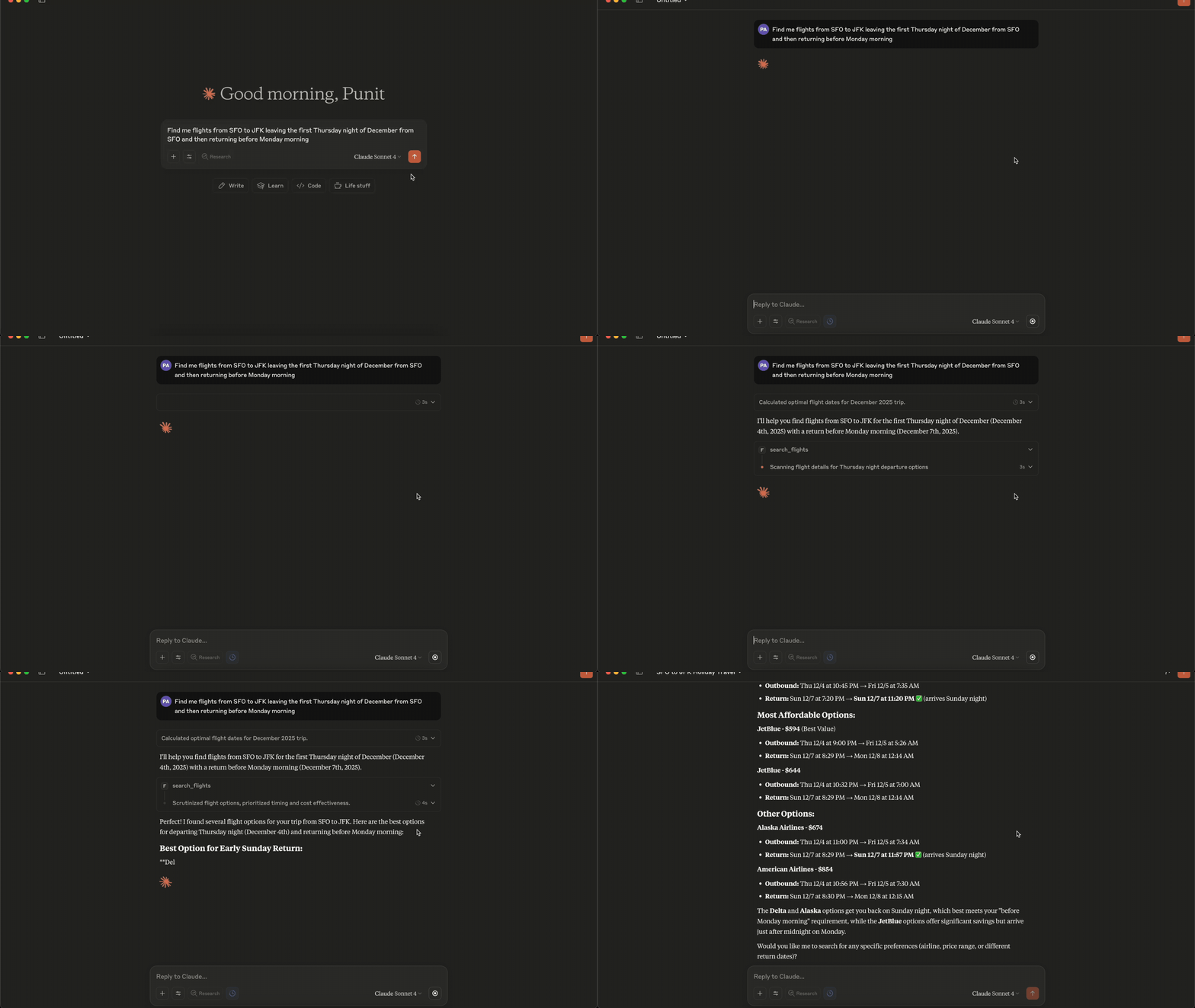
Connecting to Claude Desktop
{
  "mcpServers": {
    "fli": {
      "command": "/Users//.local/bin/fli-mcp"
    }
  }
}
Note: Replace `` with your actual username. You can also find the path to the MCP server by running
which fli-mcpin your terminal.
MCP Tools Available
The MCP server provides two main tools:
| Tool | Description |
|---|---|
search_flights |
Search for flights on a specific date with detailed filters |
search_dates |
Find the cheapest travel dates across a flexible date range |
search_flights Parameters
| Parameter | Type | Description |
|---|---|---|
origin |
string | Departure airport IATA code(s) — comma-separated for multi |
destination |
string | Arrival airport IATA code(s) — comma-separated for multi |
departure_date |
string | Travel date in YYYY-MM-DD format |
return_date |
string | Return date for round trips (optional) |
cabin_class |
string | ECONOMY, PREMIUM_ECONOMY, BUSINESS, or FIRST |
max_stops |
string | ANY, NON_STOP, ONE_STOP, or TWO_PLUS_STOPS |
departure_window |
string | Time window in ‘HH-HH’ format (e.g., ‘6-20’) |
airlines |
list | Filter by airline codes (e.g., [‘BA’, ‘AA’]) |
exclude_airlines |
list | Airline IATA codes to exclude (e.g., [‘DL’, ‘B6’]) |
alliance |
list | Restrict to alliances: ONEWORLD, SKYTEAM, STAR_ALLIANCE |
インストール
docker run --rm fli-dev make lint test-all設定
{
  "mcpServers": {
    "fli": {
      "command": "/Users/<user>/.local/bin/fli-mcp"
    }
  }
}