
このページは AI により自動翻訳されています。技術的な詳細は原文をご確認ください。 原文を見る
MCPとACPによるReact、Vue、Svelte、SolidJS、Preact&Next.jsアプリのAI搭載ビジュアルデバッグ
概要
AIはコードを読み込むことができますが、ランタイムで何が起きているのかは分かりません。 DevInspector は、ソースコードの場所、DOM の状態、スタイル、ネットワーク、コンソール、端末出力、スクリーンショットなど、欠落しているコンテキストを提供します。 : IDE の AI (Cursor, VSCode) を MCP 経由で使用したり、ACP (, , , , など) を介してブラウザで直接 AI エージェントを実行します。 DevInspectorのスキルをインストールして、エージェントは、検査員のセットアップとトラブルシューティング方法を知っているようにします。 [https://www.youtube.com/shorts/TCt2oOtPS_k] [https://x.com/yaoandyan/status/1995082020431753600] 任意の要素をクリックして、それを検査します。 AIは、ソースコードの場所、計算されたスタイル、コンポーネント階層、ID、クラス、テキストコンテンツ、およびピクセルごとの視覚理解のために、完全なコンテキストを取得します。 get page info は、URL、viewport、および表示ランドマーク、見出し、フォーム、リンクのセマンティックな理解で AI を提供します。 スクリーンショットなしでページ構造を操作できます.
概要(AI 翻訳)
AIコーディングエージェントの欠如したランタイムコンテキスト
AIはコードを読み込むことができますが、ランタイムで何が起きているのかは分かりません。 DevInspector は、ソースコードの場所、DOM の状態、スタイル、ネットワーク、コンソール、端末出力、スクリーンショットなど、欠落しているコンテキストを提供します。
2つのモード: IDEのAI(Cursor、VSCode)をMCP経由で使用したり、ACP(Claude Code、Codex CLI、Gemini CLI、OpenCodeを介してブラウザでAIエージェントを直接実行します。
クロードコードまたは別のAIエージェントの使用? DevInspectorのスキルをインストールして、エージェントは、検査員のセットアップとトラブルシューティング方法を知っているようにします。 ツイート ツイート
コンテンツの表
- デモビデオ
- ソーシャルメディア
- 主な特長
- クイックスタート
- インストール
- 自動セットアップ
- フレームワークのセットアップ
- エージェントスキル
- 構成
- 自動更新 MCP 設定
- エージェントのインストール
- カスタムエージェント
- MCP サーバー構成
- それが何をしているか
- 2つのワークフローモード
- MCPツール
- カスタム検査ツール
- MCP のプロンプト
- 建築
デモビデオ
デモを見る: https://www.youtube.com/shorts/TCt2oOtPS_k
##ソーシャルメディア
Twittter/X 投稿: https://x.com/yaoandyan/status/1995082020431753600
主な特長
##ビジュアルコンテキストと地域選択
このページは AI により自動翻訳されています。技術的な詳細は原文をご確認ください。
README
以下は原文 README の抜粋です。原文を見る。
dev-inspector-mcp


The missing runtime context for AI coding agents.
AI can read your code, but can’t see what’s happening at runtime. DevInspector provides the missing context: source code location, DOM state, styles, network, console, terminal output, and screenshots.
Two modes: Use with your IDE’s AI (Cursor, VSCode) via MCP, or run AI agents directly in the browser via ACP (Claude Code, Codex CLI, Gemini CLI, OpenCode, more).
Using Claude Code or another AI agent? Install the DevInspector skill so your agent knows how to set up and troubleshoot the inspector:
npx skills add mcpc-tech/dev-inspector-mcp
Table of Contents
- Demo Video
- Social Media
- Key Features
- Quick Start
- Agent Skills
- Configuration
- What It Does
- Two Workflow Modes
- MCP Tools
- Custom Inspector Tools
- MCP Prompts
- Architecture
Demo Video
Watch the demo: https://www.youtube.com/shorts/TCt2oOtPS_k
Social Media
Twittter/X Post: https://x.com/yaoandyan/status/1995082020431753600
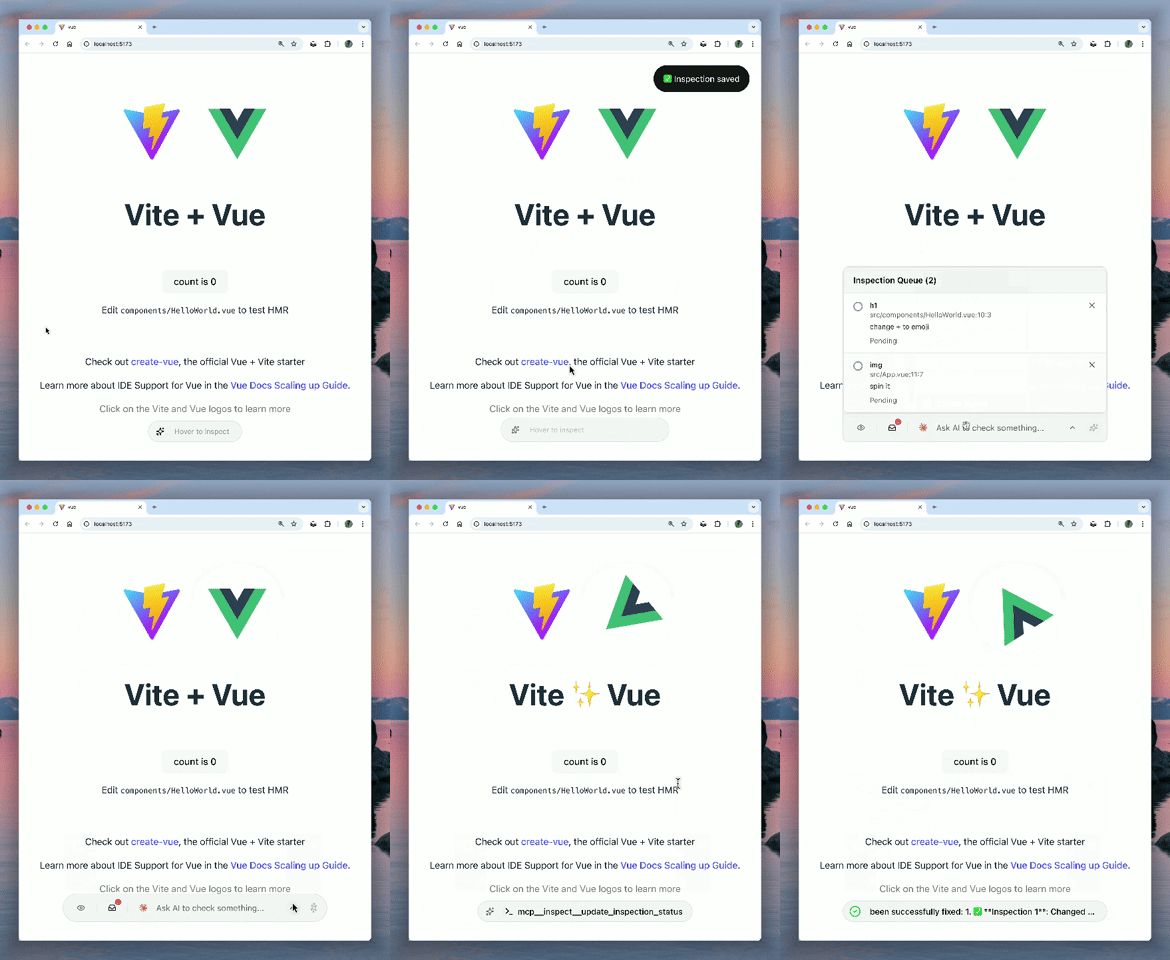
Key Features
Visual Context & Region Selection
Click any element to inspect it, or drag to select a region. AI gets the full context: source code location, computed styles, component hierarchy, IDs, classes, text content, and automatically captures screenshots for pixel-perfect visual understanding.
Page Overview & Accessibility Tree
get_page_info provides AI with a semantic understanding of the page: URL, viewport, and an accessibility tree showing landmarks, headings, forms, and links. AI can navigate the page structure without screenshots.
Universal DevTools Access
AI can access Network and Console logs from any browser (via client-side interception) or full Chrome DevTools (via chrome devtools mcp). It sees what you see, regardless of your environment.
インストール
npx @mcpc-tech/unplugin-dev-inspector-mcp setup