
lvl23ht/next-level-pentesting-using-claude-ai-with-burp-suite-community-via-mcp
Developer toolsこのページは AI により自動翻訳されています。技術的な詳細は原文をご確認ください。 原文を見る
Burp Suite Community Edition を使用しており、Burp Pro を必要としない強力な AI 支援でワークフローを過充電したい場合は、このガイドはあなたの心を吹き飛ばします.
概要
あなたが使用して、いくつかの強力なAI支援でワークフローを過給したいなら - Burp Proを必要としない - このガイドはあなたの心を吹き飛ばすつもりです。 Model Context Protocol (MCP) を使用して、Burp Suite を統合する方法を紹介します。 これにより、AI アシスタントは、ライブ HTTP 履歴の処理、リクエストの分析、脆弱性の特定、さらには悪用によるガイド、ペネテストフローのすべてが可能になります。 モデルコンテクストプロトコル(MCP)は、オープンフレームワークで、 橋になるように設計されており、Claudeのようなツールは、Burp Suiteのような技術環境で直接作業することができます。 MCP は、AI アシスタントを割り当てます: - 構造化されたツールの出力を分析 - 動的に新しいデータに応答 - ペンテストワークフローのインタラクティブな連携 リリースされたこのオープンスタンダードは、赤いチームで最先端のAIツーリングのバックボーンです.
概要(AI 翻訳)
ハックツールダークコミュニティのために作成されたロッジ投稿
Burp Suite Community Edition を使用しており、ワークフローを強力な AI 支援でスーパーチャージしたい場合 - Bullp Pro を必要としない - このガイドはあなたの心を吹き飛ばすつもりです。
Model Context Protocol (MCP) を使用して、Claude (Anthropic) で Burp Suite を統合する方法を紹介します。 これにより、AI アシスタントは、ライブ HTTP 履歴の処理、リクエストの分析、脆弱性の特定、さらには悪用によるガイド、ペネテストフローのすべてが可能になります。
お問い合わせ
MCPとは?
モデルコンテクストプロトコル(MCP)は、AIモデルとリアルタイムツール間の*同期相互作用を可能にするオープンフレームワークです**。 橋になるように設計されており、Claudeのようなツールは、Burp Suiteのような技術環境で直接作業することができます。
MCP は AI のアシスタントを割り当てます:
- 構造化されたツール出力を分析
- 動的に新しいデータに対応
- ペンテストワークフローでインタラクティブに連携
11月25日、2024にリリースされたこのオープン規格は、赤いチームで最先端のAIツーリングのバックボーンになりました。
- → 公式MCP お知らせ
- → テクニカルドキュメント
- → プロトコルの概要
お問い合わせ
アーキテクチャの概要
このページは AI により自動翻訳されています。技術的な詳細は原文をご確認ください。
README
以下は原文 README の抜粋です。原文を見る。
🧬 Next-Level Pentesting: Using Claude AI with Burp Suite Community via MCP
🚀 Post created for Hack Tools Dark Community
If you’re using Burp Suite Community Edition and want to supercharge your workflow with some powerful AI assistance – without needing Burp Pro – then this guide is going to blow your mind.
We’ll show you how to integrate Burp Suite with Claude (by Anthropic) using the Model Context Protocol (MCP). This allows your AI assistant to process live HTTP history, analyze requests, identify vulnerabilities, and even guide you through exploitation – all inside your pentest flow.
What is MCP?
Model Context Protocol (MCP) is an open framework that enables synchronous interaction between AI models and real-time tools. It’s designed to be a bridge, allowing tools like Claude to work directly with your technical environments like Burp Suite.
MCP lets AI assistants:
- Analyze structured tool output
- Respond dynamically to new data
- Collaborate interactively in pentest workflows
Released on November 25, 2024, this open standard is now the backbone of cutting-edge AI tooling in red team ops.
Architecture Overview
- MCP Server (in Burp Suite) – This extension exposes Burp’s internal data to external tools like Claude.
- Claude Desktop Integration – This links your local Claude AI with the MCP server, enabling 2-way sync.
Step-by-Step Setup (Win/macOS)
- Install Burp Suite Community Edition – Get it from PortSwigger and set it up. Or download it from here
- Load MCP Extension – Go to Extender > BApp Store, search for “MCP Server”, and click install.
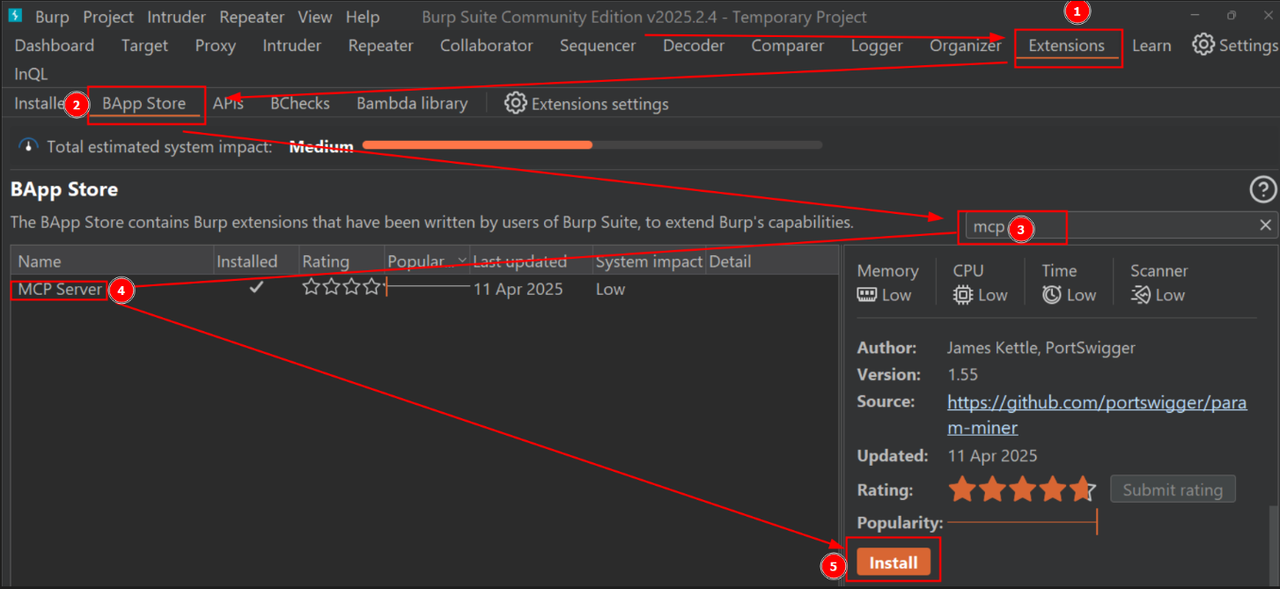
- Install Claude Desktop – Download from: https://claude.ai/download
→ Works only on Windows/macOS for now. - Enable MCP in Burp – Make sure the “MCP” tab is visible in Burp. If not, check if the extension is properly loaded under Installed Extensions.
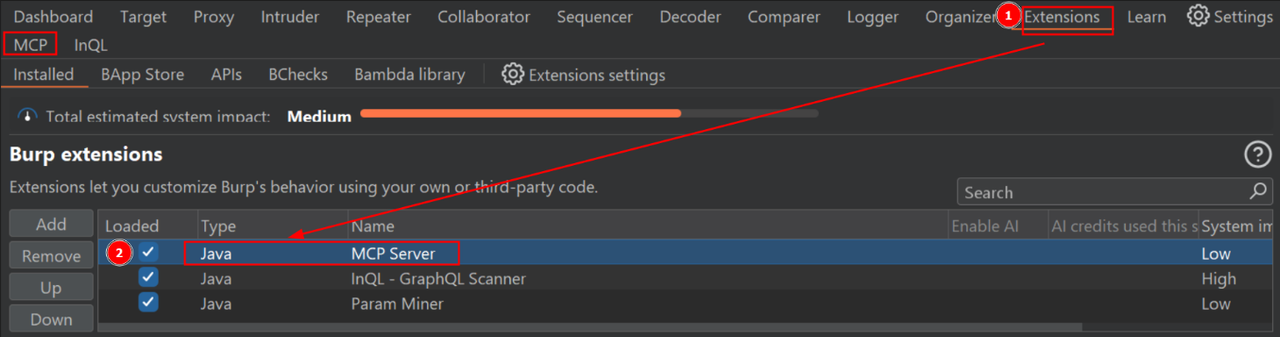
- Connect to Claude – Go to MCP tab, click Install to Claude Desktop. This generates a JSON config that links both tools.
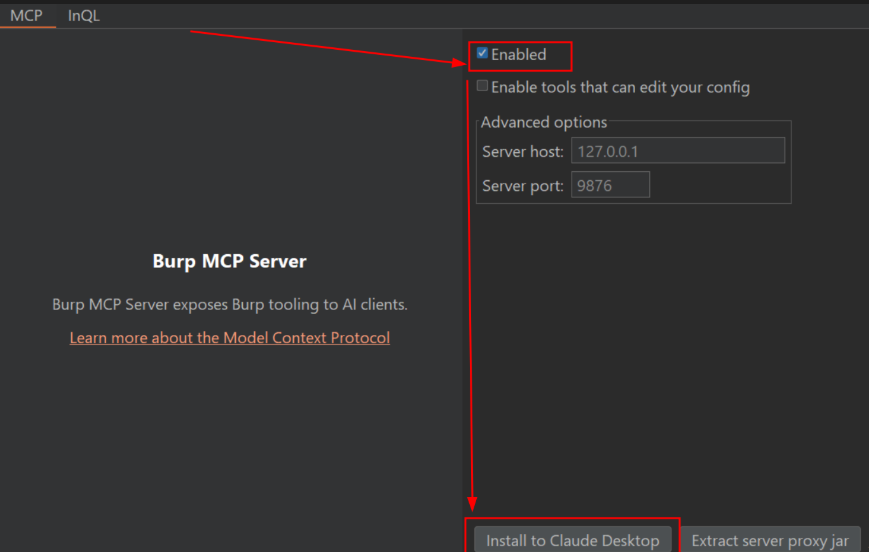
- Restart Claude Desktop – Essential to apply the configuration. After restarting, you should see an option in Claude like “Share context with Burp”.
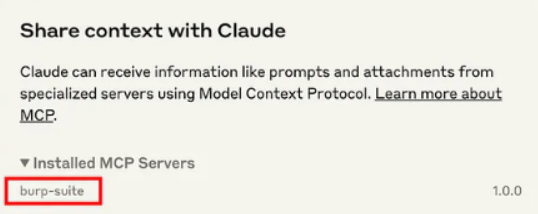
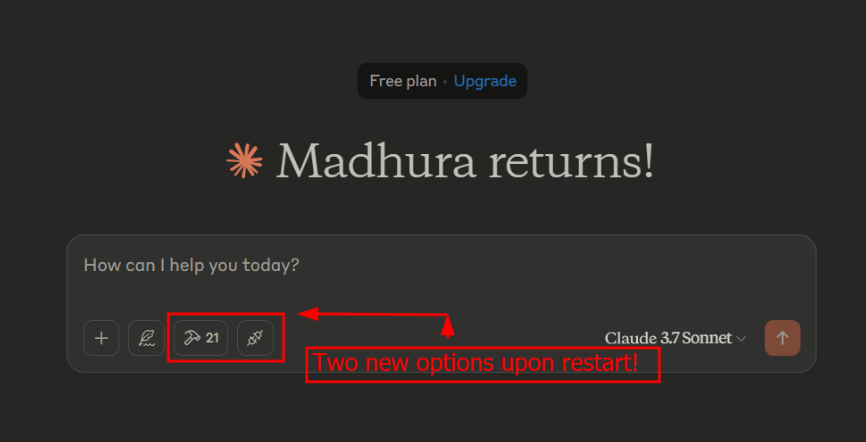
- Start Prompting – Launch your tests and fire up prompts in Claude Desktop.
Example Prompt
インストール
This server does not publish a one-line install command.
Open the repository installation guide MCP 初心者?mcpskill.org のガイドから始めましょう →