
kultivatorconsulting/pikvm_mcp_server
Developer toolsこのページは AI により自動翻訳されています。技術的な詳細は原文をご確認ください。 原文を見る
PiKVM MCP Server
概要
Give AI agents hands. This MCP server connects Claude Code (or any MCP client) directly to a PiKVM device, giving AI full keyboard, mouse, and screen access to a physical machine -- no browser automation, no virtual desktops, no emulators. Point it at real hardware. Let the AI see the screen, type commands, click buttons, and navigate GUIs on a machine it could never otherwise touch. A Raspberry Pi 5 controlled via PiKVM V4 Plus -- the AI's physical interface to the real world. IP-KVM devices translate mouse coordinates through multiple layers — USB HID emulation, host-side input drivers, display scaling — each introducing positional error. Existing KVM products either ignore this (requiring manual correction) or offer limited auto-sync that only detects cursor acceleration in a fixed corner region. This MCP server takes a different approach. The pikvm_auto_calibrate tool uses a vision-based algorithm that: 1. a known distance across multiple randomized screen positions 2.
README
以下は原文 README の抜粋です。原文を見る。
PiKVM MCP Server

Give AI agents hands. This MCP server connects Claude Code (or any MCP client) directly to a PiKVM device, giving AI full keyboard, mouse, and screen access to a physical machine – no browser automation, no virtual desktops, no emulators.
Point it at real hardware. Let the AI see the screen, type commands, click buttons, and navigate GUIs on a machine it could never otherwise touch.
A Raspberry Pi 5 controlled via PiKVM V4 Plus – the AI’s physical interface to the real world.
Automatic Mouse Calibration
IP-KVM devices translate mouse coordinates through multiple layers — USB HID emulation, host-side input drivers, display scaling — each introducing positional error. Existing KVM products either ignore this (requiring manual correction) or offer limited auto-sync that only detects cursor acceleration in a fixed corner region.
This MCP server takes a different approach. The pikvm_auto_calibrate tool uses a vision-based algorithm that:
- Moves the cursor a known distance across multiple randomized screen positions
- Diffs screenshot pairs to isolate the cursor via connected-component analysis
- Computes correction factors from detected vs commanded movement using median aggregation
- Self-verifies by moving to target positions and confirming the cursor lands within 20px
The entire process runs in ~30-60 seconds with no human intervention. Noisy screens (tooltips, animations, dynamic content) are handled through multi-round sampling, ratio divergence filtering, and outlier-resistant statistics — the algorithm discards bad data and still converges on accurate factors.
This is the first IP-KVM tooling — commercial or open source — to implement fully automated mouse coordinate calibration via computer vision. It is what makes precise AI-driven mouse control over a network KVM practical.
See it in action
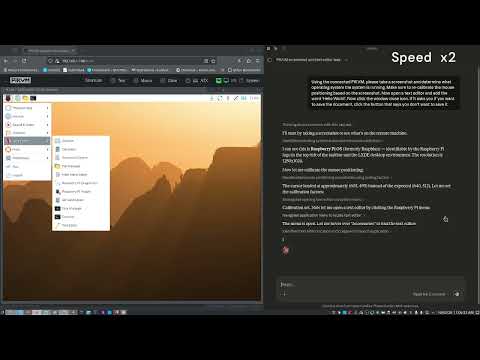
The video below shows Claude Code using this MCP server to autonomously interact with a Raspberry Pi desktop: taking a screenshot to identify the OS, opening a text editor from the menu, typing text, and closing the application – all through the PiKVM hardware interface.
インストール
This server does not publish a one-line install command.
Open the repository installation guide MCP 初心者?mcpskill.org のガイドから始めましょう →設定
{
  "mcpServers": {
    "pikvm": {
      "command": "node",
      "args": ["/path/to/pikvm_mcp_server/dist/index.js"],
      "env": {
        "PIKVM_HOST": "https://<your-pikvm-ip>",
        "PIKVM_USERNAME": "admin",
        "PIKVM_PASSWORD": "your_password"
      }
    }
  }
}