
jparkerweb/mcp-sqlite
Database managementこのページは AI により自動翻訳されています。技術的な詳細は原文をご確認ください。 原文を見る
jparkerweb/mcp-sqlite は、https://github.com/jparkerweb/mcp-sqlite. からインポートされたMCPサーバー候補です。
概要
jparkerweb/mcp-sqlite は、https://github.com/jparkerweb/mcp-sqlite. からインポートされたMCPサーバー候補です。
概要(AI 翻訳)
これは包括的なSQLiteデータベースインタラクション機能を提供するモデルコンテキストプロトコル(MCP)サーバーです。
メンテナンス
特徴
- CRUD操作(作成、読み取り、更新、削除)を完了する
- データベース探索と内省
- カスタムSQLクエリの実行
セットアップ
IDEのMCPサーバー設定でコマンドを定義してください:
例:Cursor:
例:VSCode:
データベースパスは引数として提供されなければなりません。
利用可能なツール
データベース情報
db_info
接続されたデータベースの詳細情報を入手しましょう。
例:
list_tables
データベース内のすべてのテーブルをリストアップします。
例:
get_table_schema
テーブルのスキーマについて詳細な情報を入手しましょう。
パラメータ:
tableName(文字列):テーブル名
例:
CRUDオペレーションズ
create_record
新しいレコードをテーブルに挿入します。
パラメータ:
table(文字列):テーブル名data(オブジェクト):キーと値のペアとしてデータを記録する
例:
####read_records
オプションのフィルタリングでテーブルからレコードをクエリします。
パラメータ:
table(文字列):テーブル名conditions(オブジェクト、任意):キーと値のペアとしてのフィルター条件
このページは AI により自動翻訳されています。技術的な詳細は原文をご確認ください。
README
以下は原文 README の抜粋です。原文を見る。
🐇 MCP SQLite Server
This is a Model Context Protocol (MCP) server that provides comprehensive SQLite database interaction capabilities.

Maintained by
Features
- Complete CRUD operations (Create, Read, Update, Delete)
- Database exploration and introspection
- Execute custom SQL queries
Setup
Define the command in your IDE’s MCP Server settings:
e.g. Cursor:
{
    "mcpServers": {
        "MCP SQLite Server": {
            "command": "npx",
            "args": [
                "-y",
                "mcp-sqlite",
                ""
            ]
        }
    }
}
e.g. VSCode:
{
    "servers": {
        "MCP SQLite Server": {
            "type": "stdio",
            "command": "npx",
            "args": [
                "-y",
                "mcp-sqlite",
                ""
            ]
        }
    }
}
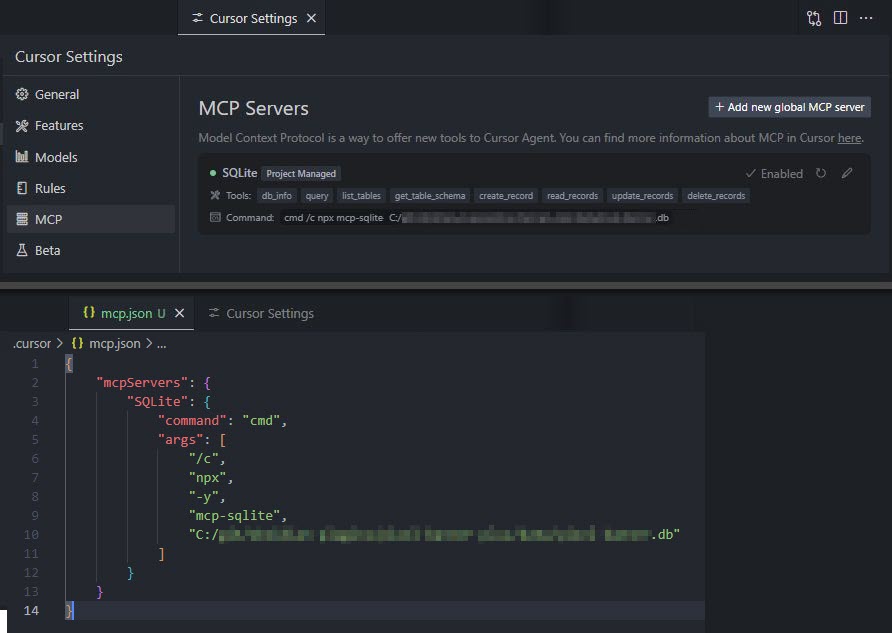
Your database path must be provided as an argument.
Available Tools
Database Information
db_info
Get detailed information about the connected database.
Example:
{
  "method": "tools/call",
  "params": {
    "name": "db_info",
    "arguments": {}
  }
}
list_tables
List all tables in the database.
Example:
{
  "method": "tools/call",
  "params": {
    "name": "list_tables",
    "arguments": {}
  }
}
get_table_schema
Get detailed information about a table’s schema.
Parameters:
tableName(string): Name of the table
Example:
{
  "method": "tools/call",
  "params": {
    "name": "get_table_schema",
    "arguments": {
      "tableName": "users"
    }
  }
}
CRUD Operations
create_record
Insert a new record into a table.
Parameters:
table(string): Name of the tabledata(object): Record data as key-value pairs
Example:
{
  "method": "tools/call",
  "params": {
    "name": "create_record",
    "arguments": {
      "table": "users",
      "data": {
        "name": "John Doe",
        "email": "[email protected]",
        "age": 30
      }
    }
  }
}
read_records
Query records from a table with optional filtering.
Parameters:
table(string): Name of the tableconditions(object, optional): Filter conditions as key-value pairslimit(number, optional): Maximum number of records to returnoffset(number, optional): Number of records to skip
インストール
npx -y mcp-sqlite <path-to-your-sqlite-database.db>設定
{
    "mcpServers": {
        "MCP SQLite Server": {
            "command": "npx",
            "args": [
                "-y",
                "mcp-sqlite",
                "<path-to-your-sqlite-database.db>"
            ]
        }
    }
}