
hushvert/mcp
Developer toolsこのページは AI により自動翻訳されています。技術的な詳細は原文をご確認ください。 原文を見る
File conversion for AI agents: MCP server over the hushvert hosted API (office docs, PDF to Word, video, LLM-ready markdown)
概要
@hushvert/mcp is a Model Context Protocol server that gives an AI coding agent (Claude Code, Cursor, Cline, Zed, and any other MCP host) a convert_file tool over the hushvert hosted API. When a task needs a conversion a browser cannot do - office documents to PDF, PDF to Word, large video transcodes - the agent converts the file in one tool call, and the result is written next to the input. No upload code, no polling, no glue. It is a thin client over the hushvert hosted API. For the conversions that DO run in a browser (images, HEIC, archives, audio, small video, PDF page ops), use the free, open-source @hushvert/engine package instead - this server will refuse those and point you there. A real run in Claude Code, recorded live and not sped up: ask, and report.pdf is written next to the input. The whole turn took 23 seconds, of which the conversion itself was about 7.
README
以下は原文 README の抜粋です。原文を見る。
@hushvert/mcp


A file-conversion tool for your AI agent.
@hushvert/mcp is a Model Context Protocol
server that gives an AI coding agent (Claude Code, Cursor, Cline, Zed, and any
other MCP host) a convert_file tool over the hushvert hosted API. When a task
needs a conversion a browser cannot do - office documents to PDF, PDF to Word,
large video transcodes - the agent converts the file in one tool call, and the
result is written next to the input. No upload code, no polling, no glue.
It is a thin client over the hushvert hosted API. For the
conversions that DO run in a browser (images, HEIC, archives, audio, small video,
PDF page ops), use the free, open-source @hushvert/engine
package instead - this server will refuse those and point you there.
Demo
A real run in Claude Code, recorded live and not sped up: ask, and report.pdf is
written next to the input. The whole turn took 23 seconds, of which the conversion
itself was about 7.

The recording starts Claude Code with only this server loaded
(--strict-mcp-config) so nothing unrelated is on screen. The tape that produced
it is assets/demo.tape,
if you want to reproduce it.
Claude Code can already convert files. Why this?
Because it can only convert what your machine can convert, and when it cannot, it does not fail loudly.
Ask any coding agent to turn report.docx into a PDF. If LibreOffice is
installed, it will shell out to soffice, do a good job, and you do not need this
server. If LibreOffice is not installed, and it is not there by default on macOS,
on Windows, or in a typical CI image, the usual fallback is pandoc. Pandoc does
not really convert a Word document. It reads the text into its own AST, hands that
to LaTeX, and LaTeX typesets a new document. You get a PDF. The agent reports
success. Nobody opens the file.
Here is the same report.docx down both paths:
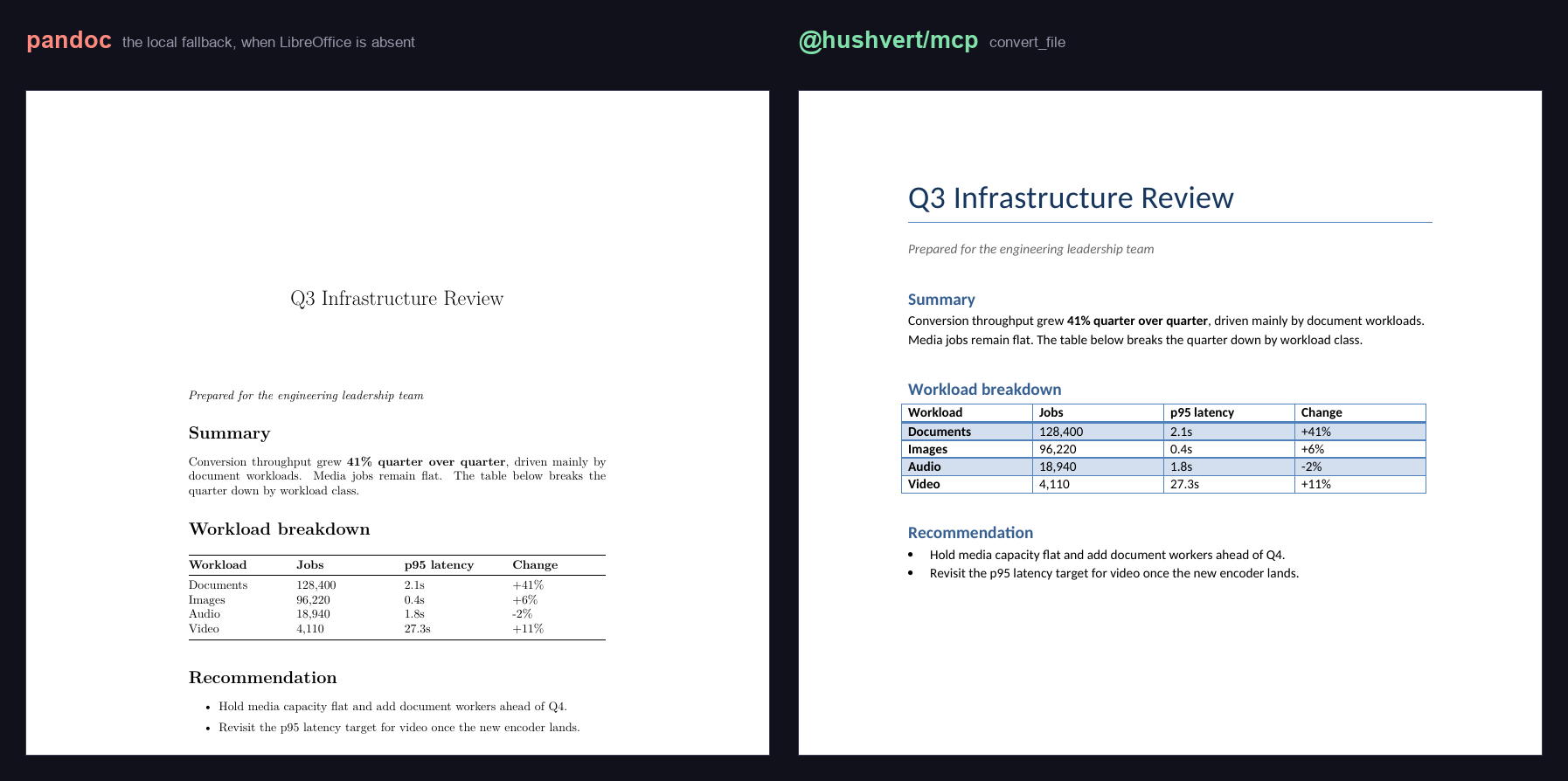
Same words, different document. Every font in the pandoc PDF is Latin Modern,
LaTeX’s default. The heading color is gone, the table lost its Word styling, and
the title moved into a centered LaTeX title block. pdffonts on the two outputs:
pandoc LMRoman17-Regular, LMRoman12-Bold, LMRoman10-Italic, ...インストール
npx -y @hushvert/mcp設定
{
  "mcpServers": {
    "hushvert": {
      "command": "npx",
      "args": ["-y", "@hushvert/mcp"],
      "env": { "HUSHVERT_API_KEY": "hv_live_your_key_here" }
    }
  }
}