
hope1026/weppy-roblox-mcp
Developer toolsこのページは AI により自動翻訳されています。技術的な詳細は原文をご確認ください。 原文を見る
Roblox Studio MCP サーバー & Claude Code, Cursor, Codex, Gemini 用のプラグイン. AI搭載スクリプト、地形、アセット、照明、双方向プロジェクトを同期.
概要
roblox Studio AI開発製品です。 人工知能アプリの接続とライブスタジオのコントロールが含まれます。 Claudeコード、Codex、およびAntigravityは、クライアントネイティブセットアップとワークフローガイダンスのオプションをインストールすることもできます。 Claude、Codex、GeminiなどのAIコーディングエージェントは強力ですが、Roblox Studio内で何かを見たり変更したりすることはできません。 DataModel、スクリプト、地形、照明は外部ツールに見えない。 ブリッジがなければ、AIは手動で貼り付けなければならないコードスニペットだけを生成できます。 AI エージェントを . AIは、インスタンス、スクリプト、プロパティ、テライン、およびスタジオ内の複数の内部を直接作成および変更し、変更はスタジオおよびダッシュボードですぐに反映され、変更が正確に確認できるようにします。 WEPPYは、複数の場所で分割されているRoblox体験にも構築されています。 ロビー、ゲーム、ショップ、チュートリアル、またはその他の場所用の5つのスタジオウィンドウを開き、スタジオIDを使用するエージェントを指示します.
概要(AI 翻訳)
WEPPY Roblox AI ToolkitはRoblox Studio AI開発製品です。 ライブスタジオコントロール用のWEPPY MCP ServerとWEPPY Roblox Studio Pluginが含まれています。 Claudeコード、Codex、およびAntigravityは、クライアントネイティブセットアップとワークフローガイダンス用のオプションWEPPY AI Agent Pluginをインストールすることもできます。
マルチプレイススタジオワーク・生成アセットをロブックス・双方向同期・自動プレイテスト・UI Studio
※英語は必須です。 | English | | 日本語 | Español | 中国語 | 繁体字 | 繁体字
なぜWEPPY Roblox AI Toolkit?
Claude、Codex、GeminiなどのAIコーディングエージェントは強力ですが、Roblox Studio内で何かを見たり変更したりすることはできません。 DataModel、スクリプト、地形、照明は外部ツールに見えない。 ブリッジがなければ、AIは手動で貼り付けなければならないコードスニペットだけを生成できます。
WEPPY MCP Server は、AI エージェントを [WEPPY Roblox Studio Plugin] に接続します。AI は、インスタンス、スクリプト、プロパティ、テライン、およびスタジオ内で直接インスタンスを作成および変更し、変更がスタジオおよびダッシュボードですぐに反映されるため、変更内容が正確に変更されます.
このページは AI により自動翻訳されています。技術的な詳細は原文をご確認ください。
README
以下は原文 README の抜粋です。原文を見る。
WEPPY Roblox AI Toolkit — AI Game Development for Roblox Studio
WEPPY Roblox AI Toolkit is a Roblox Studio AI development product. It includes the WEPPY MCP Server for AI app connections and the WEPPY Roblox Studio Plugin for live Studio control. Claude Code, Codex, and Antigravity can also install the optional WEPPY AI Agent Plugin for client-native setup and workflow guidance.
Multi-Place Studio work · Generated assets to Roblox · Bidirectional sync · Automated playtest · UI Studio
English | 한국어 | 日本語 | Español | Português | Bahasa Indonesia | Deutsch
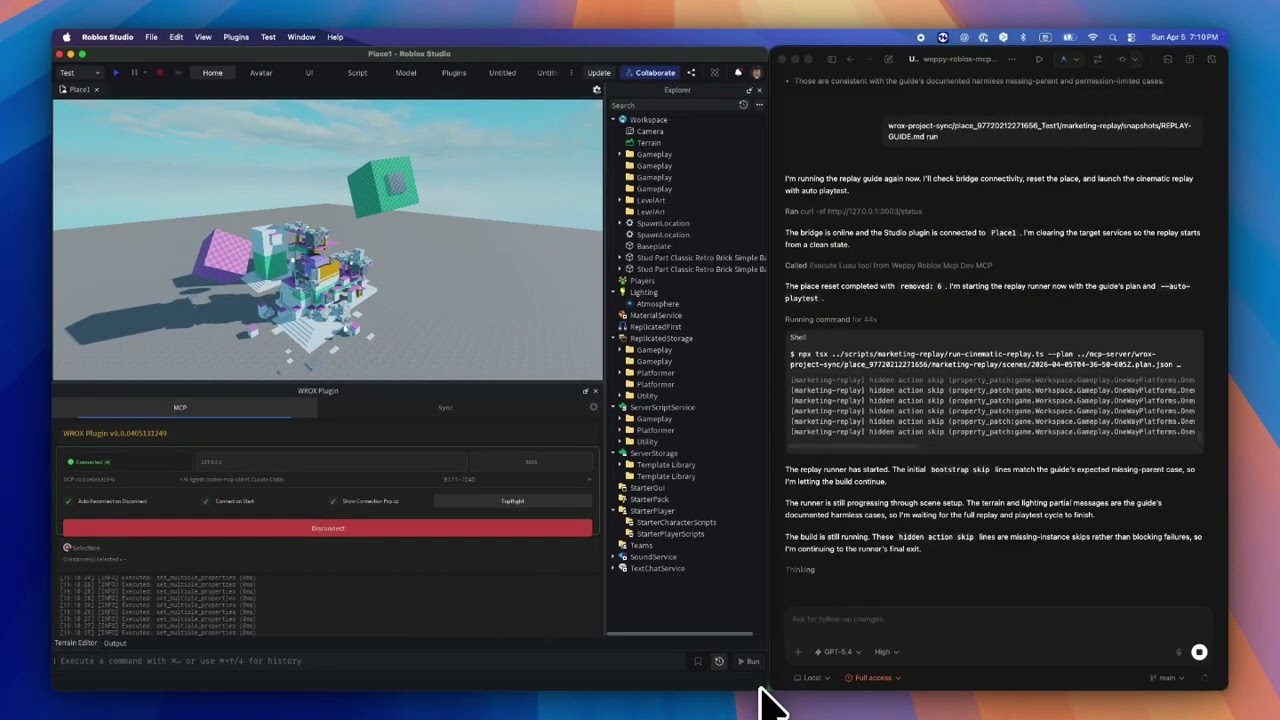
Why WEPPY Roblox AI Toolkit?
AI coding agents like Claude, Codex, and Gemini are powerful, but they cannot see or modify anything inside Roblox Studio. The DataModel, scripts, terrain, and lighting are invisible to external tools. Without a bridge, AI can only generate code snippets that you must paste manually.
The WEPPY MCP Server connects AI agents to the WEPPY Roblox Studio Plugin. AI directly creates and modifies instances, scripts, properties, terrain, and more inside Studio, and the changes are reflected immediately in Studio and the dashboard so you can see exactly what changed.
WEPPY is also built for Roblox experiences that are split across several Places. Open up to five Studio windows for Lobby, Game, Shop, Tutorial, or other Places, then tell the agent which Studio ID to use. One request can update several Places without re-explaining context or copying changes by hand.
For assets, an agent can create or prepare an image, save it to the Asset Library, upload it through Roblox Open Cloud, and apply the returned asset URI to a Place. The result is a shorter path from “make this icon/decal” to “it is visible in Studio.”
No copy-pasting code or asset IDs. AI does the work, you review the results.
Quick Install
Start from the web install page. It shows the recommended one-line script for your platform first.
Recommended One-Line Install
On the install page, copy the one-line script and run it in Terminal or PowerShell.
macOS / Linux
curl -fsSL https://raw.githubusercontent.com/hope1026/weppy-roblox-mcp/main/install.sh | bash
Windows (PowerShell)
irm https://raw.githubusercontent.com/hope1026/weppy-roblox-mcp/main/install.ps1 | iex
Then reopen your AI app and restart Roblox Studio.
Automatic WEPPY MCP Server registration supports Claude Code, Claude Desktop, Cursor, Codex CLI/App, Gemini CLI, and Antigravity / Antigravity IDE / Antigravity CLI.
インストール
npx -y @weppy/roblox-mcp@latest