
elliotttate/splicekit
Developer toolsこのページは AI により自動翻訳されています。技術的な詳細は原文をご確認ください。 原文を見る
elliotttate/splicekitは、https://github.com/elliotttate/splicekit.からインポートされたMCPサーバー候補です。
概要
elliotttate/splicekitは、https://github.com/elliotttate/splicekit.からインポートされたMCPサーバー候補です。
概要(AI 翻訳)
Final Cut Pro、アンロック済み。コマンドパレット、MCPサーバー、そしてほぼ何でもできるオープンプラグインフレームワーク。
| 🎹 コマンドパレット | 🤖 MCPサーバー | 🧩プラグインフレームワーク |
|---|---|---|
Cmd+Shift+Pを押して、入力したいものを入力してください。Apple Intelligenceがそれを管理します。 |
どんなLLMでもあなたのタイムラインを読み編集し、進めながら新しいツールを作ることができます。 | すべての組み込み機能はあくまで例のプラグインに過ぎません。あなた(またはAI)はもっと多く出荷できます。 |
編集者?ここから始めましょう。 公式のSpliceKitサイトとFAQが最も親切なアクセス方法です。質問、ヘルプ、機能リクエストはありますか?FCPカフェのDiscordでSpliceKitチャンネルに参加してください。バグ報告:GitHubの問題を開いてください。
あなたがこれでどう扱うのか楽しみです。🥳
三本柱
🎹 1。コマンドパレット
一鍵で何かに。
パッチされたFCP内でCmd+Shift+Pを押してください。100+の内蔵編集アクション(ブレード、トリム、色、速度、マーカー、エフェクト、トランジション、エクスポート)をファジー検索するか、平易な英語で入力してApple Intelligence(オンデバイス、非公開)に任せてください。
言ってみて…
- 「5秒ごとにマーカーを追加」
- 「このクリップを半速に減速」
- 「シーン交代のたびに刃」
- 「すべての沈黙を取り除け」
このページは AI により自動翻訳されています。技術的な詳細は原文をご確認ください。
README
以下は原文 README の抜粋です。原文を見る。
SpliceKit




Final Cut Pro, unlocked. A Command Palette, MCP server, and an open plugin framework to do almost anything.
SpliceKit v4
This is the official and original repository for SpliceKit.
It is still maintained - however progress is slow, as we’re busy with other jobs (hence all the open pull requests).
However, SpliceKit v4 is a fork, that’s now available on FCP Cafe that is more actively maintained and updated.
| 🎹 Command Palette | 🤖 MCP Server | 🧩 Plugin Framework |
|---|---|---|
Hit Cmd+Shift+P and type what you want. Apple Intelligence runs it. |
Any LLM can read and edit your timeline — and build new tools as it goes. | Every built-in feature is just an example plugin. You (or an AI) can ship more. |
Editor? Start here. The official SpliceKit site and the FAQ are the friendliest way in. Questions, help, or feature requests? Join the SpliceKit channels on the FCP Cafe Discord. Bug reports: open a GitHub issue.
Can’t wait to see what you do with it. 🥳
The Three Pillars
🎹 1. The Command Palette
One keystroke to anything.
Hit Cmd+Shift+P inside the patched FCP. Fuzzy-search 100+ built-in editing actions — blade, trim, color, speed, markers, effects, transitions, export — or type plain English and let Apple Intelligence (on-device, private) figure out what you meant.
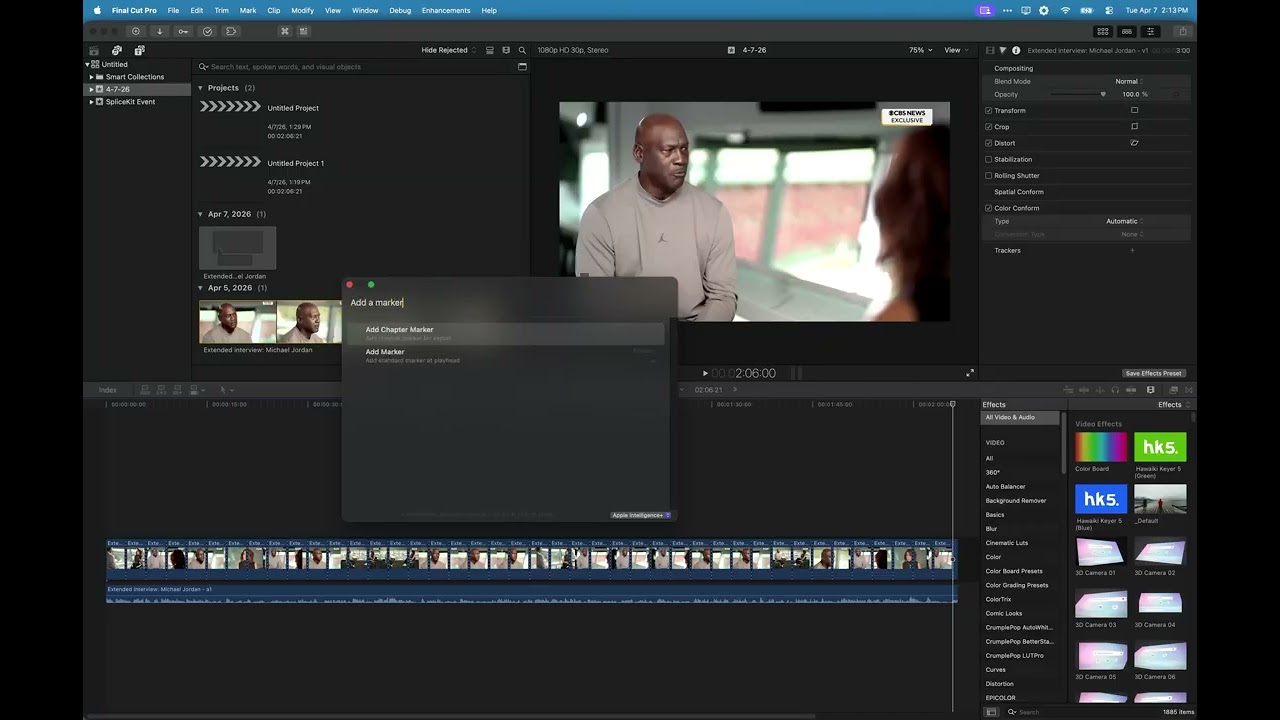
Try saying…
- “add markers every 5 seconds”
- “slow this clip to half speed”
- “blade at every scene change”
- “remove all the silences”
- “add a cross dissolve”
No more menu hunting. No more memorizing shortcuts. No cloud.
🤖 2. The MCP Server
Claude (or any other LLM) can drive your editor — and teach it new tricks.
SpliceKit ships with an MCP server that exposes ~200 tools covering every major FCP subsystem. Point Claude Code, Claude Desktop, or any MCP-compatible AI client at it and you can say things like:
- “cut this 40-minute interview down to its best moments”
- “remove the silences from this podcast, add captions, and export”
- “assemble a rough cut from these clips, synced to the beat of this song”
インストール
This server does not publish a one-line install command.
Open the repository installation guide MCP 初心者?mcpskill.org のガイドから始めましょう →設定
{
  "mcpServers": {
    "splicekit": {
      "command": "/Users/yourname/.venvs/splicekit-mcp/bin/python",
      "args": ["/absolute/path/to/SpliceKit/mcp/server.py"]
    }
  }
}