
dejuknow/md-redline
Developer toolsこのページは AI により自動翻訳されています。技術的な詳細は原文をご確認ください。 原文を見る
マークダウン仕様のインラインレビューコメント。 内蔵のMCPサーバーは、AIエージェントに直接フィードバックを残します.
概要
マークダウンの仕様、プロンプト、およびデザインドキュメントのインラインレビューコメント。 レンダリングされた文書のテキストを強調表示し、コメントを残して、AIエージェントはそれらを直接読み、対処することができます。 コメントは、.mdファイル自体の目に見えないHTMLマーカーとして保存されます。 サイドカーファイル、データベースなし、外部サービスなし。 マークダウンファイルが真理の源泉にとどまります。 組み込みのMCPサーバーでは、両方の指示で動作します。 あなたのエージェントは、あなたのフィードバックを送信するまで、またはあなたが書いたドキュメントをレビューし、あなたのためのアンカーコメントを残します。 いずれかの方法:コピーペーストなし、コンテキスト切り替えなし。 [https://github.com/user-attachments/assets/8b9b3546-a895-42e1-b3cc-5ee5b2c00398] Claudeコード、Claudeデスクトップ、Codex CLI、Gemini CLI、およびstdioサーバーをサポートするその他のMCPクライアントで動作します。 仕様のシーン・グローブ・アーガは新しいコードなので、仕様は、代理開発における作業の一次ユニットになっています。 mdrは、コードレビューに近いワークフローレビューツールを提供します.
概要(AI 翻訳)
マークダウンの仕様、プロンプト、およびデザインドキュメントのインラインレビューコメント。
レンダリングされた文書のテキストを強調表示し、コメントを残して、AIエージェントはそれらを直接読み、対処することができます。 [.md]ファイル自体に見えないHTMLマーカーとして保存されます。 サイドカーファイル、データベースなし、外部サービスなし。 マークダウンファイルが真理の源泉にとどまります。
組み込みのMCPサーバーでは、両方の指示で動作します。 あなたのエージェントは、あなたのフィードバックを送信するまで、またはあなたが書いたドキュメントをレビューし、あなたのためのアンカーコメントを残します。 いずれかの方法:コピーペーストなし、コンテキスト切り替えなし。
約30秒でフルレビューワークフローを参照してください。
[https://github.com/user-attachments/assets/8b9b3546-a895-42e1-b3cc-5ee5b2c00398]
Claudeコード、Claudeデスクトップ、Codex CLI、Gemini CLI、およびstdioサーバーをサポートするその他のMCPクライアントで動作します。 シーン・グローブは、仕様の議論が新しいコードであるので、仕様は、エージェント開発における作業の第一次ユニットになっています。 [mdr]]は、コードレビューに近いワークフローレビューツールを提供します。
クイックスタート
前提条件: Node 20 または newer
必要に応じてローカルアプリを起動し、ブラウザで開きます。
またはグローバルにインストールします
このページは AI により自動翻訳されています。技術的な詳細は原文をご確認ください。
README
以下は原文 README の抜粋です。原文を見る。
md-redline

Inline review comments for markdown specs, prompts, and design docs.
Highlight text in a rendered document, leave comments, and your AI agent can read and address them directly. Comments are stored as invisible HTML markers in the .md file itself. No sidecar files, no database, no external service. The markdown file stays the source of truth.
With the built-in MCP server, review runs in both directions. Your agent can request your review mid-task and pause until you send your feedback, or review a doc you wrote and leave anchored comments for you. Either way: no copy-paste, no context switching.
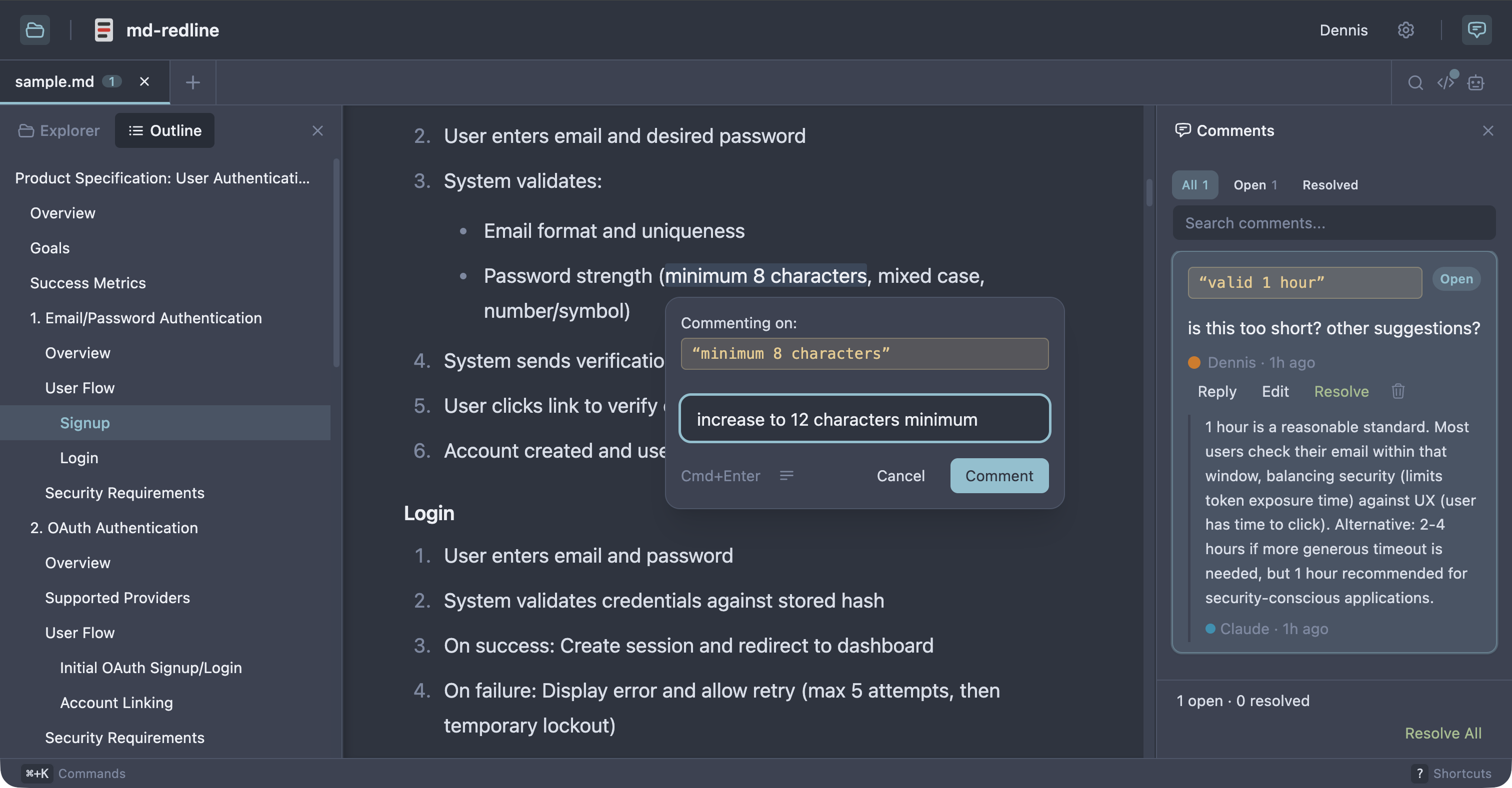
See the full review workflow in about 30 seconds:
https://github.com/user-attachments/assets/8b9b3546-a895-42e1-b3cc-5ee5b2c00398
Works with Claude Code, Claude Desktop, Codex CLI, Gemini CLI, and any other MCP client that supports stdio servers. As Sean Grove argues in specs are the new code, specs are becoming the primary unit of work in agentic development. mdr gives that workflow review tooling closer to code review.
Quick start
Prerequisite: Node 20 or newer.
npx md-redline /path/to/spec.md
This starts the local app if needed and opens it in your browser.
Or install globally:
npm install -g md-redline
mdr /path/to/spec.md        # Open a file
mdr /path/to/dir             # Open a directory
mdr --stop                   # Stop the running server
mdr sessions                 # List open review sessions (--kill ID ends one)
md-redline also works as an alias for mdr.
That gives you the viewer and commenting. The agent integration (reviews in both directions, anchored questions) comes from the MCP server, registered in the next section.
Updating
mdr checks npm once a day (from its local server, never blocking anything) and shows a small notice in the viewer and the terminal when a new version is out. Upgrading is one command:
npm install -g md-redline@latest
The running server restarts itself on the next mdr invocation after an
upgrade. To disable update checks entirely, set NO_UPDATE_NOTIFIER=1 (or
run in CI, which is auto-detected). Note this is a presence check, following
the ecosystem convention: any value, even 0 or empty, disables the checks.
MCP setup
Register the MCP server with your agent so it can request reviews mid-task.
Claude Code or Claude Desktop
mdr mcp install                   # register with both clients (default)
mdr mcp install --claude-code # just Claude Code (via `claude mcp add`)インストール
npx md-redline /path/to/spec.md設定
{
  "mcpServers": {
    "md-redline": {
      "command": "mdr",
      "args": ["mcp"]
    }
  }
}