
このページは AI により自動翻訳されています。技術的な詳細は原文をご確認ください。 原文を見る
🪐 🔧 Jupyter MCP Tools.
概要
This extension is composed of a Python package named jupyter_mcp_tools for the server extension and a NPM package named @datalayer/jupyter-mcp-tools for the frontend extension. It enables the use of JupyterLab commands as MCP tools. This extension is used by jupyter-mcp-server to enable JupyterLab commands such as opening notebooks through MCP tools. The extension supports two execution modes for JupyterLab commands: - : Commands are executed directly within the JupyterLab frontend using the built-in command registry - : Immediate execution without WebSocket communication - : Testing commands and direct UI interaction within JupyterLab itself - : Calls app.commands.
README
以下は原文 README の抜粋です。原文を見る。


🪐✨ Jupyter MCP Tools


This extension is composed of a Python package named jupyter_mcp_tools
for the server extension and a NPM package named @datalayer/jupyter-mcp-tools
for the frontend extension.
It enables the use of JupyterLab commands as MCP tools.
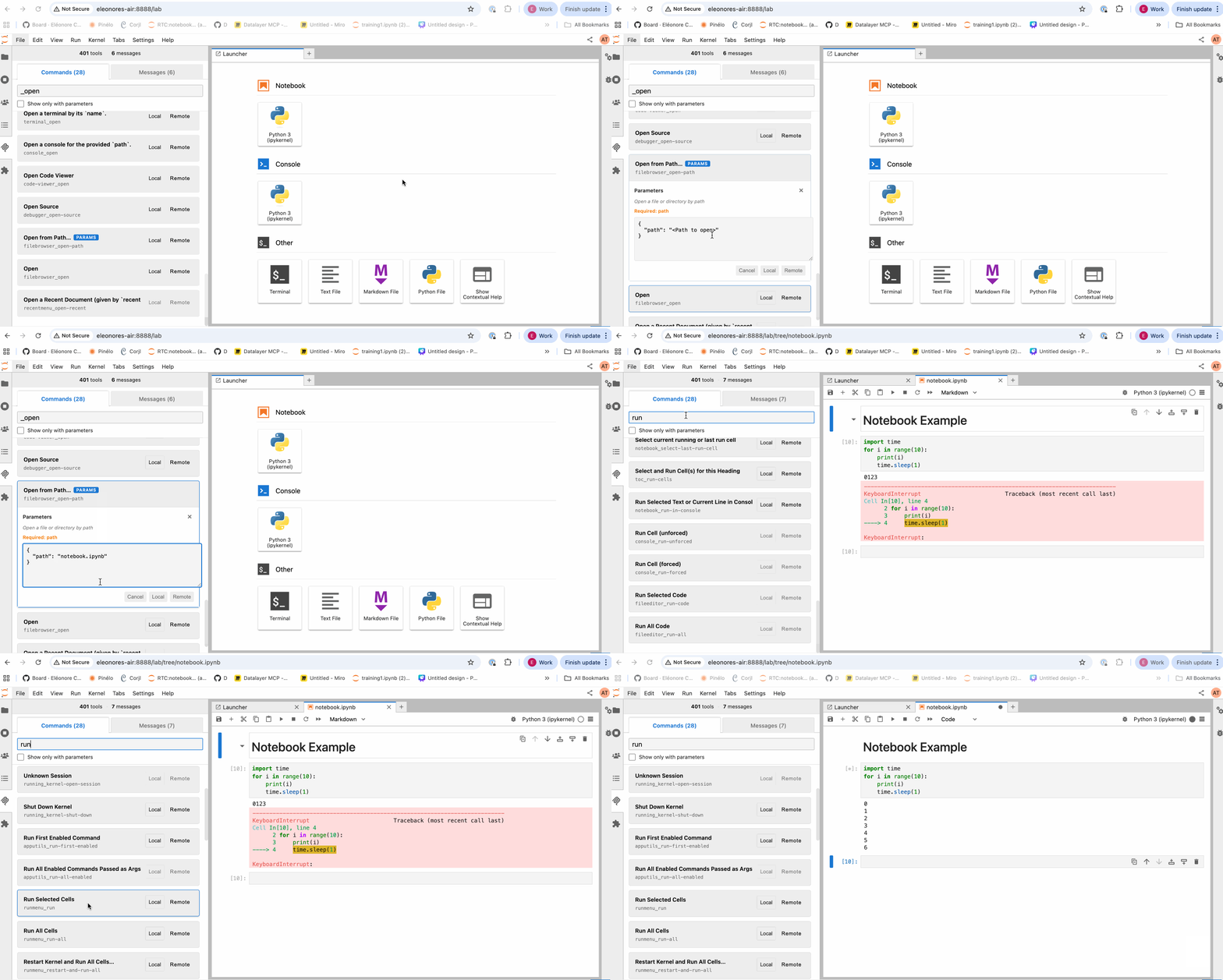
This extension is used by jupyter-mcp-server to enable JupyterLab commands such as opening notebooks through MCP tools.
Execution Modes
The extension supports two execution modes for JupyterLab commands:
Local Mode
- Direct Execution: Commands are executed directly within the JupyterLab frontend using the built-in command registry
- No Network Required: Immediate execution without WebSocket communication
- Use Case: Testing commands and direct UI interaction within JupyterLab itself
- Implementation: Calls
app.commands.execute()directly in the browser
Remote Mode
- WebSocket Communication: Commands are sent via WebSocket to the backend server extension
- External Access: Enables external MCP clients to execute JupyterLab commands remotely
- Use Case: Integration with AI agents and MCP clients like jupyter-mcp-server
- Implementation: Messages are transmitted through WebSocket protocol to backend handlers
The remote mode is what makes this extension valuable for MCP integration - it allows AI agents to trigger JupyterLab commands (like opening notebooks, executing cells, etc.) from outside the JupyterLab environment through a standardized protocol.
Available Tools
The jupyter-mcp-tools extension dynamically registers all available JupyterLab commands as MCP tools. The exact list of available tools depends on the installed JupyterLab extensions and the current context, but here are some commonly available tools :
Note: This extension automatically discovers and makes available all JupyterLab commands as MCP tools. Command IDs are converted from
namespace:commandformat tonamespace_commandfor MCP compatibility. The list below represents commonly available commands but is not exhaustive.
Core Notebook Commands
インストール
This server does not publish a one-line install command.
Open the repository installation guide MCP 初心者?mcpskill.org のガイドから始めましょう →