
armorwallet/armor-crypto-mcp
Developer toolsこのページは AI により自動翻訳されています。技術的な詳細は原文をご確認ください。 原文を見る
armorwallet/armor-crypto-mcp は、https://github.com/armorwallet/armor-crypto-mcp. からインポートされた MCP サーバー候補です。
概要
armorwallet/armor-crypto-mcp は、https://github.com/armorwallet/armor-crypto-mcp. からインポートされた MCP サーバー候補です。
概要(AI 翻訳)
アルファテストバージョン 0.1.24
AIエージェントを暗号通貨エコシステムに統合するための単一のソースです。これにはウォレットの作成と管理、スワップ、送金、DCAのようなイベントベースの取引、ストップロスや利益確定など多岐にわたります。Armor MCPはAlpha版のSolanaをサポートし、ベータ版ではEthereumを含む十数のブロックチェーンをサポートします。Base、Avalanche、Bitcoin、Sui、Berachain、megaETH、Optimism、Ton、BNB、Arbitrumなどが含まれます。ArmorのMCPを使えば、統一されたロジックと完全なツールセットを備えたAIエージェントにすべての暗号資産を組み込むことができます。
特徴
🧠 AIネイティブ
📙 ウォレット管理
🔃 スワップ
🌈 専門的な取引(DCA、ストップロスなど)
⛓️ マルチチェーン
↔️ クロスチェーントランスレーション
🥩 杭打ち
🤖 エージェント的枠組みへの迅速な統合
👫 社会的感情
🔮 予想
要件
1.Pythonをインストールしていることを確認してください
2.インストール uv
Linux / Windows
マック
3.Claude DesktopかAIエージェントがMCPを実行します
詳細は「使用状況と設定」を参照してください。
アルファテスト
このページは AI により自動翻訳されています。技術的な詳細は原文をご確認ください。
README
以下は原文 README の抜粋です。原文を見る。
Armor Crypto MCP
Alpha Test version 0.1.24
A single source for integrating AI Agents with the Crypto ecosystem. This includes Wallet creation and management, swaps, transfers, event-based trades like DCA, stop loss and take profit, and much more. The Armor MCP supports Solana in Alpha and, when in beta, will support more than a dozen blockchains, including Ethereum. Base, Avalanche, Bitcoin, Sui, Berachain, megaETH, Optimism, Ton, BNB, and Arbitrum, among others. Using Armor’s MCP you can bring all of crypto into your AI Agent with unified logic and a complete set of tools.
Features
🧠 AI Native
📙 Wallet Management
🔃 Swaps
🌈 Specialized trades (DCA, Stop Loss etc.)
⛓️ Multi-chain
↔️ Cross-chain transations
🥩 Staking
🤖 Fast intergration to Agentic frameworks
👫 Social Sentiment
🔮 Prediction
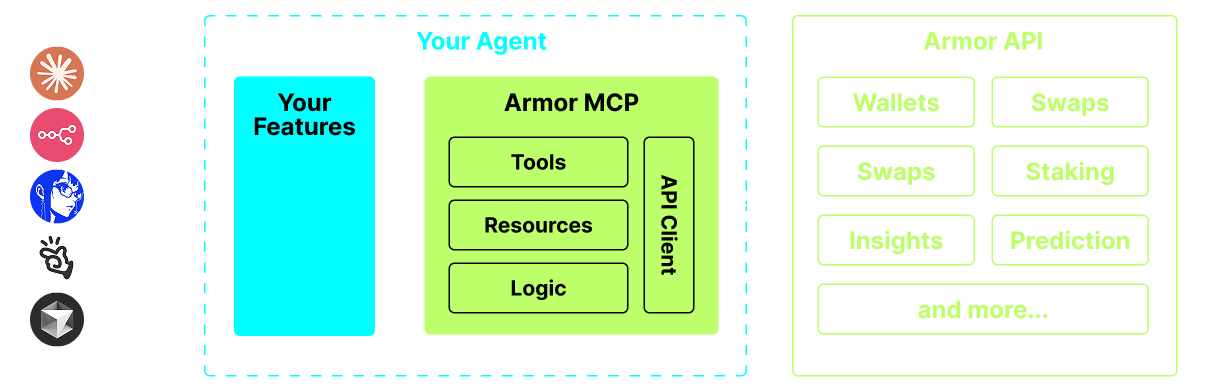
Requirements
1. Make sure you have python installed
2. Install uv
Linux / Windows
pip install uv
Mac
brew install uv
3. Claude Desktop or your AI Agent will run the MCP
See Usage & Configuration for details.
Alpha Testing
We are currently in pre-alpha, and we are testing the capabilities of various agents and agentic frameworks like Claude Desktop, Cline, Cursor, n8n, etc.
Current Features & Tools
- Wallet Management
- Grouping & Organization
- Archiving
- Swap & Trades
- Normal swap
- DCA (place / list / cancel)
- Scheduled Orders
- Limit Orders (place / list / cancel)
- Staking and Unstaking
- Token Search and Trending Tokens
- Statistical Calculator for accurate Analysis
- Supports Solana blockchain
Coming Soon
- More Blockchain Support
- Minting
- Armor Agents as a Tool (or A2A)
MCP Setup
Currently you need to have the Armor NFT to get an API Key. Get it here
Usage & Configuration
To use the Armor MCP with your agent, you need the following configuration, replace `` with your API key:
{
  "mcpServers": {
    "armor-crypto-mcp": {
      "command": "uvx",
      "args": ["armor-crypto-mcp@latest", "--version"],
      "env": {
        "ARMOR_API_KEY": ""
      }
    }
  }
}
Use in Claude Desktop
- Must have Developer Mode enabled
- Open Claude Desktop’s File Menu top left of the window.
- Go to File > Settings
- Under Developer, click Edit Configuration
- In the config file, insert the
armor-wallet-mcpsection from above - Make sure to replace the placeholder with your API key
- Save the file and start a new Chat in Claude Desktop
Use in Cline
インストール
uvx armor-crypto-mcp@latest --version設定
{
  "mcpServers": {
    "armor-crypto-mcp": {
      "command": "uvx",
      "args": ["armor-crypto-mcp@latest", "--version"],
      "env": {
        "ARMOR_API_KEY": "<PUT-YOUR-KEY-HERE>"
      }
    }
  }
}