
ami3466/tomcp
Developer toolsこのページは AI により自動翻訳されています。技術的な詳細は原文をご確認ください。 原文を見る
ami3466/tomcpは、https://github.com/ami3466/tomcp.からインポートされたMCPサーバー候補です。
概要
ami3466/tomcpは、https://github.com/ami3466/tomcp.からインポートされたMCPサーバー候補です。
概要(AI 翻訳)
どんなウェブサイトでもMCPサーバーに変えてください
クイックスタート
任意のURLの前にtomcp.org/を付けます:
そのアドレスはMCPサーバーです。クライアントに追加するか、URLを tomcp.org に貼り付けてください。
なぜMCPに?
特定のAPIはしばしばAIの幻覚を引き起こし、ウェブ検索も信頼性に欠けます。このツールは、ドキュメントをMCPサーバーとして提供し、AIが手動でコピー&ペーストせずに明確な文脈に直接アクセスできるようにします。
標準的な[[T1]ツールは、生のHTMLをAIのコンテキストに投げ込みます。ナビバー、スクリプト、フッター、ノイズなどです。toMCPはページを可読性パーサーにかけ、トークンの一部を使ってクリーンなマークダウンに変換します。
永続ドキュメントコンテキスト
AIアシスタントはドキュメントがないとAPIの詳細を幻覚的に見てしまいます。MCPリソースは永久的な読み取り専用コンテキストとしてピン留めされており、モデルはそれらをスキップしたり忘れたりしません。フレームワークドキュメント、API参照、社内チームドキュメントに最適です。
web_fetch vs MCP Resources
| web_fetch | MCPリソース | |
|---|---|---|
| データ | ノイズ付き生HTML | クリーンマークダウン |
| トークン | ハイ | ロー |
| 永続性 | リクエストごと | 常に利用可能 |
| 幻覚 | 高く | 低く |
このページは AI により自動翻訳されています。技術的な詳細は原文をご確認ください。
README
以下は原文 README の抜粋です。原文を見る。
toMCP
Turn any website into an MCP server
Quick start
Put tomcp.org/ in front of any URL:
https://tomcp.org/docs.stripe.com
That address is an MCP server. Add it to your client, or paste the URL at tomcp.org instead.
Why toMCP?
specific APIs often cause AI hallucinations, and web searching is unreliable. This tool lets you serve your documentation as an MCP server, giving the AI direct access to the clear context it needs without manual copy-pasting.
Standard web_fetch tools dump raw HTML into your AI’s context—navbars, scripts, footers, and noise. toMCP runs pages through a readability parser and converts to clean markdown, using a fraction of the tokens.
Persistent Documentation Context
AI assistants hallucinate API details when they lack documentation. MCP Resources are pinned as permanent, read-only context—the model won’t skip or forget them. Ideal for framework docs, API references, and internal team docs.
web_fetch vs MCP Resources
| web_fetch | MCP Resource | |
|---|---|---|
| Data | Raw HTML with noise | Clean markdown |
| Tokens | High | Low |
| Persistence | Per-request | Always available |
| Hallucination | Higher | Lower |
| JS Support | Full (SPAs / Dynamic) | Static Only (SSG) |
Demo
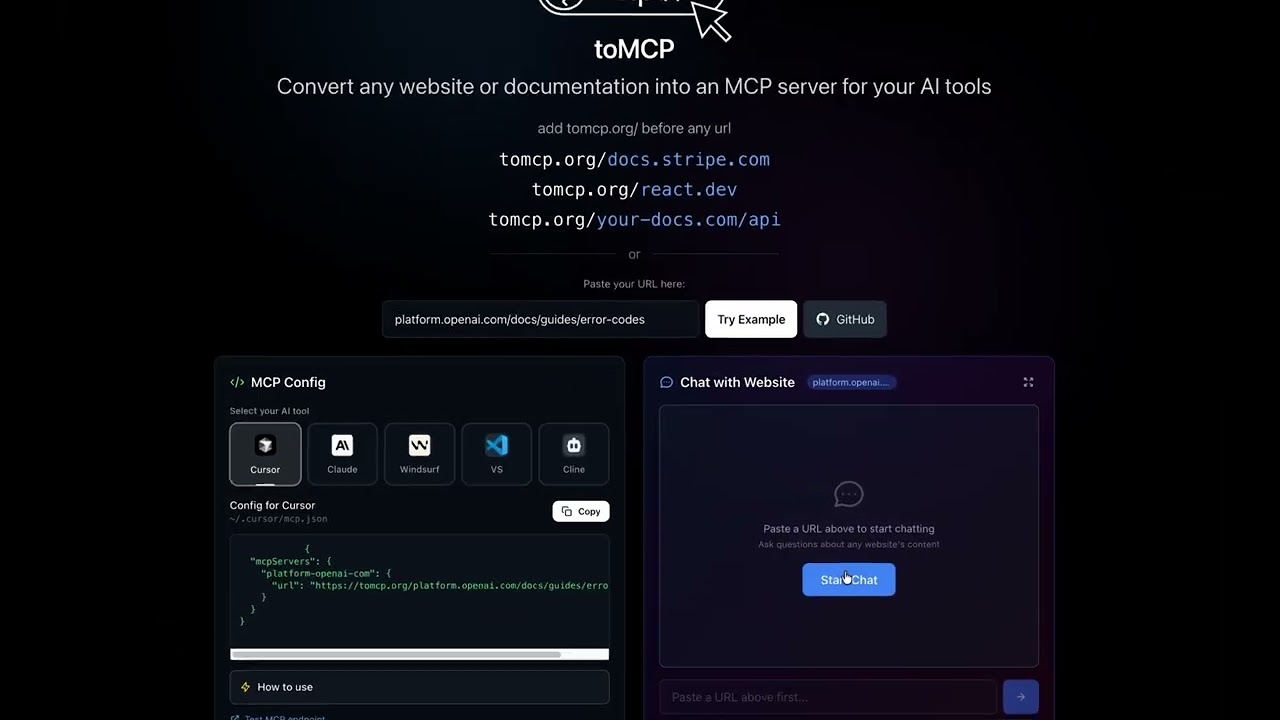
Supported AI Tools
- Cursor -
~/.cursor/mcp.json - Claude Desktop -
~/.claude/claude_desktop_config.json - Windsurf -
~/.codeium/windsurf/mcp_config.json - VS Code -
.vscode/mcp.json - Cline -
~/.cline/mcp_settings.json
How It Works
MCP Config
- Visit tomcp.org
- Enter any website URL
- Select your AI tool
- Copy the generated MCP config
- Add it to your tool’s config file
- Restart your AI tool
Chat
- Visit tomcp.org
- Paste any website URL
- Click “Start Chat”
- Ask questions about the website’s content
Example Config
{
  "mcpServers": {
    "docs-stripe-com": {
      "url": "https://tomcp.org/docs.stripe.com"
    }
  }
}
Chat API
curl -X POST https://tomcp.org/chat \
  -H "Content-Type: application/json" \
  -d '{"url": "docs.stripe.com", "message": "How do I create a payment intent?"}'
AI Models
Free Models (No API Key Required)
These models are available for everyone with no setup:
- Llama 3.1 8B (Meta) - Default model, fast and capable
- Hermes 2 Pro (NousResearch) - Great for reasoning
- Mistral 7B (Mistral) - Efficient instruction-following
- Gemma 7B LoRA (Google) - Lightweight and fast
paid Models (API Key Required)
Add your Cloudflare Workers AI API key to unlock these models:
- Llama 3.3 70B (Meta) - Most powerful Llama model
- DeepSeek R1 32B (DeepSeek) - Advanced reasoning
- Mistral Large (Mistral) - Enterprise-grade
インストール
This server does not publish a one-line install command.
Open the repository installation guide MCP 初心者?mcpskill.org のガイドから始めましょう →設定
{
  "mcpServers": {
    "docs-stripe-com": {
      "url": "https://tomcp.org/docs.stripe.com"
    }
  }
}