
agentico-dev/mcp
Deployment & DevOpsこのページは AI により自動翻訳されています。技術的な詳細は原文をご確認ください。 原文を見る
Tools generated and created by the community with Agentico
概要
This is an early version of the MCP Intent-Based demo project. This project aims to demonstrate how to create and manage a flexible, dynamic server environment using a declarative manifest approach. Please note that this is a work in progress and may not be fully functional or stable. We welcome feedback to improve the project. For more details and examples, please check the mcp-intent-based-demo README here. The server.yaml file is the heart of the MCP Intent Based approach. It defines: The entry point of the application (index.ts) is : We have prepared a script in the package.json file for you to run the demo with inspector. If you are using the default parameters, the MCP Inspector will be available at http://127.0.0.
README
以下は原文 README の抜粋です。原文を見る。
Getting Started with MCP Intent Based
This is an early version of the MCP Intent-Based demo project. This project aims to demonstrate how to create and manage a flexible, dynamic server environment using a declarative manifest approach. Please note that this is a work in progress and may not be fully functional or stable. We welcome feedback to improve the project.
For more details and examples, please check the mcp-intent-based-demo README here.
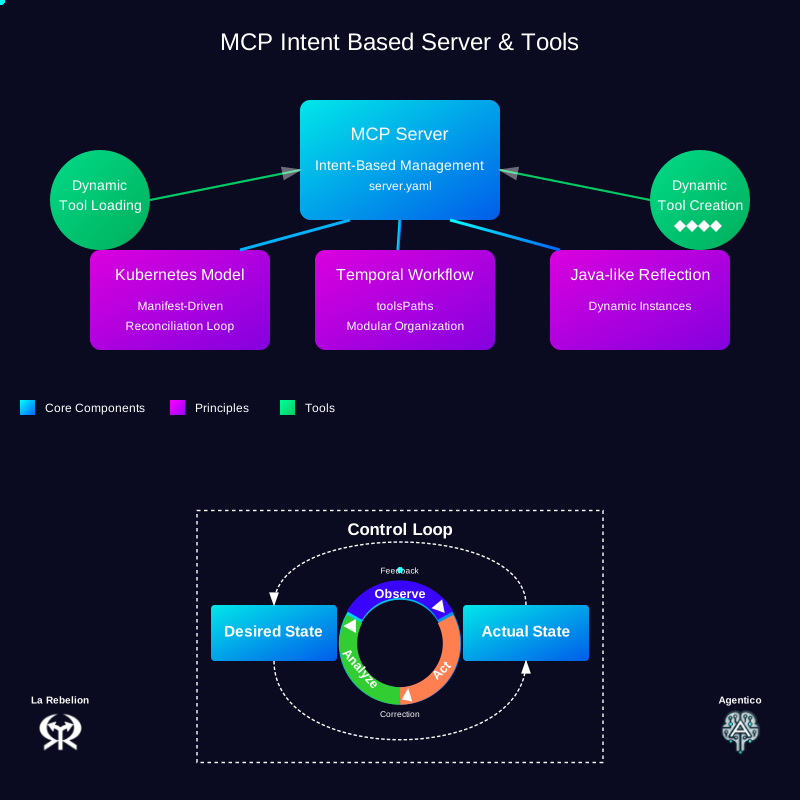
Understanding the Intent-Based Manifest File
The server.yaml file is the heart of the MCP Intent Based approach. It defines:
apiVersion: agentico.dev/v1
kind: Server
metadata:
  name: demo-mcp
  description: Demo MCP Server instance
  transport: stdio
  capabilities:
    - logging
    - tools
    #- telemetry # future: 🔭
  # future: the intent would allow to define the tools path - for now, needs to be set in the env var
  #toolsPath: ./build/tools
spec:
  template:
    metadata:
      scope: local  # future: cloud as well ☁️
    spec:
      tools:
        - name: echo
          description: 'Utility tool that returns the exact input provided to it...'
        - name: reverse
          description: 'Text manipulation tool that reverses the order of characters...'
        - name: uppercase
          description: 'String transformation utility that converts all alphabetic characters...'
Understanding the Server Initialization
The entry point of the application (index.ts) is remarkably simple:
#!/usr/bin/env node

import createServerFromFile from "@agentico/mcp-intent-based";

async function startServer() {
  const server = await createServerFromFile();
  // Yes, that's all you need to do to start the server with Agentico and Intent Based AI!!
  // server.yaml dictates the tools to be created
}

startServer().catch((error) => {
  console.error("Error starting server:", error);
  process.exit(1);
});
Running the Demo
To start the server:
We have prepared a script in the package.json file for you to run the demo with inspector.
npm run agentico
# or
yarn agentico
If you are using the default parameters, the MCP Inspector will be available at http://127.0.0.1:6274
If you want to do it manually, you can run the following commands:
NOTE: Make sure you add the tools path to the TOOLS_PATH environment variable, so that the server can find the tools.
npm run build
TOOLS_PATH=$PWD/build/tools npm run inspector
# or
yarn build
TOOLS_PATH=$PWD/build/tools yarn inspector
Next Steps
- Explore the MCP Intent Based Server documentation for more advanced features
- Try creating your custom tools and incorporate them into the manifest
インストール
This server does not publish a one-line install command.
Open the repository installation guide MCP 初心者?mcpskill.org のガイドから始めましょう →