
adhikasp/mcp-client-cli
Developer toolsこのページは AI により自動翻訳されています。技術的な詳細は原文をご確認ください。 原文を見る
LLMプロンプトを実行しMCPクライアントを実装するためのシンプルなCLIです。
概要
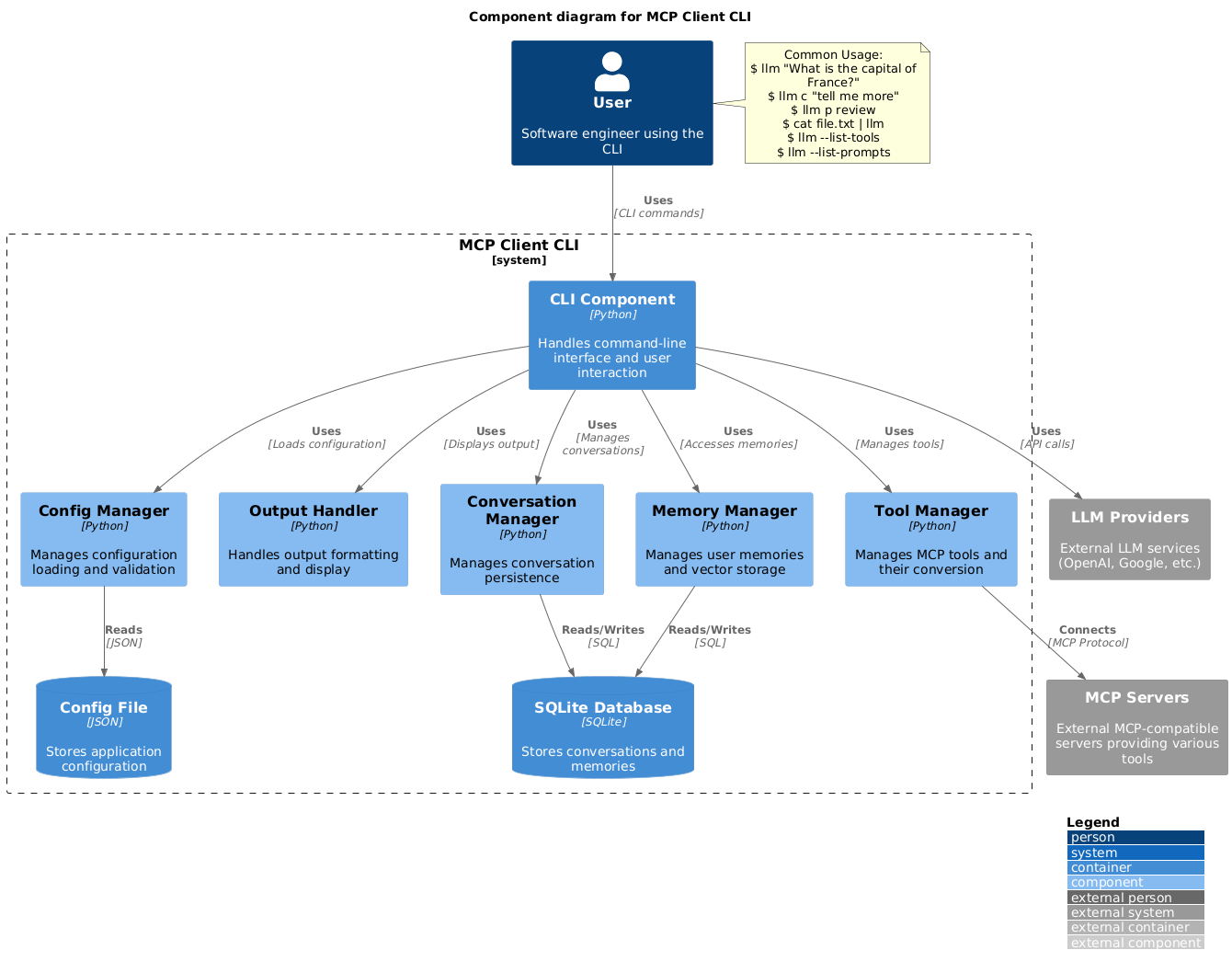
LLMプロンプトを実行し、モデルコンテキストプロトコル(MCP)クライアントを実装するためのシンプルなCLIプログラムです。 端末の便利さから、MCP対応のサーバーを利用できます。 これはClaude Desktopの隣にある代替クライアントとして機能します。さらに、OpenAIやGroq、またはllama経由でローカルLLMモデルなど、任意のLLMプロバイダーを利用できます。 2. LLMおよびMCPサーバーを設定するための~/.llm/config.jsonファイルを作成する: 注:- 設定フォーマットの完全なドキュメントは CONFIG.md を参照してください。- 実行前にユーザー確認が必要なツールを指定するにはrequires_confirmationを使います。LLM APIキーは環境変数LLM_API_KEYまたはOPENAI_API_KEYによっても設定可能です。設定ファイルは~/.llm/config.jsonまたは$PWD/.llm/config.jsonに配置されます。設定を変更したい場合はJSON設定ファイルにコメントで//を付けることができます。 引用符を省略しても構いませんが、bashの特殊文字(例えば &、 |、; )シェルによって解釈される可能性があります。
概要(AI 翻訳)
LLMプロンプトを実行し、モデルコンテキストプロトコル(MCP)クライアントを実装するためのシンプルなCLIプログラムです。
端末の便利さから、MCP対応のサーバーを利用できます。
これはClaude Desktopの隣にある代替クライアントとして機能します。さらに、OpenAIやGroq、またはllama経由でローカルLLMモデルなど、任意のLLMプロバイダーを利用できます。
セットアップ
-
pip経由でインストール:
-
LLMおよびMCPサーバーを設定するための
~/.llm/config.jsonファイルを作成する:
注:
- 構成形式の完全なドキュメントについては CONFIG.md を参照してください
requires_confirmationを使って、実行前にユーザー確認が必要なツールを指定する- LLM APIキーは環境変数
LLM_API_KEYまたはOPENAI_API_KEYによって設定も可能です。 - 設定ファイルは
~/.llm/config.jsonまたは$PWD/.llm/config.jsonのいずれかに配置されることができます] - 設定を切り替えたい場合は
//で JSON 設定ファイルにコメントを付けることができます
- CLIを実行する:
使用法
基本用法
引用符を省略しても構いませんが、&、|、[;]のようなbash特殊文字はシェルで解釈される可能性があるので注意してください。
また、他のコマンドやファイルからの入力をパイプで入力することもできます:
画像入力
画像ファイルをパイプで解析することはマルチモーダルLLMで可能です:
このページは AI により自動翻訳されています。技術的な詳細は原文をご確認ください。
README
以下は原文 README の抜粋です。原文を見る。
MCP CLI client
A simple CLI program to run LLM prompt and implement Model Context Protocol (MCP) client.
You can use any MCP-compatible servers from the convenience of your terminal.
This act as alternative client beside Claude Desktop. Additionally you can use any LLM provider like OpenAI, Groq, or local LLM model via llama.
Setup
-
Install via pip:
pip install mcp-client-cli -
Create a
~/.llm/config.jsonfile to configure your LLM and MCP servers:{ "systemPrompt": "You are an AI assistant helping a software engineer...", "llm": { "provider": "openai", "model": "gpt-4", "api_key": "your-openai-api-key", "temperature": 0.7, "base_url": "https://api.openai.com/v1" // Optional, for OpenRouter or other providers }, "mcpServers": { "fetch": { "command": "uvx", "args": ["mcp-server-fetch"], "requires_confirmation": ["fetch"], "enabled": true, // Optional, defaults to true "exclude_tools": [] // Optional, list of tool names to exclude }, "brave-search": { "command": "npx", "args": ["-y", "@modelcontextprotocol/server-brave-search"], "env": { "BRAVE_API_KEY": "your-brave-api-key" }, "requires_confirmation": ["brave_web_search"] }, "youtube": { "command": "uvx", "args": ["--from", "git+https://github.com/adhikasp/mcp-youtube", "mcp-youtube"] } } }Note:
- See CONFIG.md for complete documentation of the configuration format
- Use
requires_confirmationto specify which tools need user confirmation before execution - The LLM API key can also be set via environment variables
LLM_API_KEYorOPENAI_API_KEY - The config file can be placed in either
~/.llm/config.jsonor$PWD/.llm/config.json - You can comment the JSON config file with
//if you like to switch around the configuration
-
Run the CLI:
llm "What is the capital city of North Sumatra?"
Usage
Basic Usage
$ llm What is the capital city of North Sumatra?
The capital city of North Sumatra is Medan.
You can omit the quotes, but be careful with bash special characters like &, |, ; that might be interpreted by your shell.
You can also pipe input from other commands or files:
$ echo "What is the capital city of North Sumatra?" | llm
The capital city of North Sumatra is Medan.
$ echo "Given a location, tell me its capital city." > instructions.txt
$ cat instruction.txt | llm "West Java"
The capital city of West Java is Bandung.
Image Input
インストール
uvx mcp-server-fetch設定
{
  "systemPrompt": "You are an AI assistant helping a software engineer...",
  "llm": {
    "provider": "openai",
    "model": "gpt-4",
    "api_key": "your-openai-api-key",
    "temperature": 0.7,
    "base_url": "https://api.openai.com/v1"  // Optional, for OpenRouter or other providers
  },
  "mcpServers": {
    "fetch": {
      "command": "uvx",
      "args": ["mcp-server-fetch"],
      "requires_confirmation": ["fetch"],
      "enabled": true,  // Optional, defaults to true
      "exclude_tools": []  // Optional, list of tool names to exclude
    },
    "brave-search": {
      "command": "npx",
      "args": ["-y", "@modelcontextprotocol/server-brave-search"],
      "env": {
        "BRAVE_API_KEY": "your-brave-api-key"
      },
      "requires_confirmation": ["brave_web_search"]
    },
    "youtube": {
      "command": "uvx",
      "args": ["--from", "git+https://github.com/adhikasp/mcp-youtube", "mcp-youtube"]
    }
  }
}