
oxsecurity/megalinter
Deployment & DevOps🦙 MegaLinter analyzes 50 languages, 22 formats, 21 tooling formats, excessive copy-pastes, spelling mistakes and security issues in your repository sources with a GitHub Action, other CI tools or...
Overview
MegaLinter is an tool for that analyzes the , , , and in your repository to , no matter which IDE or toolbox is used by your developers. Powered by . Supports languages, formats, tooling formats, and is as a GitHub Action or with any CI system. It is and . MegaLinter has with popular CI/CD tools and is compliant with most . - Use the new LLM Advisor that will tell you how to fix linters issues - Create your own MegaLinter Custom Flavors to improve performance Projects need to contain clean code in order to , which makes . By using , you ensure that your and , from kickoff through each step of the project lifecycle. Not all developers use linters in their IDEs, which makes code reviews harder and longer to process. By using , you'll enjoy the following benefits for your team:
README
MegaLinter, by 












MegaLinter is an open-source tool for CI/CD workflows that analyzes the consistency of your code, IaC, configuration, and scripts in your repository to ensure all your project sources are clean and formatted, no matter which IDE or toolbox is used by your developers. Powered by OX Security.
Supports 67 languages, 23 formats, 22 tooling formats, and is ready to use out of the box as a GitHub Action or with any CI system. It is highly configurable and free for all uses.
MegaLinter has native integrations with popular CI/CD tools and is compliant with most Coding Agents.

- Use the new LLM Advisor that will tell you how to fix linters issues
- Create your own MegaLinter Custom Flavors to improve performance
Before you go further, see the online documentation website, which offers much easier navigation than this README
Table of Contents
- Why MegaLinter
- Quick Start
- Coding Agents
- Supported Linters
- Installation
- Configuration
- Reporters
- Flavors
- Badge
- Plugins
- They talk about MegaLinter
- Frequently Asked Questions
- How to contribute
- Special thanks
- License
- MegaLinter vs Super-Linter
Why MegaLinter
Projects need to contain clean code in order to avoid technical debt, which makes ongoing maintenance harder and more time-consuming.
By using code formatters and code linters, you ensure that your codebase is easier to read and follows best practices, from kickoff through each step of the project lifecycle.
Not all developers use linters in their IDEs, which makes code reviews harder and longer to process.
By using MegaLinter, you’ll enjoy the following benefits for your team:
- At each pull request, it automatically analyzes all updated code across all languages.
- By reading error logs, developers learn best practices for the languages they use.
- The MegaLinter documentation provides a list of IDE plugins for each linter, so developers know which linter and plugins to install.
- MegaLinter works out of the box after a quick setup.
- Formatting and fixes can be automatically applied directly to the Git branch or provided in reports.
- This tool is 100% open source and free for all uses (personal, professional, public, and private repositories).
- MegaLinter can run on any CI tool and be run locally: no need to authorize an external application, and your codebase never leaves your tooling ecosystem.
Join a continuously growing community: MegaLinter Docker images are pulled hundreds of thousands of times every month.

Quick Start
- With a coding agent: install the MegaLinter agent skills with
npx skills add oxsecurity/megalinter/skills, then ask your agent to “setup megalinter”. - Or with the interactive wizard: run
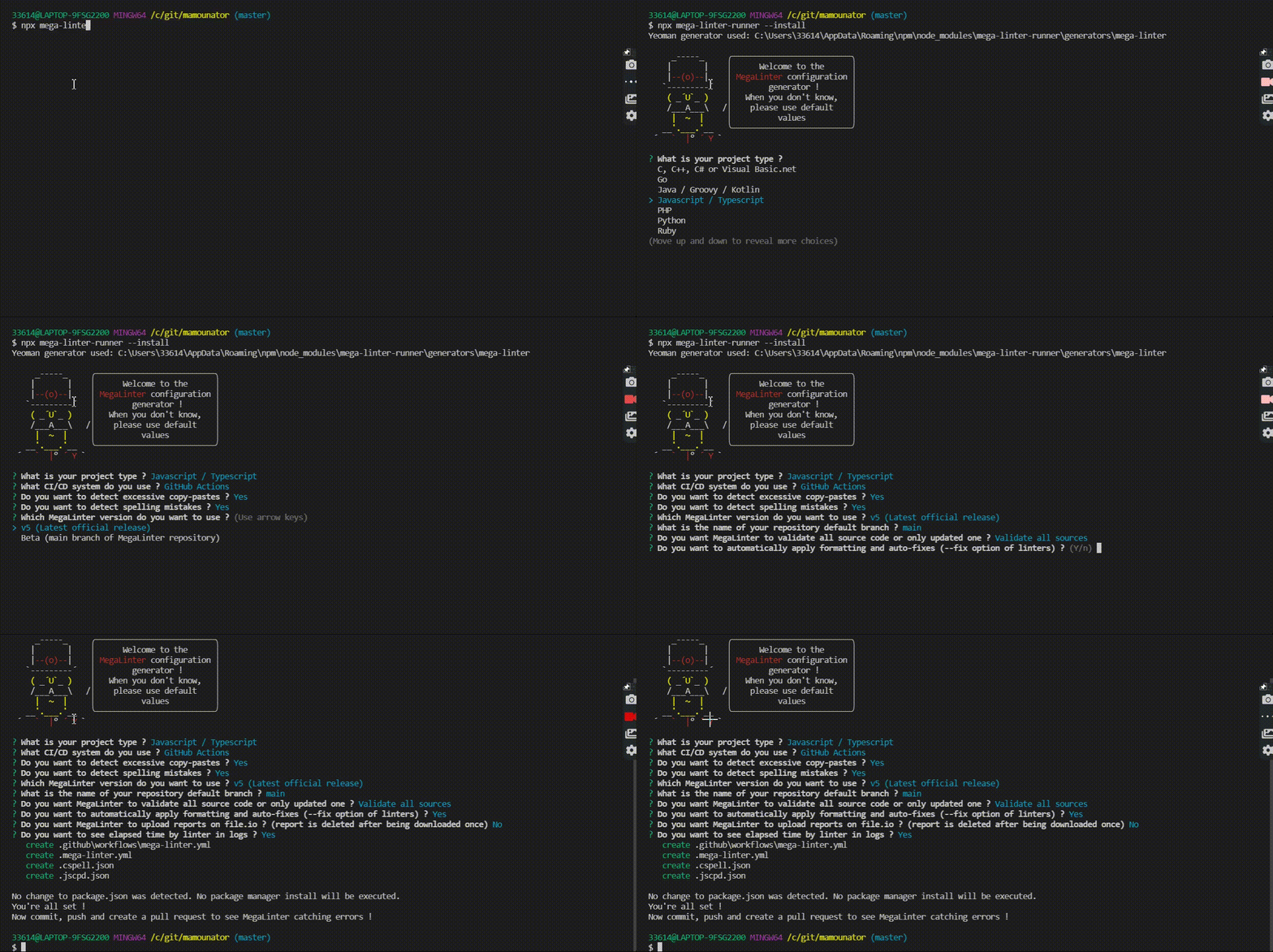
npx mega-linter-runner --installto generate configuration files (you need Node.js installed). - Commit, push, and create a pull request.
- Watch!
Notes:
- This repo is a hard fork of GitHub Super-Linter, rewritten in Python to add many additional features.
- If you are a Super-Linter user, you can transparently switch to MegaLinter and keep the same configuration (just replace
super-linter/super-linter@v3withoxsecurity/megalinter@v10in your GitHub Action YAML file, like on this PR). - If you want to use MegaLinter’s extra features (recommended), please take 5 minutes to use the assisted installation.
- For a beginner-friendly example of getting started with MegaLinter, check out this blog post by Alec Johnson.
Coding Agents
MegaLinter is designed to work hand in hand with your coding agent:
Get started
Install the MegaLinter agent skills at the root of your repository:
With Claude Code (the skills are copied directly into .claude/skills/):
npx skills add oxsecurity/megalinter/skills -s '*' -a claude-code -y
With another coding agent, replace claude-code with your agent’s identifier (cursor, github-copilot, codex, antigravity, opencode… full list in the skills CLI documentation) — or let the CLI detect your installed agents and install the skills for all of them at once:
npx skills add oxsecurity/megalinter/skills -s '*' -y --copy
Then just talk to your agent:
- “Setup MegaLinter on this repo”
- “Run MegaLinter and fix the errors”
- “Why is the MegaLinter CI job failing? Fix it”
What the skills do
| Skill | Role |
|---|---|
| megalinter | Entry point: detects the repository state and orchestrates the other skills in a check → fix → re-check loop (3 iterations max) |
| megalinter-setup | Installs or upgrades MegaLinter using npx mega-linter-runner --install (non-interactive), then refines .mega-linter.yml |
| megalinter-check | Collects errors: watches a MegaLinter CI job (GitHub Actions, GitLab CI, Azure Pipelines, Bitbucket Pipelines) or runs MegaLinter locally with docker/podman |
| megalinter-fix | Fixes errors guided by a per-linter fix guide (one for each of the 124 linters, loaded only when its linter has errors), asks you before disabling rules or pushing |
Sub-agents orchestration
On agents supporting sub-agents (Claude Code, OpenCode, GitHub Copilot custom agents…), megalinter-setup installs three sub-agents that keep large CI logs and linter outputs out of your main agent’s context, and run on low-cost models when possible:
flowchart TD
    U(["👤 You: run megalinter and fix the errors"]) --> O["🎯 megalinter(orchestrator skill)"]
    O -->|"no config found"| S["🛠️ megalinter-setup"]
    S -->|"npx mega-linter-runner --install"| CFG[/".mega-linter.yml+ CI workflow"/]
    O --> C["🔍 megalinter-check"]
    C -->|"watch mode"| W[["👀 megalinter-watchersub-agent, low-cost model"]]
    W --> CI[/"CI job logsGitHub / GitLab / Azure / Bitbucket"/]
    C -->|"local mode"| RUN[["🐳 megalinter-runnersub-agent, low-cost model"]]
    RUN --> IMG[/"MegaLinter Docker imagedocker or podman"/]
    W --> ERR[/"📋 Compact error listgrouped by linter"/]
    RUN --> ERR
    ERR --> F["🔧 megalinter-fix"]
    F -->|"one sub-agent per failing linter,in parallel"| FX1[["🤖 megalinter-fixer+ python_ruff fix guide"]]
    F --> FX2[["🤖 megalinter-fixer+ markdown_markdownlint fix guide"]]
    FX1 --> RES[/"✏️ Fixed files+ proposed rule disables"/]
    FX2 --> RES
    RES -->|"you confirm disables"| RC["♻️ Targeted re-checkparallel standalone linter images"]
    RC -->|"errors remain (max 3 loops)"| F
    RC -->|"clean"| DONE(["✅ Commit on a branch(never on main)"])

    classDef user fill:#e8f5e9,stroke:#2e7d32,stroke-width:2px,color:#1b5e20
    classDef skill fill:#ede7f6,stroke:#5e35b1,stroke-width:2px,color:#311b92
    classDef subagent fill:#e3f2fd,stroke:#1976d2,stroke-width:2px,color:#0d47a1
    classDef artifact fill:#fff8e1,stroke:#f9a825,stroke-width:1px,color:#5d4037
    classDef recheck fill:#e0f2f1,stroke:#00897b,stroke-width:2px,color:#004d40

    class U,DONE user
    class O,S,C,F skill
    class W,RUN,FX1,FX2 subagent
    class CFG,CI,IMG,ERR,RES artifact
    class RC recheck
The fix guides combine information generated from the linter descriptors (auto-fix support, rules documentation URLs, MegaLinter tuning variables) with curated fix, inline-disable and ignore instructions grounded in each linter’s official documentation.
Safety rules
- Safe fixes are applied automatically; ambiguous ones are asked to you
- Disabling a linter or a rule always requires your confirmation
- Commits are never pushed to the default branch
See also the installation page for coding agents, or install everything at once as an agent plugin.
Supported Linters
All linters are integrated into the MegaLinter Docker image, which is frequently updated with their latest versions.
Languages


Formats


Tooling formats


Other


Installation
Coding agents (skills)
MegaLinter ships agent skills making it easy to drive from coding agents like Claude Code, Cursor CLI, GitHub Copilot CLI, Codex, Antigravity or OpenCode:
With Claude Code (the skills are copied directly into .claude/skills/):
npx skills add oxsecurity/megalinter/skills -s '*' -a claude-code -y
With another coding agent, replace claude-code with your agent’s identifier (cursor, github-copilot, codex, antigravity, opencode… full list in the skills CLI documentation) — or let the CLI detect your installed agents and install the skills for all of them at once:
npx skills add oxsecurity/megalinter/skills -s '*' -y --copy
Then just ask your agent to “setup megalinter” or “run megalinter and fix the errors”. The skills handle:
- megalinter-setup: install or upgrade MegaLinter on the repository (non-interactive
npx mega-linter-runner --install) - megalinter-check: watch MegaLinter CI jobs (GitHub Actions, GitLab CI, Azure Pipelines, Bitbucket Pipelines) or run locally with Docker
- megalinter-fix: apply fixes guided by per-linter fix guides, with user confirmation before disabling anything or pushing
- megalinter: orchestrate the whole check → fix → re-check loop
On coding agents supporting sub-agents (Claude Code, OpenCode, GitHub Copilot custom agents…), dedicated MegaLinter sub-agents (running on low-cost models) watch CI jobs and digest linter outputs to keep large logs out of your agent’s context, and fix several linters in parallel.
Coding Agents (Plugins)
The MegaLinter agent skills are also published as an agent plugin, so a single command installs all four skills at once, and keeps them updated.
Claude Code
/plugin marketplace add oxsecurity/megalinter
/plugin install megalinter@megalinter
The three MegaLinter sub-agents are installed with the plugin, so there is nothing else to set up.
Cursor
Add https://github.com/oxsecurity/megalinter as a plugin source from Customize → Plugins, then install MegaLinter. The sub-agents ship with the plugin.
GitHub Copilot
copilot plugin marketplace add oxsecurity/megalinter
copilot plugin install megalinter@megalinter
Codex
codex plugin marketplace add oxsecurity/megalinter
Then install MegaLinter from the /plugins browser.
Gemini CLI and Antigravity
gemini extensions install https://github.com/oxsecurity/megalinter
Other coding agents
Every other agent (Windsurf, Cline, Roo Code, Amp, OpenCode, Goose, OpenHands…) is covered by the skills installation with npx skills add oxsecurity/megalinter/skills.
Once installed, just ask your agent to “setup megalinter” or “run megalinter and fix the errors”.
Assisted installation
Two assisted ways to setup MegaLinter on your repository:
- With a coding agent: install the MegaLinter agent skills with
npx skills add oxsecurity/megalinter/skills, then ask your agent to “setup megalinter”. - With the interactive wizard: run
npx mega-linter-runner --installat the root of your repository and answer questions, it will generate ready to use configuration files for MegaLinter :)
Which version to use ?
Docker registry change (since v9.5.0): MegaLinter Docker images are published only to GitHub Container Registry (
ghcr.io). The Docker Hub registry (docker.io/oxsecurity/megalinter, formerlyoxsecurity/megalinter:*) is frozen at v9.4.0 until we implement OIDC-based publishing to Docker Hub. Docker Hub does not have v10 images: if you pulloxsecurity/megalinterfrom Docker Hub you will stay on v9.4.0. To get v10, switch yourimage:/docker pullreferences toghcr.io/oxsecurity/megalinter:v10(same applies to:betaand all flavor tags likeghcr.io/oxsecurity/megalinter-python:v10). GitHub Action users (uses: oxsecurity/megalinter@v10) are not affected, as the action already pulls fromghcr.io.
The following instructions examples are using latest MegaLinter stable version (v10 , always corresponding to the latest release)
- Docker image:
ghcr.io/oxsecurity/megalinter:v10 - GitHub Action:
oxsecurity/megalinter@v10
You can also use beta version (corresponding to the content of main branch)
- Docker image:
ghcr.io/oxsecurity/megalinter:beta - GitHub Action:
oxsecurity/megalinter@beta
GitHub Action
- Create a new file in your repository called
.github/workflows/mega-linter.yml - Copy the example workflow from below into that new file, no extra configuration required
- Commit that file to a new branch
- Open up a pull request and observe the action working
- Enjoy your more stable, and cleaner code base
NOTES:
- If you pass the Environment variable
GITHUB_TOKEN: ${{ secrets.GITHUB_TOKEN }}in your workflow, then the MegaLinter will mark the status of each individual linter run in the Checks section of a pull request. Without this you will only see the overall status of the full run. There is no need to set the GitHub Secret as it’s automatically set by GitHub, it only needs to be passed to the action. - You can also use it outside of GitHub Actions (CircleCI, Azure Pipelines, Jenkins, GitLab, or even locally with a docker run) , and have status on Github Pull Request if
GITHUB_TARGET_URLenvironment variable exists.
In your repository you should have a .github/workflows folder with GitHub Action similar to below:
.github/workflows/mega-linter.yml
GitLab CI
Create or update .gitlab-ci.yml file at the root of your repository
# MegaLinter GitLab CI job configuration file
# More info at https://megalinter.io/

mega-linter:
  stage: test
  # You can override MegaLinter flavor used to have faster performances
  # More info at https://megalinter.io/flavors/
  image: ghcr.io/oxsecurity/megalinter:v10
  script: [ "true" ] # if script: ["true"] doesn't work, you may try ->  script: [ "/bin/bash /entrypoint.sh" ]
  variables:
    # All available variables are described in documentation
    # https://megalinter.io/configuration/
    DEFAULT_WORKSPACE: $CI_PROJECT_DIR
    # ADD YOUR CUSTOM ENV VARIABLES HERE TO OVERRIDE VALUES OF .mega-linter.yml AT THE ROOT OF YOUR REPOSITORY
  artifacts:
    when: always
    paths:
      - megalinter-reports
    expire_in: 1 week
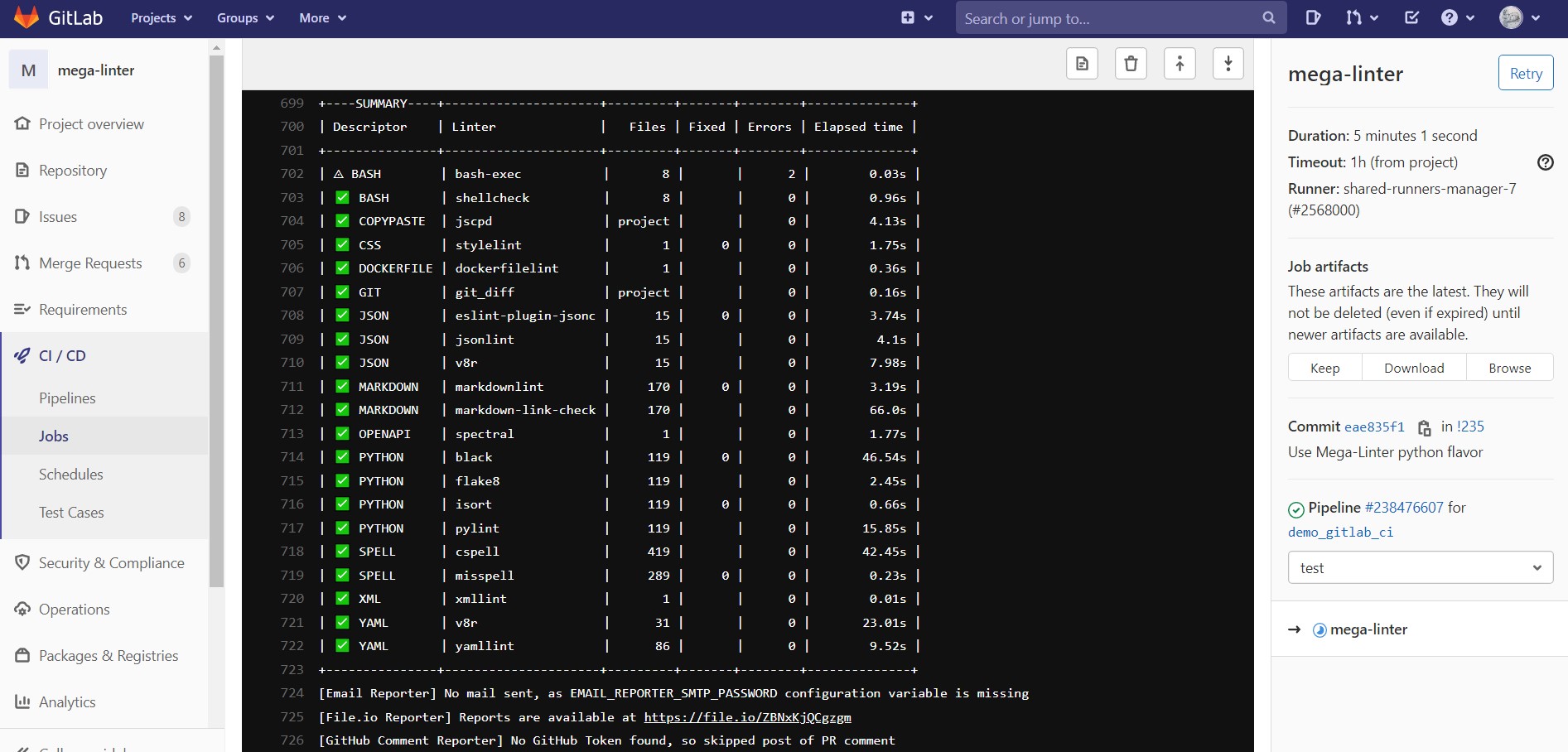
Create a Gitlab access token and define it in a variable GITLAB_ACCESS_TOKEN_MEGALINTER in the project CI/CD masked variables. Make sure your token (e.g. if a project token) as the appropriate role for commenting a merge request (at least developer).

Azure Pipelines
Use the following Azure Pipelines YAML template
You can configure a build validation branch policy against a single repository or across all repositories. If you configure across all repositories then your pipeline is stored in a central repository.
Single Repository
Add the following to an azure-pipelines.yaml file within your code repository:
  # Run MegaLinter to detect linting and security issues
  - job: MegaLinter
    pool:
      vmImage: ubuntu-latest
    steps:
      # Checkout repo
      - checkout: self

      # Pull MegaLinter docker image
      - script: docker pull ghcr.io/oxsecurity/megalinter:v10
        displayName: Pull MegaLinter

      # Run MegaLinter
      - script: |
          docker run -v $(System.DefaultWorkingDirectory):/tmp/lint \
            --env-file <(env | grep -e SYSTEM_ -e BUILD_ -e TF_ -e AGENT_) \
            -e SYSTEM_ACCESSTOKEN=$(System.AccessToken) \
            -e GIT_AUTHORIZATION_BEARER=$(System.AccessToken) \
            ghcr.io/oxsecurity/megalinter:v10
        displayName: Run MegaLinter

      # Upload MegaLinter reports
      - task: PublishPipelineArtifact@1
        condition: succeededOrFailed()
        displayName: Upload MegaLinter reports
        inputs:
          targetPath: "$(System.DefaultWorkingDirectory)/megalinter-reports/"
          artifactName: MegaLinterReport
Central Repository
Add the following to an azure-pipelines.yaml file within a separate repository, for example a ‘MegaLinter’ repository:
# Run MegaLinter to detect linting and security issues

trigger: none

pool:
  vmImage: ubuntu-latest

variables:
  repoName: $[ replace(split(variables['System.PullRequest.SourceRepositoryURI'], '/')[6], '%20', ' ') ]

steps:
  # Checkout triggering repo
  - checkout: git://$(System.TeamProject)/$(repoName)@$(System.PullRequest.SourceBranch)
    displayName: Checkout Triggering Repository

  # Pull MegaLinter docker image
  - script: docker pull ghcr.io/oxsecurity/megalinter:v10
    displayName: Pull MegaLinter

  # Run MegaLinter
  - script: |
      docker run -v $(System.DefaultWorkingDirectory):/tmp/lint \
        --env-file <(env | grep -e SYSTEM_ -e BUILD_ -e TF_ -e AGENT_) \
        -e SYSTEM_ACCESSTOKEN=$(System.AccessToken) \
        -e GIT_AUTHORIZATION_BEARER=$(System.AccessToken) \
        ghcr.io/oxsecurity/megalinter:v10
    displayName: Run MegaLinter

  # Upload MegaLinter reports
  - task: PublishPipelineArtifact@1
    condition: succeededOrFailed()
    displayName: MegaLinter Report
    inputs:
      targetPath: $(System.DefaultWorkingDirectory)/megalinter-reports/
      artifactName: MegaLinterReport
Pull Request Comments
To enable Pull Request comments, follow the configuration instructions.
Note: If your pipelines run on Azure DevOps but your source code is hosted on GitHub, and you want status reports to appear on GitHub, you must provide additional repository information to the pipeline. See this example for guidance.
Detailed Tutorial
You can also follow this detailed tutorial by DonKoning.
Alternative: Azure DevOps Extension (Community)
Note: This is a community-maintained extension and is not affiliated with or maintained by the MegaLinter team.
As an alternative to the manual Docker configuration above, the community-maintained megalinter-ado Azure DevOps extension provides a native Azure Pipelines task for running MegaLinter.
Install from the Visual Studio Marketplace, then add the task to your pipeline:
- task: MegaLinter@1
  displayName: Run MegaLinter
  inputs:
    flavor: all
    fix: true
    createFixPR: true
  env:
    SYSTEM_ACCESSTOKEN: $(System.AccessToken)
See the extension repository for full configuration options.
Bitbucket Pipelines
-
Create a
bitbucket-pipelines.ymlfile at the root of your repository. -
Copy and paste the following template or add the step to your existing pipeline.
image: atlassian/default-image:3
pipelines:
  default:
    - parallel:
      - step:
          name: Run MegaLinter
          image: ghcr.io/oxsecurity/megalinter:v10
          script:
            - export DEFAULT_WORKSPACE=$BITBUCKET_CLONE_DIR && bash /entrypoint.sh
          artifacts:
            -  megalinter-reports/**
Jenkins
Add the following stage to your Jenkinsfile.
You may activate the File.io reporter or Email reporter to access detailed logs and fixed sources.
// Lint with MegaLinter: https://megalinter.io/
stage('MegaLinter') {
    agent {
        docker {
            image 'ghcr.io/oxsecurity/megalinter:v10'
            args "-u root -e VALIDATE_ALL_CODEBASE=true -v ${WORKSPACE}:/tmp/lint --entrypoint=''"
            reuseNode true
        }
    }
    steps {
        sh '/entrypoint.sh'
    }
    post {
        always {
            archiveArtifacts allowEmptyArchive: true, artifacts: 'mega-linter.log,megalinter-reports/**/*', defaultExcludes: false, followSymlinks: false
        }
    }
}
CloudBees has a helpful tutorial about how to use MegaLinter with Jenkins!
PR Comment Reporting from Jenkins
When MegaLinter runs from a Jenkins Multibranch Pipeline, it can automatically post results as comments on pull requests / merge requests hosted on GitHub, GitLab, Azure DevOps, or Bitbucket.
MegaLinter auto-detects the git hosting platform by inspecting the GIT_URL environment variable (provided by Jenkins Git plugin). It then maps Jenkins environment variables (CHANGE_ID, GIT_COMMIT, BUILD_URL, etc.) to the native CI variables each comment reporter expects.
Requirements
- Jenkins Multibranch Pipeline with the appropriate Branch Source plugin (GitHub Branch Source, GitLab Branch Source, or Bitbucket Branch Source)
- The pipeline must be triggered by a pull request / merge request (so
CHANGE_IDis set by Jenkins) - An authentication token for the target platform, stored as a Jenkins credential
Platform Configuration
| Platform | Required Token Variable | Notes |
|---|---|---|
| GitHub | GITHUB_TOKEN (recommended) — PAT only if strictly required |
Prefer GITHUB_TOKEN. Personal Access Tokens (PAT) are not recommended due to recent supply-chain attacks on open-source projects; a leaked PAT can give attackers broad write access to your repository. Token needs repo scope (or issues:write + pull-requests:write for fine-grained tokens). |
| GitLab | GITLAB_ACCESS_TOKEN_MEGALINTER |
Personal access token with api scope |
| Azure DevOps | SYSTEM_ACCESSTOKEN |
Personal access token with Code (Read & Write) permission |
| Bitbucket | BITBUCKET_REPO_ACCESS_TOKEN |
Repository access token with Pull-requests: Write scope |
Jenkinsfile Example with GitHub PR Comments
// Lint with MegaLinter: https://megalinter.io/
stage('MegaLinter') {
    agent {
        docker {
            image 'ghcr.io/oxsecurity/megalinter:v10'
            args "-u root -e VALIDATE_ALL_CODEBASE=true -v ${WORKSPACE}:/tmp/lint --entrypoint=''"
            reuseNode true
        }
    }
    environment {
        GITHUB_TOKEN = credentials('github-token')
    }
    steps {
        sh '/entrypoint.sh'
    }
    post {
        always {
            archiveArtifacts allowEmptyArchive: true, artifacts: 'mega-linter.log,megalinter-reports/**/*', defaultExcludes: false, followSymlinks: false
        }
    }
}
Self-hosted / On-premise Platforms
MegaLinter detects the platform by looking for keywords in the GIT_URL hostname (e.g., gitlab.mycompany.com is detected as GitLab, github.internal.corp.com as GitHub).
If your self-hosted instance uses a hostname without the platform name (e.g., git.mycompany.com), set the JENKINS_REPO_PLATFORM environment variable to explicitly tell MegaLinter which platform to use:
environment {
    JENKINS_REPO_PLATFORM = 'gitlab'  // or 'github', 'azure', 'bitbucket'
    GITLAB_ACCESS_TOKEN_MEGALINTER = credentials('gitlab-token')
}
Additional Variables
For most setups, MegaLinter derives all needed variables automatically. In rare cases, you may need to set additional platform-specific variables:
- GitLab: Set
CI_PROJECT_IDif the project path cannot be parsed fromGIT_URL - Azure DevOps: Set
SYSTEM_ACCESSTOKENas a Jenkins credential
Concourse
Pipeline step
Use the following job step in your pipeline template.
Note: Make sure you have a job.plan.get step that retrieves the repo containing your repository, as shown in the example.
---

  - name: linting
    plan:
      - get: repo
      - task: linting
        config:
          platform: linux
          image_resource:
            type: docker-image
            source:
              repository: oxsecurity/megalinter
              tag: v10
          inputs:
            - name: repo
          run:
            path: bash
            args:
            - -cxe
            - |
              cd repo
              export DEFAULT_WORKSPACE=$(pwd)
              bash -ex /entrypoint.sh
              ## doing this because concourse doesn't work as other CI systems
          # params:
            # PARALLEL: true
            # DISABLE: SPELL
            # APPLY_FIXES: all
            # DISABLE_ERRORS: true
            # VALIDATE_ALL_CODEBASE: true
OR
Use it as a reusable task
Create a reusable Concourse task that can be used with multiple pipelines.
- Create task file
task-linting.yaml
---
platform: linux
image_resource:
  type: docker-image
  source:
    repository: oxsecurity/megalinter
    tag: v10

inputs:
- name: repo

## uncomment this if you want reports as task output
# output:
# - name: reports
#   path: repo/megalinter-reports

run:
  path: bash
  args:
  - -cxe
  - |
    cd repo
    export DEFAULT_WORKSPACE=$(pwd)
    bash -ex /entrypoint.sh
- Use that
task-linting.yamltask in your pipeline.
Note:
-
Make sure
task-linting.yamlis available in therepoinput at the repository root. -
Task
outputis not shown here.
resources:

  - name: linting
    plan:
      - get: repo
      - task: linting
        file: repo/task-linting.yaml
        # params:
        #   PARALLEL: true
        #   DISABLE: SPELL
        #   APPLY_FIXES: all
        #   DISABLE_ERRORS: true
        #   VALIDATE_ALL_CODEBASE: true
Drone CI
Warning: Drone CI support is experimental and is undergoing significant modifications (see issue #2047).
-
Create a
.drone.ymlfile on the root directory of your repository -
Copy and paste the following template:
kind: pipeline
type: docker
name: MegaLinter

workspace:
  path: /tmp/lint

steps:

- name: megalinter
  image: ghcr.io/oxsecurity/megalinter:v10
  environment:
    DEFAULT_WORKSPACE: /tmp/lint
This uses the Drone CI Docker runner, so you need to install and configure it beforehand on your Drone CI server.
(Optional) Adjusting trigger rules
The Drone CI workflow should trigger automatically for most scenarios (push, pull request, sync…). However, you can optionally change this behavior by modifying the trigger. For example:
kind: pipeline
type: docker
name: MegaLinter

workspace:
  path: /tmp/lint

steps:

- name: megalinter
  image: ghcr.io/oxsecurity/megalinter:v10
  environment:
    DEFAULT_WORKSPACE: /tmp/lint

trigger:
  event:
  - push
The workflow above triggers only on push, and not in other situations. For more information about configuring Drone CI trigger rules, see the documentation.
Docker container
You can also run MegaLinter with its Docker container. Execute this command:
docker run --rm -v /var/run/docker.sock:/var/run/docker.sock:rw -v $(pwd):/tmp/lint:rw ghcr.io/oxsecurity/megalinter:v10
No extra arguments are needed; however, MegaLinter will lint all files inside the /tmp/lint folder. You may need to configure your tool of choice to use /tmp/lint as its workspace.
This can be changed:
Example:
docker run --rm -v /var/run/docker.sock:/var/run/docker.sock:rw -v $(pwd):/example/folder:rw ghcr.io/oxsecurity/megalinter:v10
Run MegaLinter locally


Use mega-linter-runner to run MegaLinter locally with the same configuration defined in your .mega-linter.yml file.
See the mega-linter-runner installation instructions.
Example:
npx mega-linter-runner --flavor salesforce -e "'ENABLE=DOCKERFILE,MARKDOWN,YAML'" -e 'SHOW_ELAPSED_TIME=true'
Note: You can also use this command line in your custom CI/CD pipelines.
Configuration
.mega-linter.yml file
MegaLinter configuration variables are defined in a .mega-linter.yml file at the root of the repository or with environment variables. You can see an example config file in this repo: .mega-linter.yml.
Configuration is assisted with autocompletion and validation in most commonly used IDEs, thanks to the JSON schema stored on schemastore.org.
- VS Code: You need an extension like Red Hat YAML.
- IntelliJ IDEA family: Autocompletion is supported natively.
You can also define variables as environment variables.
- If a variable exists in both ENV and the
.mega-linter.ymlfile, priority is given to the ENV variable.

Common variables
| ENV VAR | Default Value | Notes |
|---|---|---|
| ADDITIONAL_EXCLUDED_DIRECTORIES | [] | List of additional excluded directory basenames. They’re excluded at any nested level. |
| APPLY_FIXES | none |
Activates formatting and autofix (more info) |
| CLEAR_REPORT_FOLDER | false |
Flag to clear files from report folder (usually megalinter-reports) before starting the linting process |
| CONFIG_PROPERTIES_TO_APPEND | [] | List of configuration properties to append their values (instead of replacing them) in case of using EXTENDS. |
| DEFAULT_BRANCH | HEAD |
The name of the repository’s default branch, useful if you use VALIDATE_ALL_CODEBASE=false |
| DEFAULT_WORKSPACE | /tmp/lint |
The location containing files to lint if you are running locally. |
| DISABLE_ERRORS | false |
Flag to have the linter complete with exit code 0 even if errors were detected. |
| DISABLE | List of disabled descriptors keys (more info) | |
| DISABLE_LINTERS | List of disabled linters keys (more info) | |
| DISABLE_ERRORS_LINTERS | List of enabled but not blocking linters keys. All linters not in this list will be not blocking (more info) | |
| ENABLE_ERRORS_LINTERS | List of enabled and blocking linters keys (more info) | |
| ENABLE | List of enabled descriptors keys (more info) | |
| ENABLE_LINTERS | List of enabled linters keys (more info) | |
| EXCLUDED_DIRECTORIES | […many values…] | List of excluded directory basenames. They’re excluded at any nested level. |
| EXTENDS | Base mega-linter.yml config file(s) to extend local configuration from. Can be a single URL or a list of .mega-linter.yml config files URLs. Later files take precedence. |
|
| FAIL_IF_MISSING_LINTER_IN_FLAVOR | false |
If set to true, MegaLinter fails if a linter is missing in the selected flavor |
| FAIL_IF_UPDATED_SOURCES | false |
If set to true, MegaLinter fails if a linter, a formatter or a post-command has updated sources, even if there are no errors and even if DISABLE_ERRORS is true |
| FILTER_REGEX_EXCLUDE | none |
Regular expression defining which files will be excluded from linting (more info) .ex: .*src/test.*) |
| FILTER_REGEX_INCLUDE | all |
Regular expression defining which files will be processed by linters (more info) .ex: .*src/.*) |
| FLAVOR_SUGGESTIONS | true |
Provides suggestions about different MegaLinter flavors to use to improve runtime performances |
| FORMATTERS_DISABLE_ERRORS | true |
Formatter errors will be reported as errors (not warnings) if this variable is set to false. |
| GIT_AUTHORIZATION_BEARER | If set, calls git with Authorization: Bearer+value (useful to list the updated files in a private repository whose checkout does not persist credentials) |
|
| GITHUB_WORKSPACE | Base directory for REPORT_OUTPUT_FOLDER, for user-defined linter rules location, for location of linted files if DEFAULT_WORKSPACE isn’t set |
|
| IGNORE_GENERATED_FILES | false |
If set to true, MegaLinter will skip files containing @generated marker but without @not-generated marker (more info at https://generated.at) |
| IGNORE_GITIGNORED_FILES | true |
If set to true, MegaLinter will skip files ignored by Git using the .gitignore file. |
| JAVASCRIPT_DEFAULT_STYLE | standard |
Javascript default style to check/apply. standard,prettier |
| LINTER_RULES_PATH | .github/linters |
Directory for all linter configuration rules. Can be a local folder or a remote URL (e.g., https://raw.githubusercontent.com/some_org/some_repo/mega-linter-rules). |
Recommended Tools
Try a different keyword or remove a filter.
Install
npx skillfish add oxsecurity/megalinter