
kyo0926/retentioneering-tools
Developer toolsRetentioneering is an open-source Python library for . Find where users get stuck, compare the paths different groups take, and discover patterns across clicks, sessions and repeat visits.
Overview
Retentioneering is an open-source Python library for . Find where users get stuck, compare the paths different groups take, and discover patterns across clicks, sessions and repeat visits. Explore the data yourself or let an AI agent work with the same tools. Run a demo notebook in Google Colab – no need to install the library locally, sample data included. A demo of the interactive features of the transition graph widget. You can highlight a route, compare path groups, focus on the step you want to investigate, and explore incoming and outgoing transition probabilities in the ego view. Use Retentioneering when you have a question about the sequence of actions like these: - A metric changed. Where did journeys change and move the metric? - Users stop before reaching a goal. What do they do instead and how do successful paths differ? - You want to understand engagement. What behavior types are represented, and how does usage evolve across visits? - You need to investigate a flow.
README
Retentioneering
Retentioneering is an open-source Python library for understanding user behavior from event logs. Find where users get stuck, compare the paths different groups take, and discover patterns across clicks, sessions and repeat visits. Explore the data yourself or let an AI agent work with the same tools.






Run a demo notebook in Google Colab – no need to install the library locally, sample data included.
Quick start · Use cases · Use an AI agent · Docs
A demo of the interactive features of the transition graph widget. You can highlight a route, compare path groups, focus on the step you want to investigate, and explore incoming and outgoing transition probabilities in the ego view.
Is it for you?
Use Retentioneering when you have a question about the sequence of actions like these:
- A metric changed. Where did journeys change and move the metric?
- Users stop before reaching a goal. What do they do instead and how do successful paths differ?
- You want to understand engagement. What behavior types are represented, and how does usage evolve across visits?
- You need to investigate a flow. Where do checkout, onboarding, support or agent runs loop, branch or stall?
Bring an event-level export from your analytics platform, warehouse or application logs. All you need is a user, session or case ID; an event name; and a timestamp.
Quick start
Python: 3.10 - 3.13.
Environment: Jupyter (Jupyter Notebook, JupyterLab, JupyterLab Desktop), VS Code, Cursor, Google Colab.
To install the library, run
pip install retentioneering
Within a notebook, use %pip install retentioneering instead. See the installation guide for the details.
To try out the library quickly, without loading your own data, you can use a built-in e-commerce dataset:
import retentioneering as rete

stream = rete.datasets.load_ecom()  # bundled synthetic store
stream.transition_graph()
Common use cases
Below are a few examples of how you can apply retentioneering tools to approach common analytical problems on the bundled e-commerce demo dataset. The code chunks assume stream = rete.datasets.load_ecom().
See more analysis recipes in the docs.
Bring your own data
The minimum input is a table with three columns – user_id, event and timestamp:
| user_id | event | timestamp |
|---|---|---|
| user_1 | signup | 2026-01-01 10:00:00 |
| user_1 | project_created | 2026-01-01 10:02:00 |
| user_1 | teammate_invited | 2026-01-01 10:05:00 |
Retentioneering uses the Eventstream class to store data and to provide access to all the library’s methods.
import pandas as pd
import retentioneering as rete

events = pd.read_csv("events.csv", parse_dates=["timestamp"])
stream = rete.Eventstream(events)
stream.transition_graph()
Use a schema to map other column names, declare path segments or pre-existing sessions. Any dataset readable by pandas – such as CSV, Parquet or the result of a warehouse query – can become an eventstream.
Common analysis workflow
- Prepare paths. Data processors filter events or whole journeys, split sessions, collapse repeated actions and define segments. Each returns a new eventstream, so steps chain into a pipeline.
- Explore. Interactive widgets show paths as graphs, step matrices, Sankey diagrams, funnels and clusters, and compare any two groups.
- Build your own outputs. Every widget has a headless
*_data()twin that returns the numbers behind the chart, for custom charts, reports and checks. - Share.
export_html()saves a widget as a standalone interactive page that opens without Python.
Explore agent runs, conversations and other event sequences
A path doesn’t have to be a user journey. Treat each agent run as a path and its internal steps – tool calls, retries, errors, validations – as events, then use the same tools to see where runs loop, recover or fail, and how successful runs differ from failed ones. See the agent-run example notebook (open in Colab) for a synthetic walkthrough.
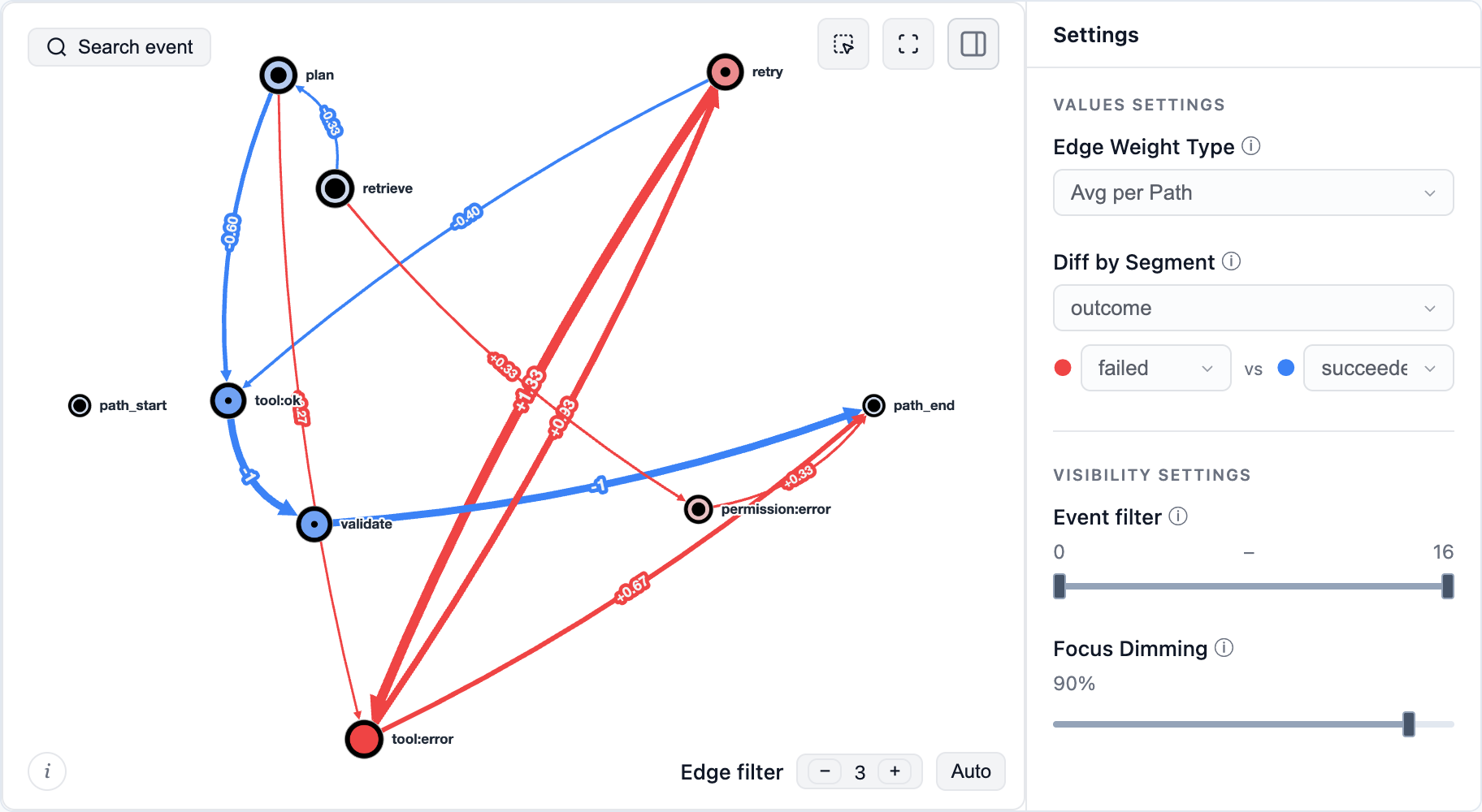
The same approach works for other processes: decide what one path is and which steps become its events. For example:
- Support conversations: a path is the sequence of message intents and handoffs within one conversation, e.g.
billing_question → bot_answer → rephrased_question → escalation → agent_answer → resolved. - Tickets: a path is the sequence of a ticket’s status changes and reassignments, e.g.
opened → triaged → assigned:tier1 → waiting_for_customer → reassigned:tier2 → closed. - Learning sessions: a path is the sequence of lessons, attempts and their results within a study session or across a learner’s whole course, e.g.
lesson_3 → quiz_3:fail → lesson_3_review → quiz_3:pass → lesson_4.
Work with an AI agent
Give your coding agent the product-analytics skill and an event file. The skill guides it through inspecting the log, choosing a recipe, running the analysis and checking the result. See skill setup for supported workflows.
For example:
Use Retentioneering to investigate where sessions in events.csv stall between cart and purchase. Check the schema and event order first. Compare sessions that purchased with those that stopped, keep non-purchasing sessions, and show the counts behind the main differences. Return the runnable analysis and an interactive HTML report.
Prefer an MCP connection? The data MCP server (beta) exposes an Eventstream to a compatible agent from a local Python environment. Its report collects several tools in tabs and links every number in the text to the element it comes from – a graph edge, a step matrix cell or a segment overview cell:
Telemetry
Anonymous usage telemetry is enabled by default. Sensitive data like event names, identifiers, path contents and parameter values is never sent; see what is collected. Set RETENTIONEERING_NO_TRACK=1 before starting Python to disable it.
Documentation and community
Quick start · Eventstream · Widgets · Data processors · Analysis recipes
Using a 3.x example? Version 5 rewrites the API. See the migration guide; legacy Sequences, Cohorts, StatTests and the visual Preprocessing Graph remain on the 3.x branch.
Bring a question, a useful recipe or a small reproducible example to GitHub issues, Discord or Telegram. Contributions to methods, widgets, examples and agent workflows are welcome – see CONTRIBUTING.md.
Apps are better with math. Join us!
Citing Retentioneering
If you use Retentioneering in your research, please cite it:
@software{retentioneering,
  title   = {Retentioneering: understanding user behavior from event logs},
  author  = {Godzi, Maxim and Kukushkin, Vladimir and Zaytsev, Anatoly},
  year    = {2026},
  url     = {https://github.com/retentioneering/retentioneering-tools},
  license = {Apache-2.0},
}
License and commercial model
Retentioneering-tools is open-source software licensed under the Apache License, Version 2.0.
Retentioneering is a community research laboratory dedicated to developing new analytics methodology and open-source tools.
Copyright retentioneering-tools v.5.0 Maxim Godzi, Vladimir Kukushkin and Anatoly Zaytsev. Updates may include software developed by the Retentioneering community.
You are free to use, modify, distribute, and build commercial products with Retentioneering-tools, subject to the terms of the Apache-2.0 license.
Other Retentioneering libraries, packages and managed execution services, enterprise integrations, premium diagnostic workflows, and hosted collaboration features are separate proprietary products and are governed by their respective commercial terms. Additional details are provided in COMMERCIAL.md.
The Apache-2.0 license applies only to the source code and assets distributed in this repository. It does not grant rights to use the Retentioneering name, logo, trademarks, hosted services, proprietary cloud infrastructure, or commercial content that is not distributed in this repository.
We welcome contributions from individuals and organizations. Contributions to Retentioneering-tools are accepted under the contribution terms described in CONTRIBUTING.md.
Our goal is to keep the core analytical language and ecosystem open, extensible, and useful for independent analysts, researchers, startups, and enterprise teams, while funding long-term maintenance through optional commercial products and services.
Recommended Tools
Try a different keyword or remove a filter.
Install
npx skillfish add kyo0926/retentioneering-tools