
A self-hostable OTA update solution for React Native (Alternative to CodePush)
Overview
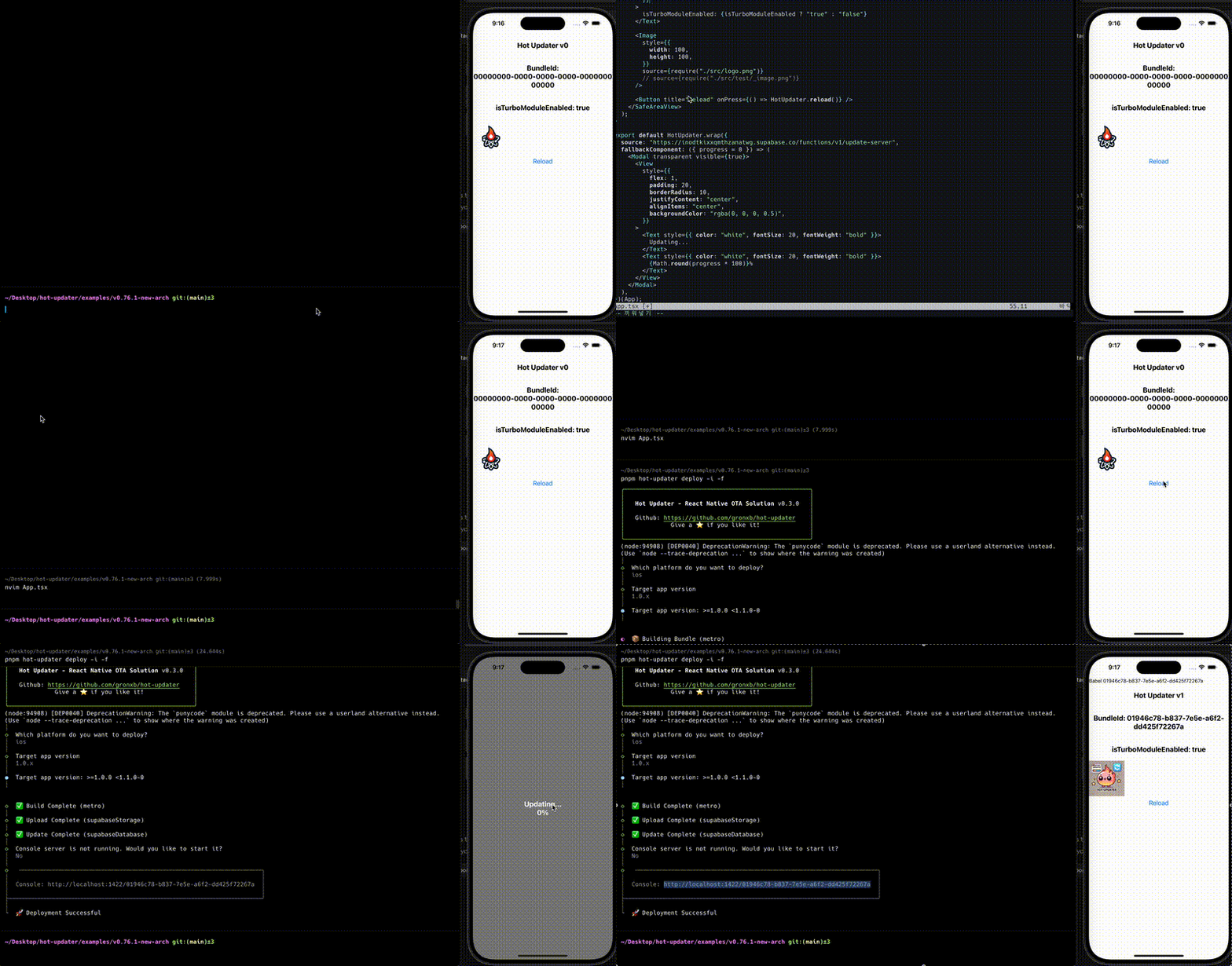
Full documentation is available at: https://hot-updater.dev Attach the Hot Updater agent skill so AI coding agents can use concise CLI context for deploys, bundle management, rollbacks, and verification: skills/hot-updater/SKILL.md Then ask your agent with prompts like $hot-updater deploy using the current app version or $hot-updater roll back the most recently deployed bundle. See the AI Agent Guide for the full workflow. - : Complete control over your update infrastructure - : Support for both iOS and Android - : Intuitive update management interface - : Reuse unchanged files and ship compact Hermes patches for smaller OTA downloads - : Support for various storage providers (AWS S3, Cloudflare R2 + D1, etc.) - : Robust app version management through semantic versioning - : Support for new architecture like React Native Hot Updater can deliver incremental OTA updates instead of making every device download the full archive again.
README
Hot Updater

Documentation
Full documentation is available at: https://hot-updater.dev
AI Skills
Attach the Hot Updater agent skill so AI coding agents can use concise CLI
context for infrastructure setup, upgrades, deploys, and verification:
skills/hot-updater/SKILL.md
npx skills add hot-updater/skills
Then ask your agent:
$hot-updater Set up infrastructure for this project.
The agent inspects your project and asks which provider to use if it cannot determine one from existing configuration. It generates deployment templates and applies them using available provider tools. It verifies each step and can resume from a failed step. You can also ask it to deploy an update or roll back a bundle.
To upgrade an existing server:
$hot-updater Upgrade this project's existing server infrastructure.
The agent reads the versioned upgrade instructions, including intermediate releases, applies the required changes, and verifies the server with doctor.
See the AI Agent Guide for
the full workflow, or use interactive setup
with npx hot-updater init in your terminal.
Key Features
- Self-Hosted: Complete control over your update infrastructure
- Multi-Platform: Support for both iOS and Android
- Web Console: Intuitive update management interface
- Bundle Diffing: Reuse unchanged files and ship compact Hermes patches for smaller OTA downloads
- Plugin System: Support for various storage providers (AWS S3, Cloudflare R2 + D1, etc.)
- Version Control: Robust app version management through semantic versioning
- New Architecture: Support for new architecture like React Native
Bundle Diffing
Hot Updater can deliver incremental OTA updates instead of making every
device download the full archive again. A diff-enabled runtime reuses bundle
files that already exist on the device, while deploys prepare .bsdiff
patches for changed Hermes bundles by default.
The server offers individual files, eligible patches, and an optional archive. When patch and complete-file sizes are known and the complete file is available, the server omits patches that are not strictly smaller. The native runtime checks which files it can reuse locally, then chooses between individual downloads and the archive. Archive selection requires at least two network files and compares their planned download sizes, with bounded TAR overhead allowed for a full download without patches. Manifest bytes are not part of that comparison.
See the Bundle Diffing guide for the full runtime behavior and fallback rules.
Adapters and Plugins
Hot Updater is extensible through adapters and plugins. Build, storage, database, and signing are adapters: pick one for each slot of your config. Server and client plugins add features such as Insights and API keys.
Adapters
- Build Adapter: Support for bundlers like Metro, Expo, Rock
- Storage Adapter: Support for bundle storage like AWS S3, Supabase Storage, Cloudflare R2 Storage, Vercel Blob, Neon Object Storage, Azure Blob Storage
- Database Adapter: Support for metadata storage like Supabase Database, PostgreSQL, Cloudflare D1, Azure Cosmos DB
Configuration Example
import { existsSync } from "node:fs";
import { bare } from "@hot-updater/bare";
import { supabaseDatabase, supabaseStorage } from "@hot-updater/supabase";
import { apiKeys, insights, remoteConfig } from "hot-updater/plugins";
import { defineConfig } from "hot-updater";

if (existsSync(".env.hotupdater")) {
  process.loadEnvFile(".env.hotupdater");
}

export default defineConfig({
  build: bare({ enableHermes: true }),
  updateStrategy: "appVersion",
  storage: supabaseStorage({
    supabaseUrl: process.env.HOT_UPDATER_SUPABASE_URL!,
    supabaseServiceRoleKey: process.env.HOT_UPDATER_SUPABASE_SERVICE_ROLE_KEY!,
    bucketName: process.env.HOT_UPDATER_SUPABASE_BUCKET_NAME!,
  }),
  database: supabaseDatabase({
    supabaseUrl: process.env.HOT_UPDATER_SUPABASE_URL!,
    supabaseServiceRoleKey: process.env.HOT_UPDATER_SUPABASE_SERVICE_ROLE_KEY!,
  }),
  plugins: [apiKeys(), insights(), remoteConfig()],
});
import { existsSync } from "node:fs";
import { bare } from "@hot-updater/bare";
import { d1Database, r2Storage } from "@hot-updater/cloudflare";
import { apiKeys, insights, remoteConfig } from "hot-updater/plugins";
import { defineConfig } from "hot-updater";

if (existsSync(".env.hotupdater")) {
  process.loadEnvFile(".env.hotupdater");
}

export default defineConfig({
  build: bare({ enableHermes: true }),
  updateStrategy: "appVersion",
  storage: r2Storage({
    bucketName: process.env.HOT_UPDATER_CLOUDFLARE_R2_BUCKET_NAME!,
    accountId: process.env.HOT_UPDATER_CLOUDFLARE_ACCOUNT_ID!,
    credentials: {
      accessKeyId: process.env.HOT_UPDATER_CLOUDFLARE_R2_ACCESS_KEY_ID!,
      secretAccessKey: process.env.HOT_UPDATER_CLOUDFLARE_R2_SECRET_ACCESS_KEY!,
    },
  }),
  database: d1Database({
    databaseId: process.env.HOT_UPDATER_CLOUDFLARE_D1_DATABASE_ID!,
    accountId: process.env.HOT_UPDATER_CLOUDFLARE_ACCOUNT_ID!,
    cloudflareApiToken: process.env.HOT_UPDATER_CLOUDFLARE_API_TOKEN!,
  }),
  plugins: [apiKeys(), insights(), remoteConfig()],
});
import { existsSync } from "node:fs";
import { bare } from "@hot-updater/bare";
import { dynamoDB, s3Storage } from "@hot-updater/aws";
import { apiKeys, insights, remoteConfig } from "hot-updater/plugins";
import { defineConfig } from "hot-updater";

if (existsSync(".env.hotupdater")) {
  process.loadEnvFile(".env.hotupdater");
}

const awsOptions = {
  region: process.env.HOT_UPDATER_S3_REGION!,
  credentials: {
    accessKeyId: process.env.HOT_UPDATER_S3_ACCESS_KEY_ID!,
    secretAccessKey: process.env.HOT_UPDATER_S3_SECRET_ACCESS_KEY!,
  },
};

export default defineConfig({
  build: bare({ enableHermes: true }),
  updateStrategy: "appVersion",
  storage: s3Storage({
    ...awsOptions,
    bucketName: process.env.HOT_UPDATER_S3_BUCKET_NAME!,
  }),
  database: dynamoDB({
    ...awsOptions,
    tableName: process.env.HOT_UPDATER_DYNAMODB_TABLE_NAME!,
  }),
  plugins: [apiKeys(), insights(), remoteConfig()],
});
import { existsSync } from "node:fs";
import { bare } from '@hot-updater/bare';
import { firebaseStorage, firebaseDatabase } from '@hot-updater/firebase';
import { apiKeys, insights, remoteConfig } from "hot-updater/plugins";
import { applicationDefault } from 'firebase-admin/app';
import { defineConfig } from "hot-updater";

if (existsSync(".env.hotupdater")) {
  process.loadEnvFile(".env.hotupdater");
}

// https://firebase.google.com/docs/admin/setup?hl=en#initialize_the_sdk_in_non-google_environments
// Check your .env.hotupdater file and add the credentials
// Set the GOOGLE_APPLICATION_CREDENTIALS environment variable to your credentials file path
// Example: GOOGLE_APPLICATION_CREDENTIALS=./firebase-adminsdk-credentials.json
const credential = applicationDefault();

export default defineConfig({
  build: bare({
    enableHermes: true,
  }),
  updateStrategy: "appVersion",
  storage: firebaseStorage({
    projectId: process.env.HOT_UPDATER_FIREBASE_PROJECT_ID!,
    storageBucket: process.env.HOT_UPDATER_FIREBASE_STORAGE_BUCKET!,
    credential,
  }),
  database: firebaseDatabase({
    projectId: process.env.HOT_UPDATER_FIREBASE_PROJECT_ID!,
    credential,
  }),
  plugins: [apiKeys(), insights(), remoteConfig()],
});
import { existsSync } from "node:fs";
import { bare } from "@hot-updater/bare";
import { postgres, vercelBlobStorage } from "@hot-updater/vercel";
import { apiKeys, insights, remoteConfig } from "hot-updater/plugins";
import { defineConfig } from "hot-updater";

if (existsSync(".env.hotupdater")) {
  process.loadEnvFile(".env.hotupdater");
}

export default defineConfig({
  build: bare({ enableHermes: true }),
  updateStrategy: "appVersion",
  storage: vercelBlobStorage({
    token: process.env.HOT_UPDATER_VERCEL_BLOB_READ_WRITE_TOKEN!,
  }),
  database: postgres({
    connectionString: process.env.HOT_UPDATER_VERCEL_DATABASE_URL!,
  }),
  plugins: [apiKeys(), insights(), remoteConfig()],
});
import { existsSync } from "node:fs";
import { azureBlobStorage, cosmosDatabase } from '@hot-updater/azure';
import { bare } from '@hot-updater/bare';
import { apiKeys, insights, remoteConfig } from "hot-updater/plugins";
import { defineConfig } from "hot-updater";

if (existsSync(".env.hotupdater")) {
  process.loadEnvFile(".env.hotupdater");
}

export default defineConfig({
  build: bare({
    enableHermes: true,
  }),
  updateStrategy: "appVersion",
  storage: azureBlobStorage({
    connectionString: process.env.HOT_UPDATER_AZURE_STORAGE_CONNECTION_STRING!,
    containerName: "hot-updater",
  }),
  database: cosmosDatabase({
    connectionString: process.env.HOT_UPDATER_AZURE_COSMOS_CONNECTION_STRING!,
  }),
  plugins: [apiKeys(), insights(), remoteConfig()],
});
End-to-end tests
Contributors can run pnpm -w e2e -- --platform ios or the Android equivalent
with a local simulator or emulator. The command prepares local PGlite and S3
services and runs the same OTA scenarios used by the E2E bot, without cloud
accounts. See the E2E guide for toolchain prerequisites,
device selection, and cleanup.
License
Hot Updater is released under the MIT License, with one addition for the server and the Console. @hot-updater/server and @hot-updater/console use the MIT License with a hosted service attribution condition (server, Console). If you offer either of them, or a service built on them, as a hosted service that other people use to update their own apps, you must show “Powered by hot-updater” with a link where that service’s users can see it. The Console’s sidebar already shows it. Running them for your own apps, or for apps you build for clients, needs no notice.
The “hot-updater” name and logo are covered by the trademark policy.
Recommended Tools
Try a different keyword or remove a filter.
Install
npx skillfish add gronxb/hot-updater