
https://github.com/user-attachments/assets/89353468-a299-4315-9516-e520bcbfbd4b
Overview
https://github.com/user-attachments/assets/89353468-a299-4315-9516-e520bcbfbd4b
README
STS2 AI Agent
Play experience
Auto-play uses the game’s own Fast Mode and restores your setting on pause. Forced moves spend no model requests; combat can execute a checked whole-turn plan from one request. Combat math, deck statistics and route advice accompany the current state. F7 pauses/resumes; F8 opens the panel. The HUD shows the action and reason, and is hidden from screenshots. A finished run gets a copyable report and an optional bounded factual journal. These switches are under Settings → Play experience.
Will acceleration change my saved game speed? The temporary speed is guarded against being written to the game’s settings; pause restores the previous value. Co-op is capped at Fast. All features can be switched off. See the current status page for release and validation evidence.
In-game screenshots
Real v0.19.2 interface captures using an isolated profile with no API key.
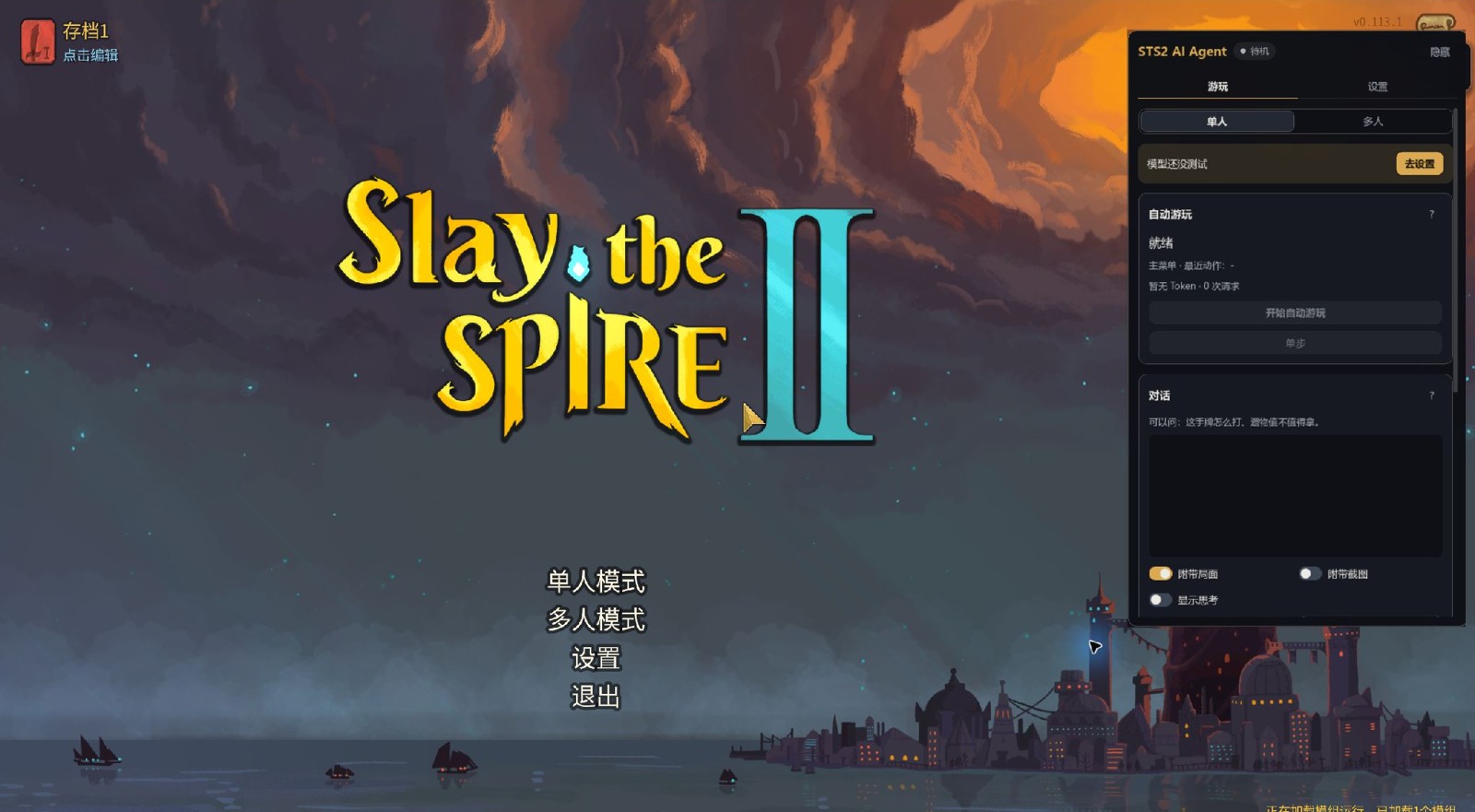
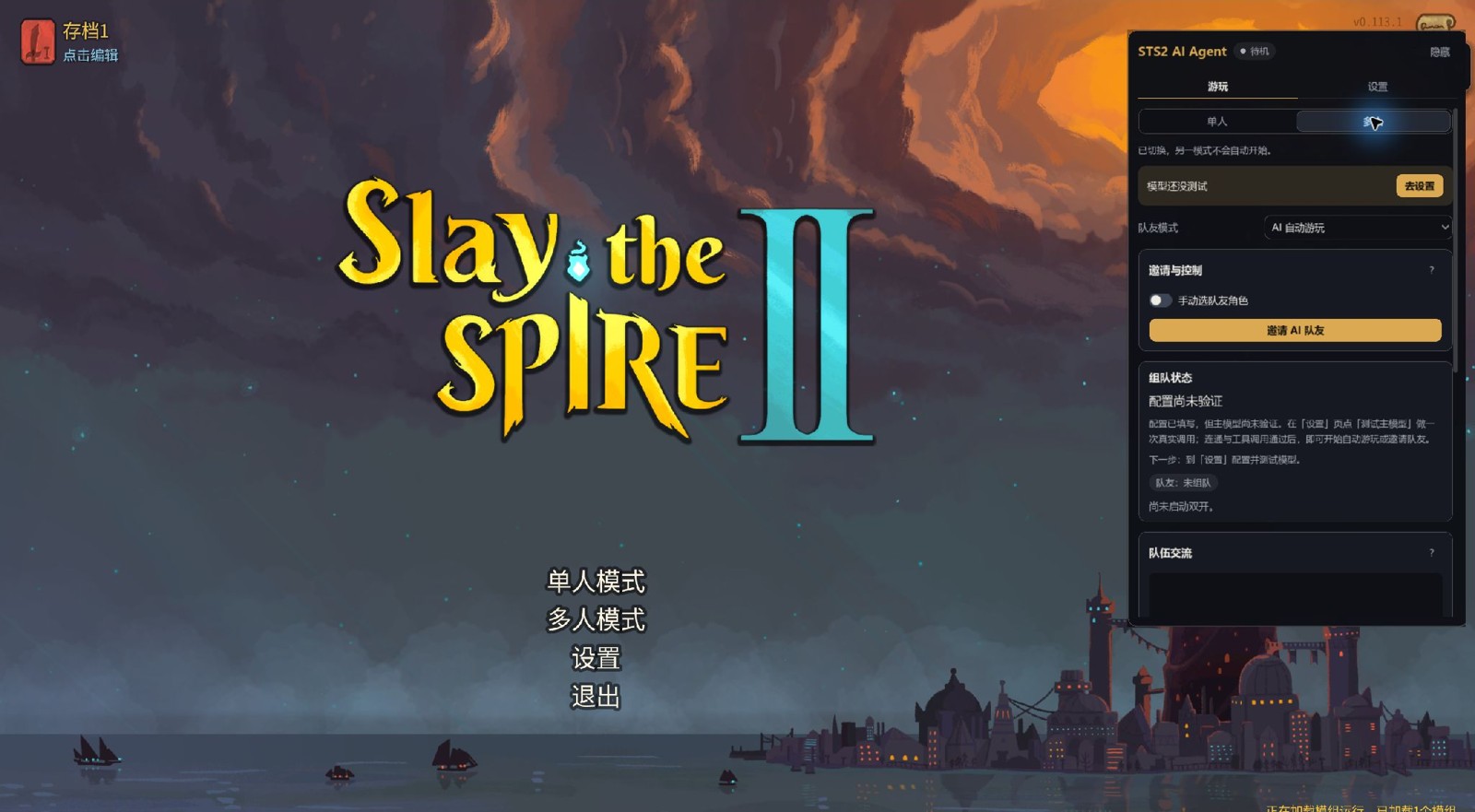
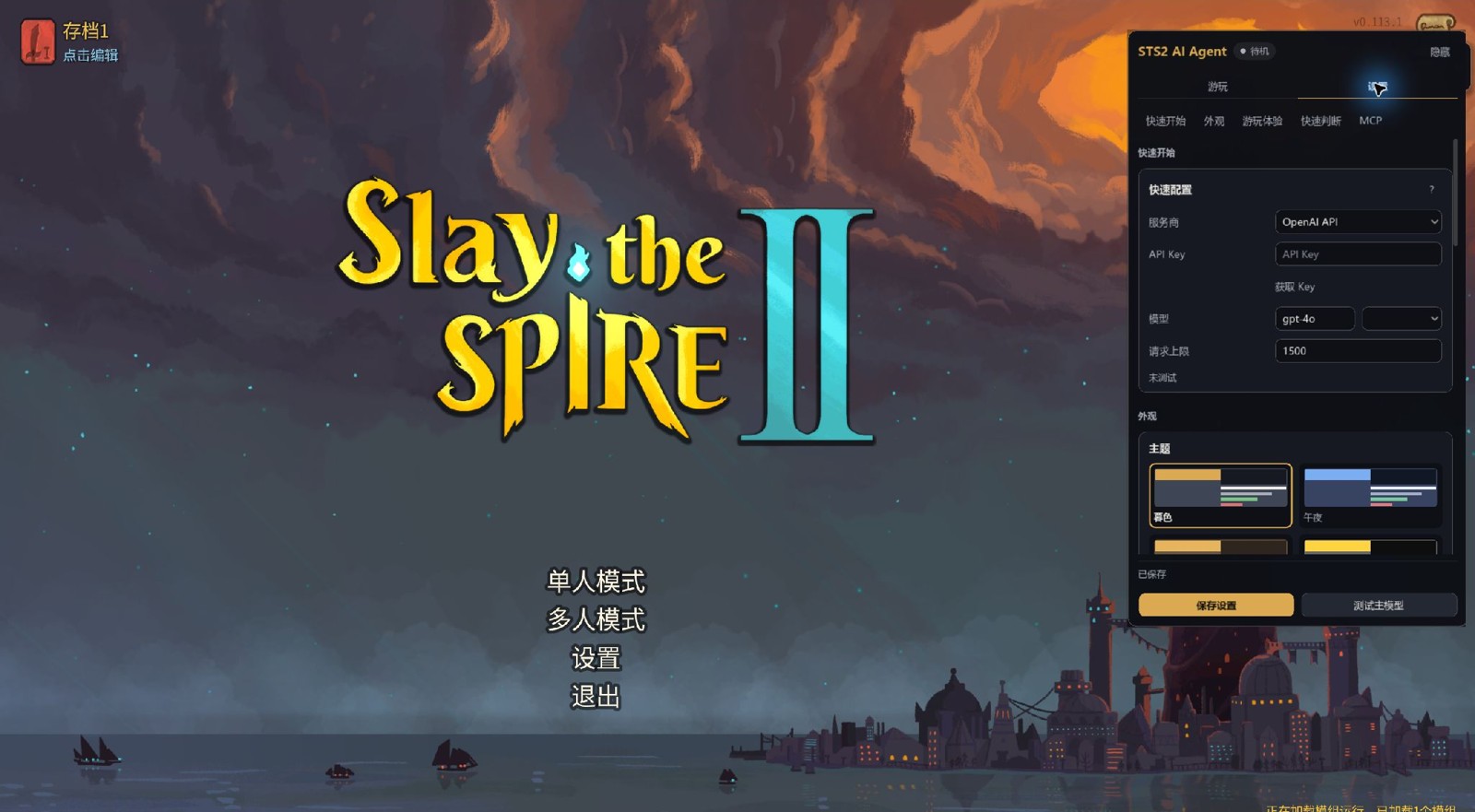
🌟 Key Highlights
- 🎮 In-Game Overlay UI: Press F8 at any time to open the configuration and control window directly inside the game—no external browser required.
- 🤖 OpenAI-Compatible Endpoints: Configure a compatible chat-completions endpoint, with per-model thinking settings. Tool calling, vision, streaming, and usage reporting depend on the provider and model; test chat and play separately.
- 🃏 Autonomous Auto-Play: Uses text state for combat, card drafting, shops, events, pathing, and capstones, with optional screenshot context. Run completion and strategy quality depend on the model and game conditions; see the current status for validation limits.
- 👥 Local Co-op AI Teammate: One-click launch from the main menu spins up an isolated second game instance. You play your character; the AI teammate plays its own character in co-op mode.
- 💬 Live Team Conversation: Talk to your AI teammate in natural language from the human window (e.g., “focus the right cultist”, “let’s take the shop path”). The AI replies and uses recent context in subsequent decisions.
- 🛡️ Session Budget Guards & Fault Recovery: Tracks reported token usage and request counts, stops new calls when session limits are reached, and bounds retries. Missing usage is shown as unknown; these guards are not a billing guarantee.
- 🔌 Developer-Ready: Built-in local HTTP API (
:8080). The Settings → MCP section can expose MCP at/mcpon the same port for Cursor, Claude, and Codex.
🚀 3-Minute Quick Start (Players)
The easiest way to play is the Steam Workshop page. Subscribe, wait for the download, then Steam → Play with Mods. You do not copy any files. That page is a short player guide; this README has extra detail if you need it.
This mod is still in development. Some things may be unfinished or break. Please send suggestions and issues here: GitHub Issues.
Step 1: Install The Mod
This build requires Slay the Spire 2 v0.113.0 or later. In Steam, choose Properties → Game Versions & Betas → public-beta to use v0.113.x.
Option A: Steam Workshop (recommended)
- Subscribe on the Workshop page and wait for the download.
- Start the game from Steam with Play with Mods. You do not copy any files.
- If the game warns that the code is untrusted: accept, quit fully, enable STS2 AI Agent in Mods, then restart.
Option B: GitHub zip
- Download
sts2-ai-agent-v*-windows.zipfrom GitHub Releases and unzip it. - Copy only these three files from the zip
mod/folder into the gamemods/folder (create it if needed):STS2AIAgent.dll STS2AIAgent.pck mod_id.json - Final layout example:
Do not copy the whole zip orC:\Program Files (x86)\Steam\steamapps\common\Slay the Spire 2\mods\STS2AIAgent.dll C:\Program Files (x86)\Steam\steamapps\common\Slay the Spire 2\mods\STS2AIAgent.pck C:\Program Files (x86)\Steam\steamapps\common\Slay the Spire 2\mods\mod_id.jsonmcp_server/intomods/.mcp_server/is optional for developers.
Do not double-install: if you already subscribed on Workshop and also copied GitHub files, delete the manual copies from mods/ and keep the Workshop item. Two copies can load twice.
Step 2: Launch The Game & Open The Overlay
- Start Slay the Spire 2 from Steam with Play with Mods.
- Press
F8(configurable) or click the greyAItab on the right edge of the screen to open the Agent window.
Step 3: Quick model setup
- First launch opens Settings → Quick setup: pick a provider (DeepSeek, Zhipu GLM, Kimi, Qwen, OpenRouter, OpenAI, SiliconFlow, Ollama, LM Studio or a custom URL) and enter the API key; Get key opens the provider’s key page. A common model is filled in for you, and the list beside it offers others (local Ollama / LM Studio can leave the key empty and take the name of a model you have downloaded).
- Click Save settings: a changed provider, key or model is tested straight away (Test main model runs the same test on demand). Auto-play needs connectivity and tool calling to pass; once they do, the setup line at the top of Play disappears.
- Click Go play: solo, press Start auto-play; co-op, switch the top of the page to Multiplayer and invite the AI teammate.
Request limits, proxies, thinking protocols and the External Agent route: see Model setup details.
Step 4: Play!
Option A: Auto-Play
- Start a standard single-player run.
- Switch to the Play tab and click Start auto-play (or Single step).
- The model evaluates live state and dispatches cards, rewards, and route decisions autonomously.
Option B: Co-op With An AI Teammate (Recommended!)
- Go to the game’s Main Menu.
- Switch to the Play → Multiplayer page and click Invite AI Teammate.
- A second game window will launch automatically and join the co-op lobby. You play your character; the AI controls its character!
- The main window shows whether the teammate is connected, waiting on you/the game/the model, or why it stopped and what to click next. Pause teammate gives immediate feedback; already submitted actions still finish.
- Use team chat to coordinate in plain English or Chinese.
- By default the teammate takes the preselected character and readies up by itself. To pick its character yourself (in the teammate window, or through the companion API with
select_characterthenembark), tick Pick teammate character above the invite button (it setscompanionAutoSelectCharactertofalsein the mod’ssettings.json); the teammate then waits on the character screen, for the AI driving it or for you, without a timeout. - After a run, return to the root main menu and invite again: the mod closes its previous teammate window and starts a fresh one. If that window does not close, close it normally and retry.
- To pick up a saved co-op run, use Continue co-op save, the button under the invite; it is enabled on the main menu while a co-op save exists. It hosts the saved run over the local connection and brings the teammate back. Do not use the game’s own Load button for that save: it opens the run over Steam networking, rejects the local-connection player ids, and renames the save as corrupt.
Option C: Hand The Teammate Window To An External Agent
- Select External Agent in Play → Multiplayer before inviting. Existing HTTP/MCP invite actions retain their verification-based route selection for compatibility.
- You do not need to configure or verify any model to invite a teammate on this route: it never calls a model, so a missing or broken model cannot make it fail. The teammate still launches, joins the lobby, and readies up on its own.
- When the run starts, the teammate stops where it is and plays nothing by itself: its
/healthreportsplay_phase: "paused"withsession_requests: 0, because this route never calls a model. - In Play → Multiplayer, select Copy MCP URL and add
http://127.0.0.1:/mcpto DSH or another local Streamable HTTP MCP client. This mode enables native MCP for the teammate session only and does not change the main window’s MCP setting. Tell the agent to usedecidefor its game state andactto play; it only controls the teammate’s character. - Do not press Resume to take over. Resume and
POST /teammate/controlon the main window control the mod’s own auto-play loop;running: truestill requires a verified play model. REST clients or the Python MCP sidecar can readdata.companion.api_portfrom the host’sGET /health, then use the teammate’s HTTP base URL without/mcp. On this routedata.companion.auto_playisfalse.
Both routes enforce the same structural conditions (you are on the main menu, this is not the teammate instance, and the character has no auto-play already running); only the model gate differs. Full contract: docs/api.md.
Model setup details
- Test main model usually sends 3 requests (connectivity, tool calling and streamed arguments) with a 45-second deadline; while it runs the button reads Cancel test, so press it again to cancel. Auto-play requires verified tool calling; chat connectivity alone is not enough.
- New installs stop auto-play after 1,500 requests by default. Adjust the limit, or leave it empty / enter 0 for unlimited. Existing unlimited settings are preserved. Tests also call your provider. Request and token counters are not a bill; consult your provider for charges.
- Quick setup shares one model for conversation and play. Multiple endpoints, vision, thinking protocols and advanced budgets are under Show advanced options. Proxy aliases do not need to be renamed
deepseek-chat: set the endpoint protocol explicitly. - In Play → Multiplayer, choose AI auto-play before inviting, or explicitly choose External Agent to launch a teammate that waits for Claude Code / Cursor / Codex; that route needs no model.
- A ChatGPT subscription does not include an OpenAI API key or API credits.
🎮 Core Features
1. Autonomous Gameplay (Auto-Play)
- Compact State Engine: Actionable text state covering cards, energy, intents, relics, HP, and potion slots. Vision is optional; offline state and action tests do not prove full-run completion.
- Optional Vision Augmentation: When using a vision-capable model, screenshots are captured on demand to provide rich visual context.
- Real-Time Counters: The overlay displays prompt, completion, total tokens, and request counts live.
2. Dual-Instance Local Co-op
- Two Co-op Routes: Explicitly choose AI auto-play (verified tools required) or External Agent control (waits for outside commands; see Option C).
- Zero-Collision Isolation: Propagates
--force-steam offand incrementsclientIdin offline mode. Automatically derives and clonessettings.companion.jsonso both instances never write over each other’s configurations or save slots. - Team Conversation:
- Chat directly with the AI teammate during multiplayer runs.
- Teammate replies using its play model, and recent discussions inform subsequent play decisions.
- Read-only safety: The chat interface never plays cards for the human or unpauses a paused companion.
- Conversation is player-initiated by default. An optional, off-by-default proactive chat lets the teammate speak one short line when a fight starts and ends, with a selectable tone (轻松搭档 / 沉稳参谋 / 简短简报). It never plays for you and stays under the session budget.
3. Interactive In-Game Advisor
- Use the conversation area on Play to ask strategic advice.
- Enable “Attach State” to pass full live game context (deck, relics, route) to the model for tactical guidance.
🛡️ Reliability & Safety Guards
| Mechanism | Description | Player Benefit |
|---|---|---|
Session Budget Guard (SessionBudgetGuard) |
Tracks provider-reported JSON/SSE usage and requests; checks configured caps before new calls | Stops new calls at the limit and shows next steps; in-flight calls can add usage, and missing usage remains unknown |
Autoplay Circuit Breaker (AutoPlayRecovery) |
Automatic halt after 3 consecutive failures with 2s/4s exponential backoff | Prevents spin loops on unrecognized game dialogs or invalid choices |
| Immediate Config Error Exit | Halts immediately upon receiving HTTP 401, 403, or 404 responses | Stops wasted token calls when API keys expire or are mistyped |
Run Boundary Protection (CurrentRunBoundary) |
Scoped strictly to the active run’s unique runId |
Exiting a run, surrendering, or returning to lobby immediately stops autoplay |
Process & Settings Isolation (CoopLaunchPolicy) |
Dedicated companion settings file and safe clientId stepping |
Complete segregation between main and companion instances |
🛠️ Advanced Users & Developers Guide
System Architecture
┌───────────────────────────────────────────────────────────┐
│                    Slay the Spire 2                       │
│  ┌─────────────────────────────────────────────────────┐  │
│  │             STS2AIAgent (C# Mod)                    │  │
│  │  - Godot In-Game Overlay UI (F8)                    │  │
│  │  - OpenAI-compatible Client & Budget Guard          │  │
│  │  - Autoplay Decision Loop & Recovery Controller     │  │
│  │  - GameThread Action / State Synchronizer           │  │
│  │  - Local Dual-Instance Process Launcher             │  │
│  └───────────────────────┬─────────────────────────────┘  │
└──────────────────────────┼────────────────────────────────┘
                           │ Local HTTP API (:8080)
                           │ Optional MCP (:8080/mcp)
                           ▼
        External Agents (Cursor / Claude Desktop / Codex)
Local HTTP API
The mod runs an embedded HTTP server on http://127.0.0.1:8080 (with dynamic fallback on port contention):
GET /health: Health check, returnsapi_port,instance_role,mcp_enabled, and process PID. On the main window, once this co-op session has connected to a teammate, it also returns acompanionblock: the teammate’sapi_host,api_port, andprocess_id, plus this route’sauto_playflag.GET /state: Full raw game state JSON.GET /actions/available: Currently available legal actions and schema.GET /events/stream: Real-time SSE stream for game events.POST /action: Dispatch an action (e.g.,play_card,choose_map_node,proceed).GET /data/{collection}: Export a bundled game metadata collection (cards,relics,monsters,potions,events,powers,characters).POST /session/control: Start or pause autoplay for this instance ({"running": true|false}).POST /teammate/control: Start or pause the teammate’s built-in auto-play from the main window ({"running": true|false}). Loopback only and main-window only. For direct external control, use the teammate’s MCP URL (see Option C above).POST /companion/control/POST /companion/message: Control or message the AI teammate instance (local dual-instance only). These are the teammate instance’s own controlled endpoints, called by the main process with this session’s token; external callers should usePOST /teammate/controlinstead.POST /mcp: Optional MCP (Streamable HTTP). Off by default; enable it on the Settings → MCP section.
Which MCP entry to use
| If you want to… | Use | Needs | How to confirm |
|---|---|---|---|
| Play with an AI teammate | In-game overlay, MCP off | Mod only | F8 / AI tab opens Play → Multiplayer |
| Drive the game from Cursor / Claude / Codex | Native MCP under Settings → MCP | Mod only | Copy the actual URL shown (port may not be 8080) |
| stdio, layered/full, or compatibility | Optional Python mcp_server/ |
Python + uv | From the release root, run scripts/test-mcp-tool-profile.ps1 |
External clients: F8 → Settings → MCP → tick Enable MCP → pick Claude Code / Cursor / Codex under Client configuration → Copy config (a terminal command for Claude Code, JSON for Cursor, a ~/.codex/config.toml snippet for Codex). It shares the HTTP API port and listens on 127.0.0.1 only. Do not hard-code 8080 or 8765.
The Python sidecar is not required for players and is not the recommended entry.
Default shape (replace the port with the one under Settings → MCP):
{
  "mcpServers": {
    "sts2-ai-agent": {
      "type": "http",
      "url": "http://127.0.0.1:8080/mcp"
    }
  }
}
Built-in MCP tools add health_check on top of the surface in-game Auto-Play uses: get_game_state, get_available_actions, act, get_game_data_*, wait_until_actionable. The default guided profile also exposes decide (state, available actions and scene guidance from one call), get_scene_guidance, get_raw_game_state, get_decision_log, get_run_summary and diff_state.
In-game Auto-Play already follows the bundled play contract. If you drive the game from an external agent over MCP (Cursor, Claude, Codex, or the optional Python sidecar), also load the companion skill sts2-mcp-player. Connecting tools without that skill can click legal actions; the skill is what matches in-game play quality.
For character selection, tell the external agent which character you want; the shared playbook requires it to honor that choice and report if the character is unavailable. Without a specified character it keeps a valid unlocked selection, or chooses an unlocked character if needed. The teammate’s automatic preselection above is a separate bootstrap setting.
The built-in play/chat tool loop estimates every request against the configured model context window (256,000 tokens when unset), including tool schemas, replies and attached images, plus the configured output cap (or an 8,192-token assumption when unset) and a safety margin. It keeps a fixed-size memory of recent decisions and removes optional history first; current game facts, legal actions, player instructions and complete tool exchanges are retained. If required content still exceeds the estimate, the request is stopped and queued play guidance remains available. Estimates are local approximations, not exact tokenizer counts or a guarantee that a provider will accept the request. Cached tokens still count against the context window. The session card’s Copy diagnostics / Save diagnostics includes at most 40 recent numeric request breakdowns and the session peak, alongside provider-reported input, output and cache usage when available; it contains no prompt bodies or keys. Separate planner, vision-caption, fast-judgment and model-test requests do not use this check. An external MCP client’s conversation and context are managed by that client. If compact MCP state omits unchanged data after the client loses context, request get_game_state(full_state=true); the Python sidecar also offers get_raw_game_state. Session request limits do not guarantee a fixed run cost.
🧪 Building From Source & Automated Testing
Standalone core and MCP contract tests run without the game client. Godot UI, real-game actions, multiplayer, saves, and installation channels require separate live validation:
The GitHub zip includes only the optional sidecar launch and profile-check
scripts under scripts/. The build, preflight, and live-game commands below
require a source checkout.
Build Mod
⚠️ Close the game first so the DLL file is not locked by the OS.
# Windows
powershell -ExecutionPolicy Bypass -File ".\scripts\build-mod.ps1" -Configuration Release

# Linux / macOS
./scripts/build-mod.sh --configuration Release
Run Tests
- C# Core Unit Tests:
Covers the session budget guard, autoplay recovery backoff, run-boundary interception, offline dual-instance isolation, HTTP port fallback, and native save switching, among others.dotnet run --project STS2AIAgent.Tests/STS2AIAgent.Tests.csproj - Python MCP Contract Tests:
cd mcp_server uv run python -m unittest discover -s tests -v - Full Release Preflight Check:
powershell -ExecutionPolicy Bypass -File ".\scripts\preflight-release.ps1"
❓ FAQ
Q1: Pressing F8 does not open the overlay.
- Workshop: start with Play with Mods. GitHub: copy the three files from the zip
mod/folder into the gamemods/folder. Do not keep both Workshop and a manual copy. - Confirm files were copied into the Steam game installation directory, not the repository directory.
- Look for the grey AI tab on the right screen edge and click it directly.
Q2: Autoplay stopped unexpectedly. How do I resume?
- Read the AI Teammate status line and the suggested next click. Config errors do not retry forever; fix settings, test, then Resume play without restarting the whole game.
- If tokens show unknown, the provider omitted usage; that is not a zero spend. Request caps still work.
- Use Copy diagnostics or Save diagnostics at the bottom of the Party card in Play → Multiplayer. The export excludes API keys, Authorization headers, and session tokens, and does not include chat bodies by default.
Q3: Dual-instance companion window fails to start.
- Local co-op runs through the internal multiplayer test lobby.
- The launcher sets
--force-steam offand stepsclientIdautomatically. Check if third-party antivirus software blocked launching the child process. - If ports are in use, the mod automatically selects an available fallback port.
Updates and co-op recovery
- The second window stages files from the mod actually loaded by the host, accepting GitHub
mod_id.jsonand WorkshopSTS2AIAgent.json. Unmodified managed copies upgrade automatically. Manual or edited copies are preserved and report their conflict path. Keep one installation instead of both Workshop and a manual copy. - Model, key, budget and non-combat-only changes are pushed to an existing teammate and shown as applied only after acknowledgement. Its current action settles first; an unverified model leaves it paused.
- Resume local AI co-op saves with Play → Multiplayer → Continue co-op save. When the native load path would use the wrong player identity for an identified local save, the mod blocks it before the game can rename the save
.VAL.corrupt. Ordinary Steam saves do not match this guard. - Copy diagnostics uses the clipboard. Save diagnostics writes redacted text and opens its folder. The DLL build SHA256 distinguishes builds with the same version. Keys and chat bodies are excluded.
📁 Repository Layout
STS2-Agent/
├── STS2AIAgent/          # C# In-Game Mod (Overlay UI, LLM Client, Decision Loop, Budget Guard)
├── STS2AIAgent.Tests/    # Standalone C# tests (no game client required)
├── mcp_server/           # FastMCP Server implementation
├── scripts/              # Build, packaging, startup, and preflight scripts
├── skills/               # State-first gameplay skill specifications
├── docs/                 # Developer reference and API documentation (start at docs/README.md)
├── history/              # Archived snapshots, release records and live-test evidence
└── PRODUCT_PLAN_CURRENT.md # Current product status and evidence boundary
License
This project is licensed under the GNU Affero General Public License v3.0 (AGPL-3.0).
Recommended Tools
Try a different keyword or remove a filter.
Install
npx skillfish add chartyr/sts2-agent