
Open-source, self-hosted analytics for MCP servers
Overview
Open-source, self-hosted analytics for MCP servers. See which tools, resources and prompts get used, by which client, how fast they answer, and why they fail. Add one line to your MCP server, run the dashboard with docker compose up, and nothing ever leaves your machine. - Tool calls, resource reads and prompt gets, with the client that made them: Claude, Claude Code, Cursor, VS Code, Codex, ChatGPT and the rest. - Median and 95th percentile per tool, and the full distribution, so a cache hit and a slow path do not hide inside one average. - How large each tool's answers are, typical and largest: a tool that now and then returns megabytes fills the agent's context while looking fine on every latency chart. - Every session starts by reading the definitions of all your tools, called or not. See how many tokens that list costs, and which tools agents were shown in hundreds of sessions and never called.
README
mcpspan
Open-source, self-hosted analytics for MCP servers. See which tools, resources and prompts get used, by which client, how fast they answer, and why they fail.
Add one line to your MCP server, run the dashboard with docker compose up,
and nothing ever leaves your machine.
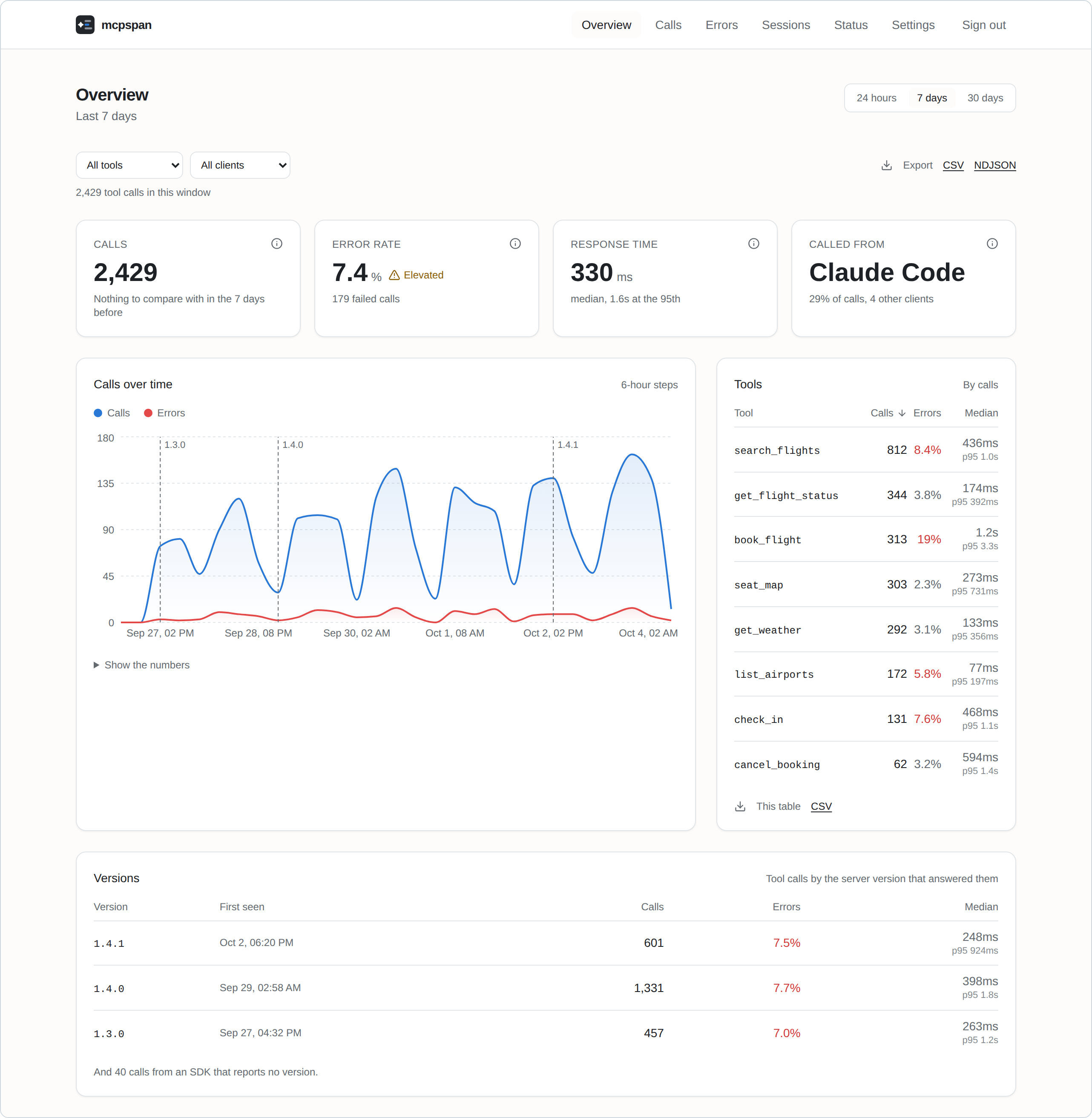
Features
- Every call, from every client. Tool calls, resource reads and prompt gets, with the client that made them: Claude, Claude Code, Cursor, VS Code, Codex, ChatGPT and the rest.
- Response times that mean something. Median and 95th percentile per tool, and the full distribution, so a cache hit and a slow path do not hide inside one average.
- Answer sizes. How large each tool’s answers are, typical and largest: a tool that now and then returns megabytes fills the agent’s context while looking fine on every latency chart.
- What agents are shown. Every session starts by reading the definitions of all your tools, called or not. See how many tokens that list costs, and which tools agents were shown in hundreds of sessions and never called.
- Failures, told apart. A handler that threw, a tool that answered with an error, arguments the server refused and which of them were wrong, and tools that agents asked for but your server does not have: which clients asked, the closest name you do have, and what the agent did next.
- Sessions. Each connection’s calls, step by step, as the agent made them, with the calls an agent repeated with the same arguments marked: a loop that looks fine one call at a time. A tool’s page says which call came right before it repeated or failed, by client.
- Releases. Every call carries the version of your server that answered it; the charts mark where each release began and compare it with the one before. A tool’s own chart also marks where its description or input schema changed, since rewording a description can change how agents use a tool more than a change to its code.
- Alerts to Slack, Discord or any webhook, when errors climb or a server goes quiet, for a whole server or one tool.
- Your data, yours to take. CSV and NDJSON exports of anything you can see, and forwarding to OpenTelemetry for Grafana, Datadog, Honeycomb and the like.
- Private by design. Parameter values never leave your server’s process, and nothing is sent anywhere you did not set up yourself. Error messages, which a tool that runs commands can fill with anything, can be turned off.
Quick start
You need Docker.
git clone https://github.com/mcpspan/mcpspan.git
cd mcpspan
docker compose up -d
Open http://localhost:6270 and create your account. You get an API key for your first server, and the Settings page shows the line to add to it, in its language.
Connect your MCP server
TypeScript, on the official MCP SDK:
npm install mcpspan
import { instrument } from 'mcpspan';

instrument(server, {
  apiKey: process.env.MCPSPAN_API_KEY,
  endpoint: 'http://localhost:6271', // your mcpspan installation
});
Register your tools as you always have: every one is measured, and each returns and fails exactly as it did before.
Eight languages, the same features in each:
| Language | MCP SDKs | Install | Guide |
|---|---|---|---|
| TypeScript | official SDK, v1 and v2 | npm install mcpspan |
packages/mcpspan |
| Python | official SDK, FastMCP | pip install mcpspan |
packages/mcpspan-python |
| Go | official Go SDK, mcp-go | go get github.com/mcpspan/mcpspan/packages/mcpspan-go/mcpsdk |
packages/mcpspan-go |
| C# / .NET | official C# SDK | dotnet add package McpSpan |
packages/mcpspan-dotnet |
| Java / Kotlin | official Java SDK | com.mcpspan:mcpspan-java-sdk |
packages/mcpspan-jvm |
| Rust | rmcp | cargo add mcpspan |
packages/mcpspan-rust |
| Ruby | official Ruby SDK | gem install mcpspan |
packages/mcpspan-ruby |
| PHP | Laravel MCP, official PHP SDK | composer require mcpspan/mcpspan |
packages/mcpspan-php |
Every SDK behaves the same way, set out in one contract and checked by one test suite in every language.
Running it
Settings are optional: copy .env.example to .env to change ports, how long
data is kept, or the address your MCP servers reach the API at.
docs/self-hosting.md covers the rest: the account and
password reset, several servers, settings, exports, OpenTelemetry, and
backups.
Contributing
See CONTRIBUTING.md.
Licence
MIT. See LICENSE.
Install
This server does not publish a one-line install command.
Open the repository installation guide New to MCP? Start with the mcpskill.org guide →