
ivanmurzak/mcp-plugin-dotnet
Developer tools.NET MCP bridge: expose app methods/data as MCP tools, prompts, and resources via an in-app plugin + lightweight server (SignalR; stdio/http).
Overview
is a comprehensive solution for integrating .NET applications with the Model Context Protocol (MCP). It allows you to easily expose methods and data from your .NET applications as , , and to AI assistants (like Claude) and other MCP clients. Standard MCP servers are typically designed to be launched as subprocesses by the client (e.g., Claude Desktop spawns a Python script). This works well for lightweight scripts but creates challenges for complex .NET applications like , , or : 1. : These applications are often too heavy to be spawned repeatedly by an MCP client. 2. : They often need to run independently (e.g., you are already working in the Unity Editor). 3. : You want to interact with the currently running instance (e.g., "Add a cube to the current scene"), not start a new, empty instance. This project solves this by decoupling the MCP Server from your application using a : 1. : A lightweight library you add to your .NET application (e.g., Unity, WPF, Console).
README
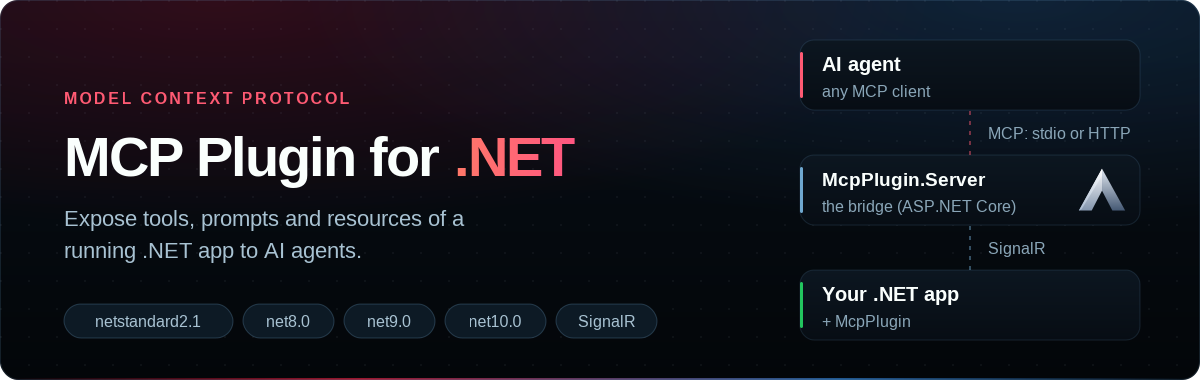







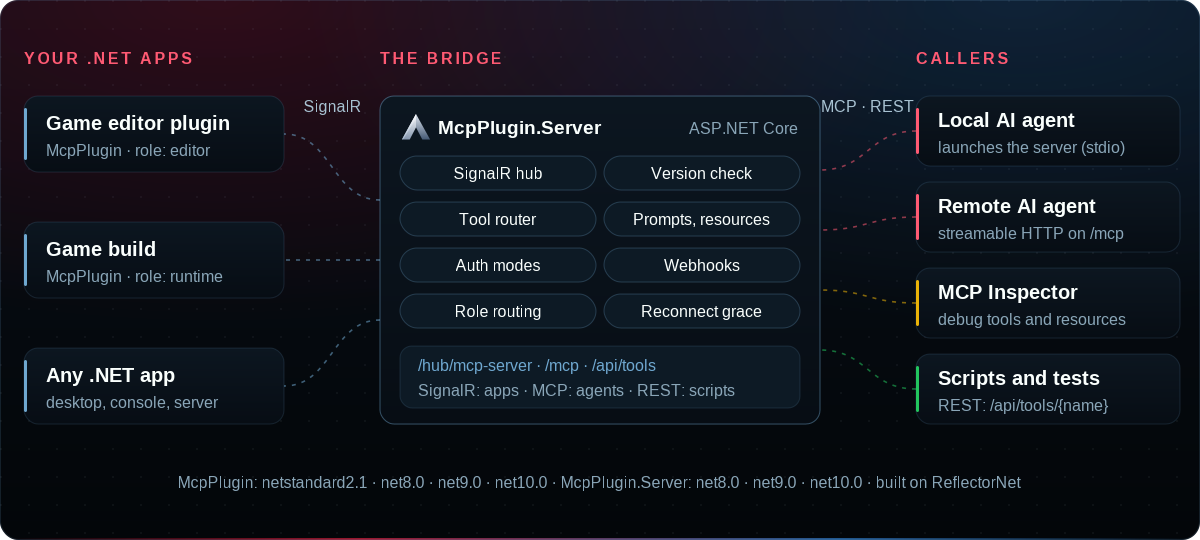
MCP Plugin for .NET lets a .NET application that is already running (a game editor, a game, a desktop or server app) expose its methods as Model Context Protocol tools, prompts and resources. Usual MCP servers are started by the AI client as a subprocess; this one splits the work in two: a small library inside your app, and a bridge server that the AI client talks to. The app connects to the bridge over SignalR and keeps working on its own lifecycle. It powers Unity-MCP.
Packages
All three share one version and are released together.
| Package | Targets | Use it in |
|---|---|---|
com.IvanMurzak.McpPlugin |
netstandard2.1, net8.0, net9.0, net10.0 | Your app: declares tools, prompts and resources and connects to the server |
com.IvanMurzak.McpPlugin.Server |
net8.0, net9.0, net10.0 | The bridge: an ASP.NET Core host for the SignalR hub and the MCP endpoints |
com.IvanMurzak.McpPlugin.Common |
netstandard2.1 | Shared models and settings; referenced by the other two |
Features
✅ Attributes — [AiTool], [AiPrompt], [AiResource] on plain C# methods
✅ Any .NET type — ReflectorNet builds schemas and binds nested objects, lists, enums
✅ Lives with your app — SignalR link with auto-reconnect; catalog kept during reloads
✅ Two MCP transports — stdio or streamable HTTP on /mcp
✅ REST — GET /api/tools and POST /api/tools/{name} for scripts and tests
✅ Editor and game — editor and runtime connections side by side
✅ Tool annotations — title plus read-only, destructive, idempotent, open-world hints
✅ Skill files — a SKILL.md per tool in a SKILLS/ folder
✅ Auth and hooks — none / token / oauth modes, analytics and auth webhooks
Install
dotnet add package com.IvanMurzak.McpPlugin          # in your app
dotnet add package com.IvanMurzak.McpPlugin.Server   # in the bridge host (or run DemoWebApp)
Quick start
1. Declare tools, prompts and resources. A class is scanned only when it carries the matching
[Ai*Type] attribute. [Description] text is what the AI agent reads.
using System.ComponentModel;
using com.IvanMurzak.McpPlugin;
using com.IvanMurzak.McpPlugin.Common.Model;

[AiToolType]
public static class GameTools
{
    [AiTool("add", "Add numbers", ReadOnlyHint = true)]   // name, title
    [Description("Adds two numbers.")]
    public static int Add(
        [Description("First number.")] int a,
        [Description("Second number.")] int b) => a + b;
}

[AiPromptType]
public static class GamePrompts
{
    [AiPrompt(Name = "review-scene")]
    [Description("Asks the agent to review the open scene.")]
    public static string ReviewScene(string focus = "performance")
        => $"Review the open scene. Focus on {focus}.";
}

[AiResourceType]
public static class GameResources
{
    [AiResource(Route = "app://status", Name = "app-status", MimeType = "text/plain",
        ListResources = nameof(ListStatus))]
    [Description("Current application status.")]
    public static ResponseResourceContent[] GetStatus(string uri)
        => new[] { ResponseResourceContent.CreateText(uri, "Running", "text/plain") };

    public static ResponseListResource[] ListStatus()
        => new[] { new ResponseListResource("app://status", "app-status") };
}
2. Build the plugin and connect it.
using System;
using com.IvanMurzak.McpPlugin;
using com.IvanMurzak.McpPlugin.Common;
using com.IvanMurzak.ReflectorNet;
using Version = com.IvanMurzak.McpPlugin.Common.Version;

var version = new Version { Api = Consts.ApiVersion, Plugin = "1.0.0", Environment = "MyApp" };
var assembly = typeof(GameTools).Assembly;

var plugin = new McpPluginBuilder(version)
    .WithConfig(config =>
    {
        config.Host = "http://localhost:8080";                  // the McpPlugin.Server address
        config.ProjectRootPath = Environment.CurrentDirectory;  // where SKILLS/ is written
    })
    .WithToolsFromAssembly(assembly)
    .WithPromptsFromAssembly(assembly)
    .WithResourcesFromAssembly(assembly)
    .Build(new Reflector());

await plugin.Connect(); // reconnects on its own while KeepConnected is true (the default)
Api must match the server’s API version, so pass Consts.ApiVersion from the package you reference.
3. Run the server. Use the demo host from this repository:
cd DemoWebApp
dotnet run -- port=8080 client-transport=streamableHttp
or host it in your own ASP.NET Core app:
using com.IvanMurzak.McpPlugin.Common.Utils;
using com.IvanMurzak.McpPlugin.Server;
using Microsoft.AspNetCore.Builder;

var dataArguments = new DataArguments(args); // port=, client-transport=, auth=, ...

var builder = WebApplication.CreateBuilder(args);
builder.Services
    .WithMcpServer(dataArguments)
    .WithMcpPluginServer(dataArguments);
builder.WebHost.UseKestrelForMcpPlugin(dataArguments.Port, dataArguments.Bind);

var app = builder.Build();
app.UseMcpPluginServer(dataArguments);
app.Run();
4. Connect an AI agent. Point an MCP client at http://localhost:8080/mcp, or let it launch the server
with client-transport=stdio. Scripts can call a tool directly:
curl -X POST http://localhost:8080/api/tools/add -H "Content-Type: application/json" -d '{"a":2,"b":3}'
# {"status":"success","structured":{"result":5}}
Writing good tools
- Annotate. Give each tool a
Titleand an explicitReadOnlyHintorDestructiveHint; MCP tool directories reject tools without them.AiToolAnnotationsValidator.Validate(assembly)lists the gaps in a unit test. - Fail clearly. Throw an exception with a message the agent can act on, or return
ResponseCallTool.Error(message). ThrowToolUnavailableExceptionwhile the host is busy (compiling, reloading). How each case is reported: docs/tool-errors.md. - Game-only tools. Mark them
[AiToolType(Target = ToolTarget.Runtime)]and setconfig.ClientRole = ClientRole.Runtimein the game build, beforeBuild().
Documentation
| Page | What is in it |
|---|---|
| Configuration | Server arguments and environment variables, plugin settings, webhooks, Docker |
| Tool errors | How tool failures map to MCP results and HTTP status, by version |
| Transport and auth | stdio / streamable HTTP and the none / token / oauth modes in depth |
| Migrating to 8.0.0 | The CancellationToken change in the prompt and resource hubs |
| NullEngine | An engine-free test host with a fixed tool set |
| Chain fixtures | Recording and replaying a plugin’s catalog for downstream tests |
The legacy [McpPluginTool], [McpPluginPrompt], [McpPluginResource] names still compile as [Obsolete]
aliases of the [Ai*] attributes.
Build from source
dotnet build McpPlugin.sln
dotnet test
Runnable samples: DemoWebApp (server) and DemoConsoleApp (plugin with one tool).
Community
Questions and ideas: Discord or GitHub issues.
License
Apache-2.0 © Ivan Murzak
Install
This server does not publish a one-line install command.
Open the repository installation guide New to MCP? Start with the mcpskill.org guide →