
holdmybeer-gg/blenderwright
Developer toolsMCP server for Blender. 191 tools for modelling, materials, rendering and more, driven by Claude, Cursor, Codex, Ollama, llama.cpp, or any MCP client.
Overview
Formerly blend-ai. Same project, new name, nothing else changed. The most intuitive and efficient MCP Server for Blender. Control Blender entirely through AI assistants like Claude: create 3D models, set up scenes, animate, render, and more, all through natural language. through expert prompts, proven workflows, visual feedback, and mesh quality analysis. A shuttle launch from two questions: "do you want to have a go at the space shuttle launch?" and then "could you animate the launch?" Claude Code (Fable 5.1) modelled the orbiter, tank, boosters and service tower, lit the plumes as emissive volumes and grew the exhaust cloud from metaballs. Keyframes lift the stack and tilt the camera after it, drivers stream the plumes and boil the smoke, and all 60 Cycles frames come back from a single render_animation call, all through blenderwright with no manual modelling: Watch it with sound. Launch audio courtesy of NASA: STS-131, "Sound of Launch.
README
blenderwright
Formerly blend-ai. Same project, new name, nothing else changed.
The most intuitive and efficient MCP Server for Blender. Control Blender entirely through AI assistants like Claude: create 3D models, set up scenes, animate, render, and more, all through natural language.
blenderwright goes beyond tool exposure: it guides the LLM to produce professional 3D results through expert prompts, proven workflows, visual feedback, and mesh quality analysis.
A shuttle launch from two questions: “do you want to have a go at the space shuttle launch?” and then “could you animate the launch?” Claude Code (Fable 5.1) modelled the orbiter, tank, boosters and service tower, lit the plumes as emissive volumes and grew the exhaust cloud from metaballs. Keyframes lift the stack and tilt the camera after it, drivers stream the plumes and boil the smoke, and all 60 Cycles frames come back from a single render_animation call, all through blenderwright with no manual modelling:

Watch it with sound. Launch audio courtesy of NASA: STS-131, “Sound of Launch.”
The still it grew from, modelled and rendered in under twenty minutes:

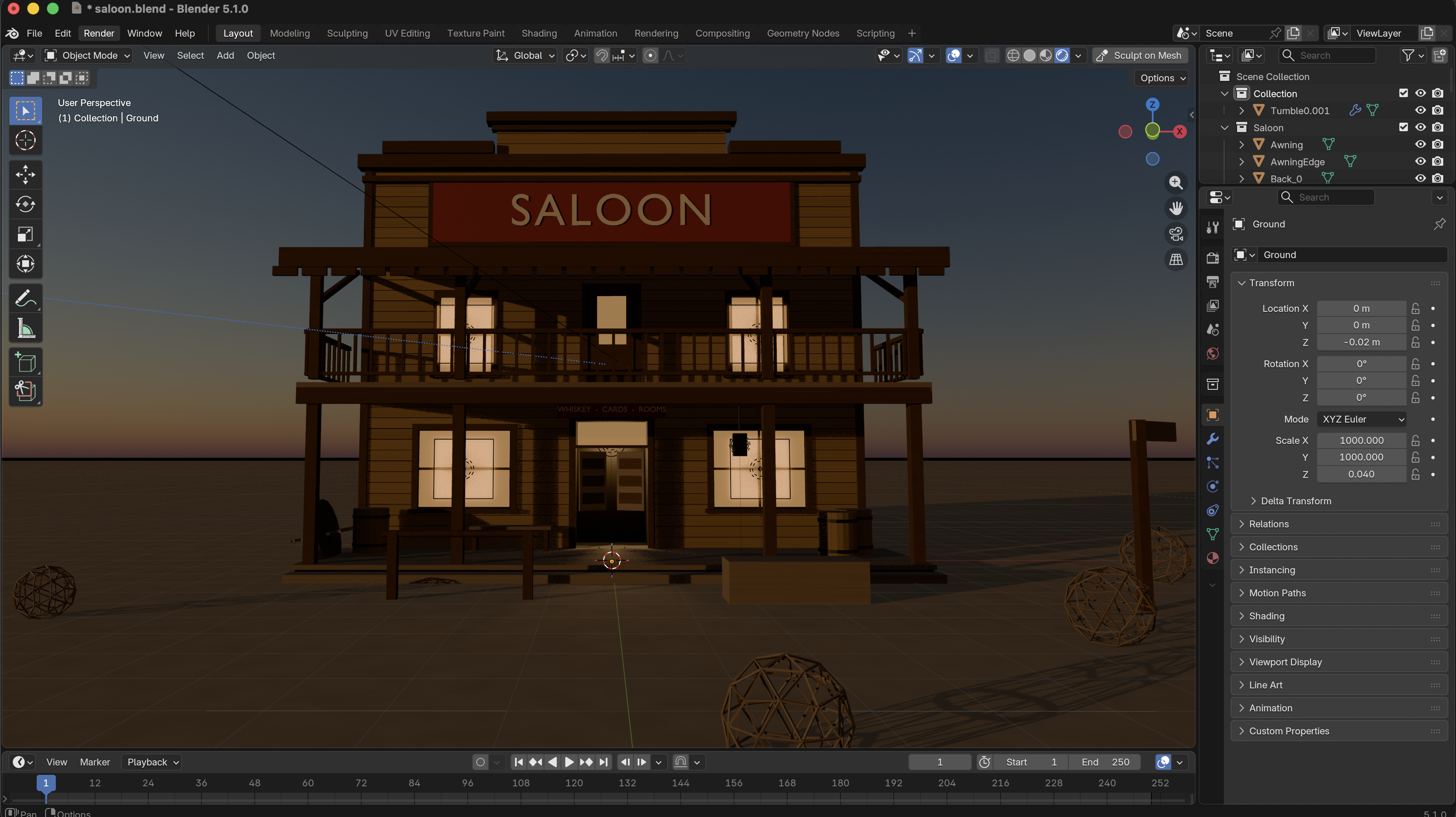
A two-storey Western saloon from a single sentence: “create a Western style 2-story saloon, the outside is more important than any inside detail.” Claude Code (Fable 5.1) built the false front, plank siding, balcony, batwing doors and street dressing, then relit it for dusk, all through blenderwright, in about twenty minutes with no manual modelling:
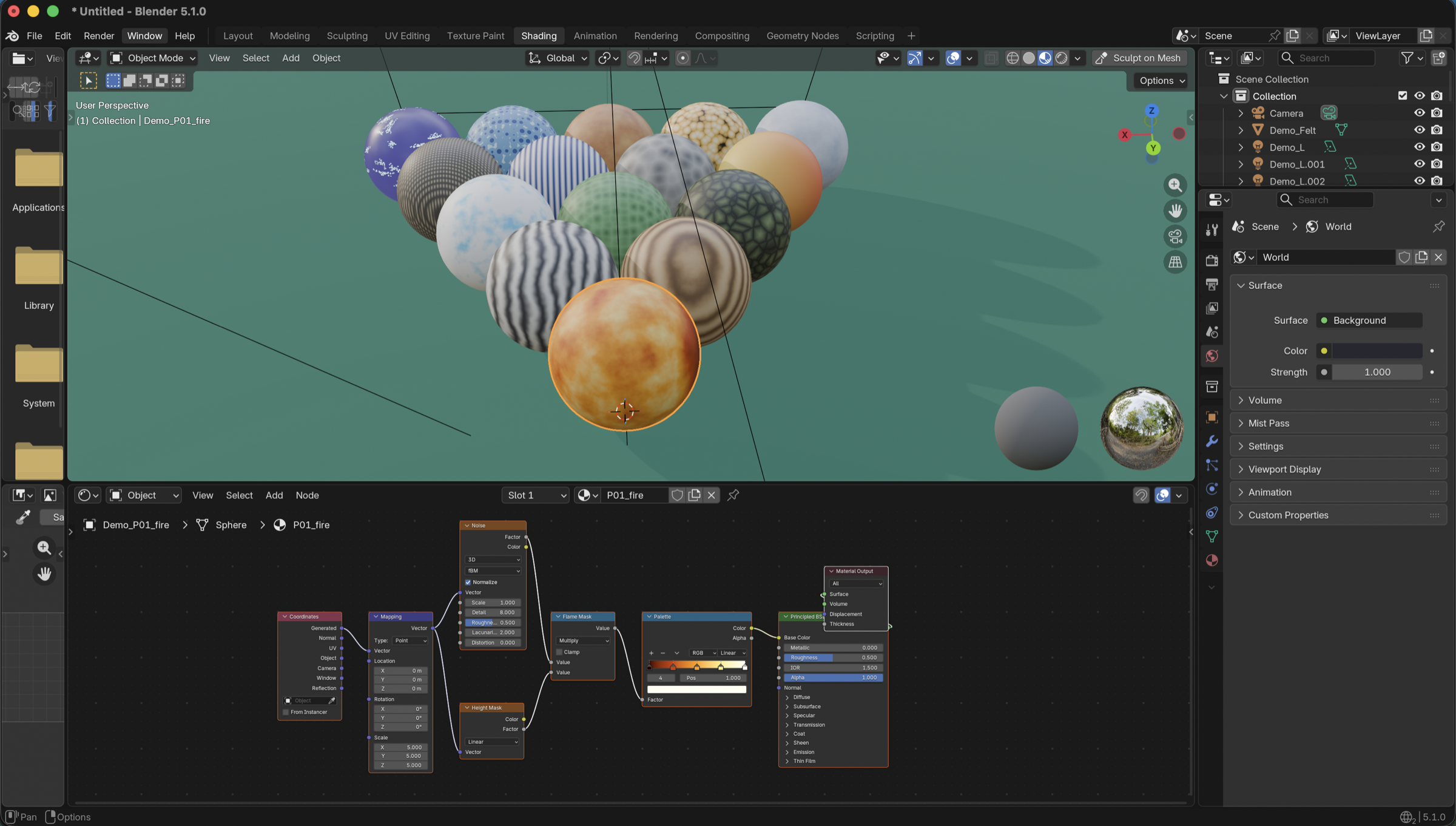
Fifteen procedural materials, each built by a single create_procedural_material call. The selected ball’s node graph below was generated entirely by that one call: coordinates, mapping, noise, height mask, colour ramp, and Principled BSDF, laid out and wired:
Key Features
- 276 tools across 32 modules covering every major Blender domain: modeling, mesh editing, materials, shader nodes, lighting, camera, animation, rendering, sculpting, UV mapping, physics, geometry nodes, rigging, curves, sweeps along a path, 3D-print checking, annotations, collections, file I/O, Bool Tool, viewport control, mesh quality analysis, and extension suggestions
- 13 expert prompts: topology best practices, real-world scale references, lighting principles, studio setup, character basemesh workflow, PBR material guide, auto-critique feedback loop, and more
- Visual feedback loop: fast viewport screenshots via OpenGL render (~ms, not seconds) with auto-critique prompts that guide the LLM to check its own work
- Mesh quality analysis: structured reports covering non-manifold edges, loose vertices, zero-area faces, duplicate vertices, and wire edges
- Extension suggestions: proactively recommends Bool Tool, LoopTools, and Node Wrangler when a task would benefit from them (skips already-installed extensions)
- Signed socket: the MCP server and Blender prove a shared per-start token to each other with HMAC-SHA256, then sign and number every command and reply, so no other local program can drive your Blender or replay a command. The token is regenerated on every Start Server and never crosses the wire. See Security
- Raw Python is opt-in:
execute_blender_codeis off until you tick “Allow raw Python” in the N-panel, per session, never saved into the .blend. When on, every snippet is echoed to the console and listed in the panel. A restricted namespace blocks obvious mistakes (os,subprocess,exec,open, …); it is a guard against accidents, not a security boundary - Render-aware: automatically detects when Blender is rendering and queues commands. Recovers from stuck render guards via
load_posthandler and reset command - Built for Blender 5.2 LTS: ships as a Blender Extension; developed and tested on Blender 5.2
- Custom port: configure the server port from the N-panel UI (default: 9876, range: 1024–65535)
- Zero telemetry: no usage tracking, no analytics, no data collection. Everything runs locally on
127.0.0.1 - Zero-dependency addon: the Blender addon uses only Python stdlib +
bpy. Nothing to pip install inside Blender - Thread-safe architecture: background TCP server with queue-based main-thread execution, TCP keepalive for stale connection detection
- 3500+ tests: 2900+ unit tests across tools, handlers, validators, prompts and the cross-platform installer (ubuntu/macos/windows × py3.11/3.13 in CI), plus 600+ live tests that run every tool against a real Blender 5.2
Quickstart
1. Install the MCP server
Nothing to install. With uv on your machine, uvx blenderwright fetches the server from PyPI and runs it; every client config below uses that one command. Prefer pip? pip install blenderwright gives you a blenderwright command instead.
2. Install the Blender addon
- Download the latest addon zip from GitHub Releases
- Open Blender 5.2 LTS
- Go to Edit > Preferences > Get Extensions, click the dropdown (▾) top-right, and choose Install from Disk…
- Select the downloaded
.zipfile - Enable “blenderwright” in the extensions list
Blender 5.1 and earlier: Not supported. blenderwright targets Blender 5.2 LTS, and Blender refuses to install it on older versions. Please upgrade Blender from blender.org/download.
3. Start the server in Blender
In Blender’s 3D Viewport, open the N-panel (press N), find the blenderwright tab. Set your preferred port (default: 9876), then click Start Server. To skip this every time, tick Start server when Blender opens in Edit > Preferences > Add-ons > blenderwright (off by default).
4. Connect your AI assistant
Updating
Update both halves to the same release. They check each other’s protocol version on connect, and a mismatch is refused with an error instead of half-working.
The MCP server
uvx keeps using the copy it cached, so ask for the latest:
uvx blenderwright@latest   # or: uv cache clean blenderwright
pip install -U blenderwright   # if you installed with pip
If your client config uses uvx blenderwright, changing it to uvx blenderwright@latest checks for a new release every time the client starts it.
The Blender addon
- Download the new zip from GitHub Releases.
- If the server is running, open the N-panel blenderwright tab and click Stop Server.
- In Edit > Preferences > Get Extensions, find blenderwright and click Uninstall.
- Quit and restart Blender (this clears cached
blenderwrightmodules). - Install the new
.zipvia the ▾ > Install from Disk… menu and enable it.
Blender must be fully restarted, not “Reload Scripts”. The addon runs a background TCP server thread that survives a script reload, so reloading leaves a stale handler registered and the old socket still bound.
From a clone: one command
If you work from a git clone, install_addon.py does all of that for you, building the zip from your checkout’s addon/:
python install_addon.py upgrade
With no argument it finds your Blender installations and offers them as a numbered list, so there is no path to get wrong. You can still pass one explicitly:
# macOS - the binary inside the bundle, not the .app itself
python install_addon.py upgrade /Applications/Blender.app/Contents/MacOS/Blender

# Linux
python install_addon.py upgrade /usr/local/bin/blender

# Windows
python install_addon.py upgrade "C:\Program Files\Blender Foundation\Blender 5.2\blender.exe"
It refuses to run while Blender is open, checks the path before touching anything,
removes every blenderwright install across all Blender version directories, rebuilds the
zip from addon/, and installs it through Blender’s own extension machinery. It also
handles the case that bites people most: an older copy left behind under a previous
Blender version.
Two companion commands:
python install_addon.py doctor          # list every blenderwright install found, and where
python install_addon.py uninstall --yes # remove them all (omit --yes for a dry run)
Start with doctor if the addon is behaving strangely: a duplicate install under an
old Blender version is the usual cause.
Developer symlink installs
If you symlinked addon/ into Blender’s extensions directory, there is nothing to
install. git pull and restart Blender. Use doctor to confirm which kind of install
you have; it reports symlinks distinctly.
Expert Guidance
blenderwright includes 13 MCP prompts that guide the LLM toward professional-quality results:
| Prompt | What It Teaches |
|---|---|
blender_best_practices |
Bool Tool preference, mesh editing patterns, modifier workflow |
topology_best_practices |
Quad topology, edge flow, poles, n-gon cleanup, face density |
scale_reference_guide |
Real-world dimensions for 8 common objects, unit system setup |
lighting_principles |
Three-point lighting, HDRI, EEVEE vs Cycles, color temperature |
studio_lighting_setup |
6-step studio lighting workflow with specific energy values |
character_basemesh_workflow |
7-step character base mesh from cube with mirror + subdivision |
material_workflow_guide |
PBR materials, Principled BSDF recipes, texture color spaces |
auto_critique_workflow |
Visual feedback loop: when to screenshot, what to check, token budget |
product_shot_setup |
Professional product shot setup guide |
character_base_mesh |
Character modeling guide |
scene_cleanup |
Scene organization workflow |
animation_turntable |
Turntable animation setup |
imported_mesh_cleanup |
Import, analyze, repair, decimate, normals, scale, UVs for meshes from scans, downloads, or generators |
Tool Domains
Toolsets
Every tool is loaded by default, and that is the setting the featured renders were made with. The full set of schemas costs roughly 48k tokens per request, which is fine for Claude-class clients and too much for a local model on a 32k window. BLENDERWRIGHT_TOOLSETS (or --toolsets) trims it:
| Value | Loads |
|---|---|
unset or all |
everything (default) |
auto |
the core toolsets plus list_toolsets and enable_toolset; the model loads other groups as a task needs them |
core |
scene, objects, transforms, modeling, mesh quality, lighting, camera, rendering, screenshot, viewport, collections |
core,physics,animation |
any comma-separated list of toolset names; a toolset is one row of the table above |
{
  "mcpServers": {
    "blenderwright": {
      "command": "uvx",
      "args": ["blenderwright"],
      "env": { "BLENDERWRIGHT_TOOLSETS": "auto" }
    }
  }
}
auto relies on the client honouring the MCP tools/list_changed notification. The bundled Ollama chat client picks auto on its own when the full set would take more than half of --num-ctx, and says so at startup.
Architecture
AI Assistant blenderwright server Blender addon Blender
Privacy
- Zero telemetry: blenderwright collects no usage data, sends no analytics, and makes no network requests beyond the local TCP connection to Blender.
- Fully local: all communication stays on your machine. No cloud services, no external APIs, no phone-home behavior.
- Open source: the entire codebase is auditable. What you see is what runs.
Security
- Localhost only: The TCP socket binds to
127.0.0.1, never exposed to the network. - Authenticated socket: any local program can reach
127.0.0.1, so the connection is authenticated. Start Server writes a fresh random token to a file only your user can read (~/Library/Application Support/blenderwright/tokenon macOS,%APPDATA%\blenderwright\tokenon Windows,~/.config/blenderwright/tokenon Linux) and deletes it on Stop. The token never crosses the socket: Blender and the MCP server each prove they know it by signing fresh random nonces (HMAC-SHA256), and every command and reply after that is signed with a per-connection key and numbered, so commands cannot be injected, altered or replayed. The MCP server refuses to send anything to a process on the port that cannot prove itself. A failed check closes the connection and the N-panel shows the count. On Windows the port is claimed exclusively. If the MCP server runs where it can’t see the token file (WSL, Docker), setBLENDERWRIGHT_TOKEN_FILEto its path. Each port has its own token file (tokenfor 9876,token-otherwise), so two Blenders on two ports never overwrite each other’s; point an MCP server at the second one withBLENDERWRIGHT_PORT. - Raw Python is off by default:
execute_blender_coderefuses to run until you tick “Allow raw Python” in the blenderwright N-panel. The switch is aWindowManagerproperty, so it is per Blender session and is never written into a.blendfile. Every run is echoed to the system console and the panel shows a count and the last snippet. The structured tools do not need it. - The restricted namespace is not a sandbox: when raw Python is on, the import hook refuses 25 imports (
os,subprocess,socket,shutil,sys,ctypes,importlib,pathlib,signal,multiprocessing,pickle,shelve,tempfile,http,urllib,ftplib,smtplib,xmlrpc,code,codeop,compileall,webbrowser,antigravity,turtle,tkinter) and the builtins__import__,exec,eval,compile,open,globals,locals,vars,input,breakpoint,exit,quit,helpandmemoryvieware removed. That catches a model making a mistake. It does not contain an adversary: the code runs in-process with fullbpy, andbpyalone can save files anywhere and run any operator. Treat “Allow raw Python” the way you would treat running a script someone else wrote: read what the model is about to run, and turn it off when you are done. - Input validation: All inputs pass through validators before reaching Blender: name sanitization, path traversal prevention, numeric range checks, enum allowlists.
- File safety: Files the model opens, imports, links or appends never auto-run their scripts. Auto-run is turned off for that Blender session only and never saved, so your own trusted files still auto-run next launch. File extensions are checked against allowlists.
- Command allowlist: The addon dispatcher only processes explicitly registered commands. Unknown commands are rejected.
- Shader node allowlist: Only 93 known shader node types can be created, which prevents arbitrary type injection.
How it compares
All three servers talk to Blender over a TCP socket on localhost:9876. They differ in who is allowed to use that socket and what it will run.
| blenderwright | Blender Lab lab/blender_mcp |
ahujasid/mcp-for-blender (formerly blender-mcp) |
|
|---|---|---|---|
| Socket authentication | HMAC-SHA256 handshake, every message signed and numbered | None | None (its README says so) |
| Raw Python | Off until “Allow raw Python” is ticked, per session | On, no switch | On by default. BLENDER_MCP_SAFE_MODE=1 limits the MCP server, not the add-on socket |
| Guard on raw Python | 25 imports and 14 builtins removed (not a sandbox) | sys.exit and 4 operators blocked (its docs: “isn’t really a sandbox”) |
AST allowlist in safe mode only |
Checked against each project’s main branch on 2026-11-18. Projects change: if a row is out of date, open an issue.
Limitations
Development
# Install with dev dependencies
uv pip install -e ".[dev]"

# Unit tests: validation and logic, Blender faked
uv run --extra dev pytest

# Live tests: every tool against a real headless Blender 5.2
BLENDER=/Applications/Blender.app/Contents/MacOS/Blender uv run --extra dev pytest tests_live

# Run tests with coverage
uv run --extra dev pytest --cov=blenderwright

# Lint
ruff check src/ tests/

# Format
ruff format src/ tests/
License
MIT. See LICENSE.md.
Copyright © 2026 jabberwock.
Install
uvx blenderwrightConfiguration
{
  "mcpServers": {
    "blenderwright": {
      "command": "uvx",
      "args": ["blenderwright"]
    }
  }
}